由於遺失憑證,NetWorker Web 使用者介面無法擷取儀表板的最新計數
Summary: NetWorker Web 使用者介面 (NWUI) 產生錯誤「無法擷取儀表板的最新計數 - 從監控服務擷取活動狀態計數時發生錯誤。」
This article applies to
This article does not apply to
This article is not tied to any specific product.
Not all product versions are identified in this article.
Symptoms
成功登入 NWUI 後,使用者介面會顯示錯誤:
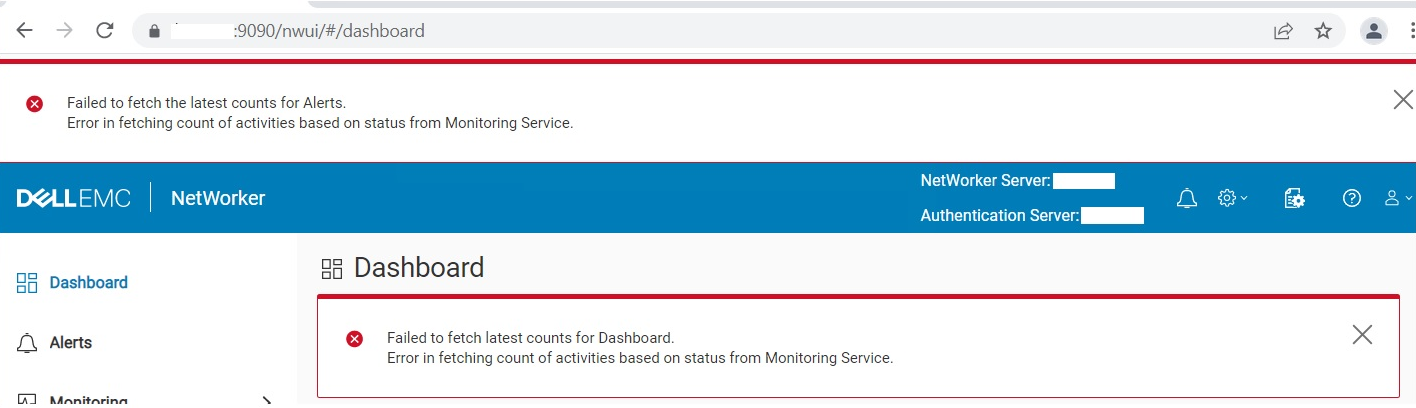
Failed to fetch latest counts for Dashboard. Error in fetching count of activities based on status from Monitoring Service
Cause
缺少憑證別名 emcnwuimonitoring 在 Java cacerts 金鑰存放區中。
- Linux:
/opt/nre/java/latest/lib/security/cacerts
- Windows:
%drive%:\Program Files\NRE\java\jre1.8.0_<xxx>\lib\security\cacerts
Resolution
匯入 emcnwuimonitoring 憑證 (不需要關閉 NetWorker 服務。)
- Linux:
/opt/nre/java/latest/bin # keytool -import -alias emcnwuimonitoring -keystore /opt/nre/java/latest/lib/security/cacerts -storepass changeit -file /nsr/nwui/monitoring/app/conf/emcnwuimonitoring.cer
- Windows:
%drive%:\Program Files\NRE\java\jre1.8.0_<xxx>\bin> keytool.exe -import -alias emcnwuimonitoring -keystore "C:\Program Files\NRE\java\jre1.8.0_<xxx>\lib\security\cacerts" -storepass changeit -file "%drive%:\Program Files\EMC NetWorker\nwui\monitoring\app\conf\emcnwuimonitoring.cer"
Affected Products
NetWorkerProducts
NetWorker SeriesArticle Properties
Article Number: 000197327
Article Type: Solution
Last Modified: 01 Jul 2024
Version: 6
Find answers to your questions from other Dell users
Support Services
Check if your device is covered by Support Services.