Data Domain ESRSゲートウェイにData Domainを追加/登録する方法
Summary: Summary: このドキュメントでは、Data DomainシステムをESRSゲートウェイに登録/追加する手順について詳しく説明します。
This article applies to
This article does not apply to
This article is not tied to any specific product.
Not all product versions are identified in this article.
Instructions
CLI:
Device registered to ESRS gateway.
GUI: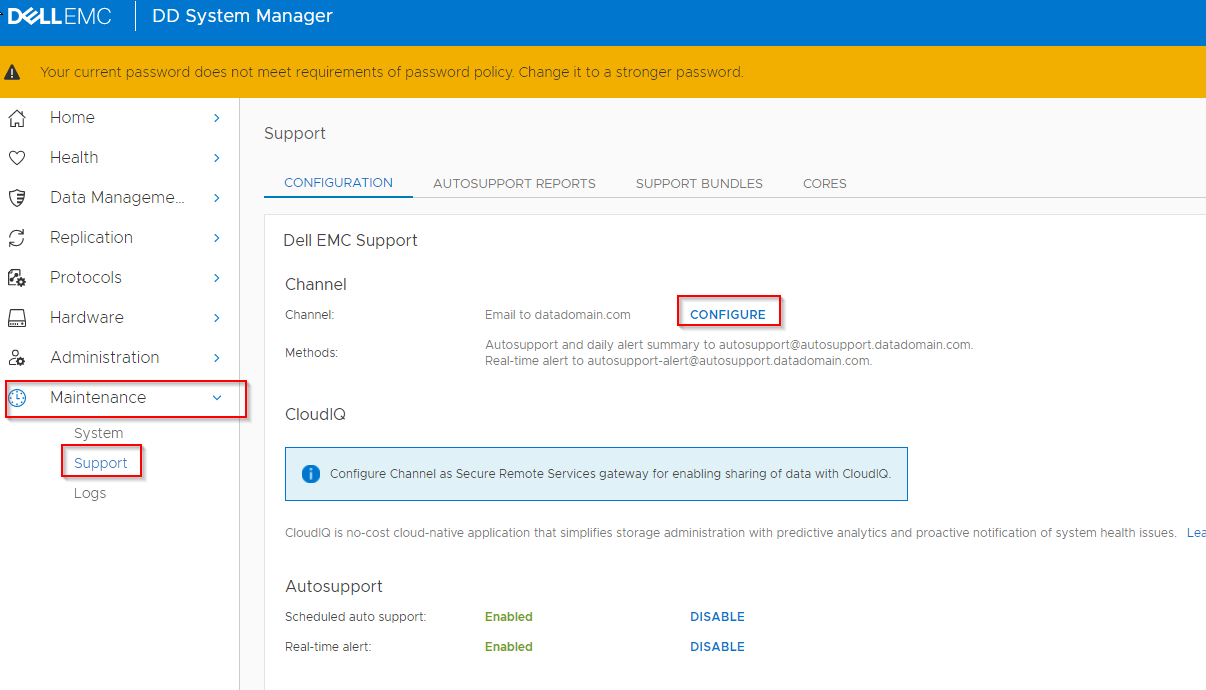

このプロセス全体でエラーが発生した場合は、エラーをキャプチャし、サポートでサービス リクエストを作成してください。
- sysadminとしてData Domainシステムにssh/puttyで接続します
- 現在の設定を確認します。
- # support notification method show
- # support connectemc config show
- ESRSにDDを登録します
- # support connectemc device register <DDR IP> esrs-gateway <the ESRS GW hostname>
- これにより、Service Linkのユーザー名とパスワードの入力を求めるプロンプトが表示されます。お客様のサポート認証情報を使用できます(Dellサポート サイトを表示する場合と同じ認証情報)。
- 出力例:
- # support connectemc device register <DDR IP> esrs-gateway <the ESRS GW hostname>
# support connectemc device register 10.10.10.10 esrs-gateway myesrsgw01
Enter Service Link username: admin
Enter Service Link password: <入力しても表示されません>
Enter Service Link username: admin
Enter Service Link password: <入力しても表示されません>
Device registered to ESRS gateway.
- 登録が成功したら、設定を再度確認し、通知方法をconnectemcに設定します。
- # support connectemc config show
- 出力例:
- # support connectemc config show
# support connectemc config show
ConnectEMC Configuration:
ESRS gateway IP/hostname: myesrsgw01
Registered device IP(s): 10.10.10.10
ConnectEMC Configuration:
ESRS gateway IP/hostname: myesrsgw01
Registered device IP(s): 10.10.10.10
-
- # support notification method set connectemc
- # support notification method show
- 接続をテストします
- # support connectemc test
- 出力例:
- # support connectemc test
# support connectemc test
Sending test message through ConnectEMC...
Test message successfully sent through ConnectEMC.
Sending test message through ConnectEMC...
Test message successfully sent through ConnectEMC.
GUI:
- [Maintenance]>[Support]>[Configure Channel]
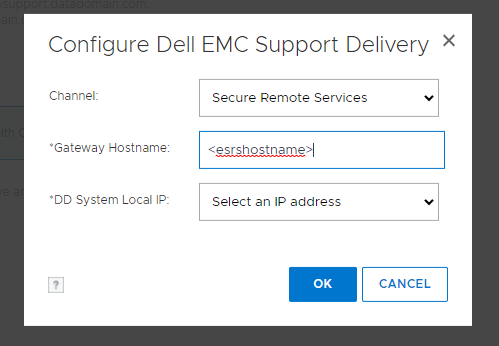
- [Secure Remote Services]を選択します。
- ESRSホスト名を入力し、DD IPを選択します
- Service Linkの認証情報を入力します(Dellサポート サイトを表示する場合と同じ認証情報)。
- 登録が完了
このプロセス全体でエラーが発生した場合は、エラーをキャプチャし、サポートでサービス リクエストを作成してください。
Affected Products
Data DomainArticle Properties
Article Number: 000197719
Article Type: How To
Last Modified: 01 Dec 2025
Version: 7
Find answers to your questions from other Dell users
Support Services
Check if your device is covered by Support Services.