Odbieranie dźwięku z monitorów Dell Gaming i Alienware
Summary: Dowiedz się, dlaczego możesz nie słyszeć dźwięku z monitora Dell Gaming lub Alienware. Dowiedz się, jak odbierać dźwięk z monitorów Dell Gaming i Alienware.
This article applies to
This article does not apply to
This article is not tied to any specific product.
Not all product versions are identified in this article.
Symptoms
Cause
Monitory Dell Gaming i Alienware (z wyjątkiem monitora Alienware 55 OLED AW5520QF) NIE mają wbudowanych głośników.
Resolution
Brak dźwięku w monitorach Dell Gaming i Alienware
Do odbioru dźwięku z monitorów Dell Gaming i Alienware (z wyjątkiem monitora Alienware 55 OLED AW5520QF) wymagany jest zestaw słuchawkowy lub głośnik zewnętrzny).
- Podłącz komputer do monitora za pomocą kabli HDMI, DisplayPort (DP), USB Type-C itd. (dowolne, jeśli są dostępne).
Uwaga: kliknięcie ikony głośnika na pasku zadań powoduje wyświetlenie monitora jako urządzenia do odtwarzania. Mimo że monitor wygląda jak urządzenie odtwarzające, nie słychać dźwięku, ponieważ NIE jest wyposażony w głośniki.
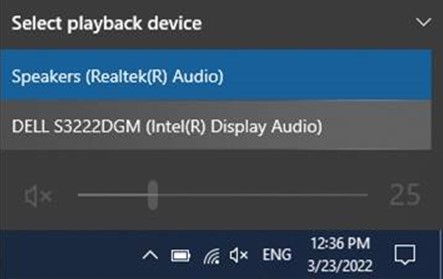
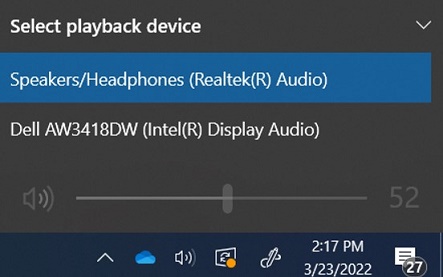
- Podłącz zestaw słuchawkowy lub głośnik zewnętrzny do gniazda słuchawek z tyłu monitora. Więcej informacji na temat portów można znaleźć w podręczniku użytkownika monitora.
Uwaga:
- Niektóre monitory mają oddzielne porty zestawu słuchawkowego i głośników. Zapoznaj się z podręcznikiem użytkownika monitora, aby określić, którego portu należy użyć.
- Listwy dźwiękowe firmy Dell NIE są zgodne z monitorami Dell Gaming. Aby uzyskać więcej informacji, zapoznaj się z artykułem: Nie można zamontować listw dźwiękowych na podstawkach do monitorów Dell Gaming.
Aby uzyskać więcej informacji na temat rozwiązywania problemów z dźwiękiem w systemie Windows, zapoznaj się z artykułem Rozwiązywanie problemów z dźwiękiem w systemie Windows 10
Aby uzyskać listę monitorów do gier firmy Dell, zapoznaj się z tematem Często zadawane pytania dotyczące gier firmy Dell i monitorów Alienware.
Affected Products
Alienware 25 Gaming Monitor AW2518H, Alienware 25 Gaming Monitor AW2518Hf, Alienware 34 Monitor AW3418DW, Alienware 34 Monitor AW3418HW, Alienware 34 Curved OLED Monitor AW3423DW, Alienware 25 Gaming Monitor AW2521H
, Alienware 25 Gaming Monitor AW2521HF, Alienware 25 Gaming Monitor AW2521HFA, Alienware 25 Gaming Monitor AW2521HFL, Alienware 25 Gaming Monitor AW2521HFLA, Alienware 27 Gaming Monitor AW2720HF, Alienware 27 Gaming Monitor AW2720HFA, Alienware 27 Gaming Monitor AW2721D, Alienware AW3420DW, Alienware 38 Curved Gaming Monitor AW3821DW, Alienware 55 OLED Monitor AW5520QF, Dell S2417DG, Dell S2419HGF, Dell Gaming S2421HGF, Dell 24 Curved Gaming Monitor S2422HG, Dell 25 Gaming Monitor S2522HG, Dell S2716DG, Dell S2719DGF, Dell 27 Gaming Monitor S2721DGF, Dell S2721DGFA, Dell Gaming S2721HGF, Dell 27 Curved Gaming Monitor S2722DGM, Dell S3220DGF, Dell 32 Curved Gaming Monitor S3222DGM, Dell 32 Curved Gaming Monitor S3222HG, Dell 34 Curved Gaming Monitor S3422DWG, Dell 24 Gaming Monitor G2422HS, Dell 27 Gaming Monitor G2722HS, Dell 27 Gaming Monitor G2723HN, Dell 32 Gaming Monitor G3223D, Dell 32 4K UHD Gaming Monitor G3223Q
...
Products
Alienware 34 Monitor AW3418DW, Alienware 34 Monitor AW3418HW, Alienware 34 Curved OLED Monitor AW3423DW, Alienware AW3420DW, Alienware 38 Curved Gaming Monitor AW3821DW, Alienware 55 OLED Monitor AW5520QF, Dell S2417DG, Dell S2419HGF
, Dell Gaming S2421HGF, Dell 24 Curved Gaming Monitor S2422HG, Dell 25 Gaming Monitor S2522HG, Dell S2716DG, Dell S2719DGF, Dell 27 Gaming Monitor S2721DGF, Dell S2721DGFA, Dell Gaming S2721HGF, Dell 27 Curved Gaming Monitor S2722DGM, Dell S3220DGF, Dell 32 Curved Gaming Monitor S3222DGM, Dell 32 Curved Gaming Monitor S3222HG, Dell 34 Curved Gaming Monitor S3422DWG, Dell 24 Gaming Monitor G2422HS, Dell 27 Gaming Monitor G2722HS, Dell 27 Gaming Monitor G2723HN, Dell 32 Gaming Monitor G3223D, Dell 32 4K UHD Gaming Monitor G3223Q
...
Article Properties
Article Number: 000197984
Article Type: Solution
Last Modified: 17 Oct 2025
Version: 9
Find answers to your questions from other Dell users
Support Services
Check if your device is covered by Support Services.