Så här tar du emot ljud från Dell Gaming- och Alienware-skärmar
Summary: Läs om varför du kanske inte hör ljud från en Dell Gaming- eller Alienware-skärm. Läs om hur du tar emot ljud från Dell Gaming- och Alienware-skärmar.
This article applies to
This article does not apply to
This article is not tied to any specific product.
Not all product versions are identified in this article.
Symptoms
Cause
Dell Gaming- och Alienware-skärmar (förutom Alienware 55 OLED-skärmen AW5520QF) har INTE inbyggda högtalare.
Resolution
Inget ljud från Dell Gaming- och Alienware-skärmar
Ett headset eller en extern högtalare krävs för att ta emot ljud från Dell Gaming- och Alienware-skärmarna (förutom Alienware 55 OLED-skärmen AW5520QF).
- Anslut datorn till bildskärmen via HDMI, DisplayPort (DP), USB Type-C och så vidare (alla som finns tillgängliga).
Obs! Om du klickar på högtalarikonen i aktivitetsfältet visas skärmen som en uppspelningsenhet. Även om monitorn visas som en uppspelningsenhet hörs det inget ljud från monitorn eftersom den INTE har högtalare.
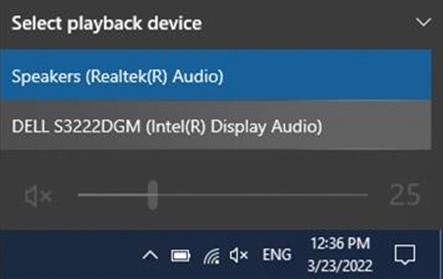
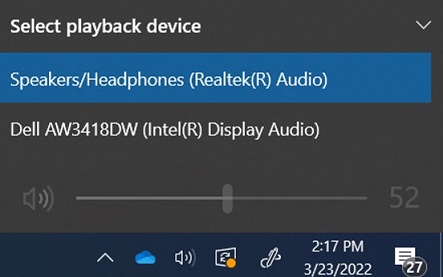
- Anslut ett headset eller en extern högtalare till hörlursporten på baksidan av skärmen. Mer information om portarna finns i användarhandboken för din skärm.
Obs!
- Vissa skärmar har separata portar för headset och högtalare. Läs användarhandboken för din skärm för att identifiera rätt port att använda.
- Dells soundbarhögtalare är INTE kompatibla med Dell Gaming-skärmar. Mer information finns i artikeln: Dell-soundbarhögtalare kan inte installeras på Dell Gaming-bilskärmsstativ.
Mer information om felsökning av ljudproblem i Windows finns i Åtgärda ljudproblem i Windows 10
En lista över Dell Gaming-skärmar finns i Vanliga frågor och svar om Dell Gaming- och Alienware-skärmar.
Affected Products
Alienware 25 Gaming Monitor AW2518H, Alienware 25 Gaming Monitor AW2518Hf, Alienware 34 Monitor AW3418DW, Alienware 34 Monitor AW3418HW, Alienware 34 Curved OLED Monitor AW3423DW, Alienware 25 Gaming Monitor AW2521H
, Alienware 25 Gaming Monitor AW2521HF, Alienware 25 Gaming Monitor AW2521HFA, Alienware 25 Gaming Monitor AW2521HFL, Alienware 25 Gaming Monitor AW2521HFLA, Alienware 27 Gaming Monitor AW2720HF, Alienware 27 Gaming Monitor AW2720HFA, Alienware 27 Gaming Monitor AW2721D, Alienware AW3420DW, Alienware 38 Curved Gaming Monitor AW3821DW, Alienware 55 OLED Monitor AW5520QF, Dell S2417DG, Dell S2419HGF, Dell Gaming S2421HGF, Dell 24 Curved Gaming Monitor S2422HG, Dell 25 Gaming Monitor S2522HG, Dell S2716DG, Dell S2719DGF, Dell 27 Gaming Monitor S2721DGF, Dell S2721DGFA, Dell Gaming S2721HGF, Dell 27 Curved Gaming Monitor S2722DGM, Dell S3220DGF, Dell 32 Curved Gaming Monitor S3222DGM, Dell 32 Curved Gaming Monitor S3222HG, Dell 34 Curved Gaming Monitor S3422DWG, Dell 24 Gaming Monitor G2422HS, Dell 27 Gaming Monitor G2722HS, Dell 27 Gaming Monitor G2723HN, Dell 32 Gaming Monitor G3223D, Dell 32 4K UHD Gaming Monitor G3223Q
...
Products
Alienware 34 Monitor AW3418DW, Alienware 34 Monitor AW3418HW, Alienware 34 Curved OLED Monitor AW3423DW, Alienware AW3420DW, Alienware 38 Curved Gaming Monitor AW3821DW, Alienware 55 OLED Monitor AW5520QF, Dell S2417DG, Dell S2419HGF
, Dell Gaming S2421HGF, Dell 24 Curved Gaming Monitor S2422HG, Dell 25 Gaming Monitor S2522HG, Dell S2716DG, Dell S2719DGF, Dell 27 Gaming Monitor S2721DGF, Dell S2721DGFA, Dell Gaming S2721HGF, Dell 27 Curved Gaming Monitor S2722DGM, Dell S3220DGF, Dell 32 Curved Gaming Monitor S3222DGM, Dell 32 Curved Gaming Monitor S3222HG, Dell 34 Curved Gaming Monitor S3422DWG, Dell 24 Gaming Monitor G2422HS, Dell 27 Gaming Monitor G2722HS, Dell 27 Gaming Monitor G2723HN, Dell 32 Gaming Monitor G3223D, Dell 32 4K UHD Gaming Monitor G3223Q
...
Article Properties
Article Number: 000197984
Article Type: Solution
Last Modified: 17 Oct 2025
Version: 9
Find answers to your questions from other Dell users
Support Services
Check if your device is covered by Support Services.