PSQN:簡易ユーザー パスワードの保存中にiDRAC9のセットアップ メニュー エラーが発生する
Summary: Dell PowerEdgeエンド ユーザーは、シンプルなユーザー パスワードを保存するときに、Dell iDRAC9ヒューマン入力インターフェイス(HII)メニュー内で重大なエラーが発生することがあります。
This article applies to
This article does not apply to
This article is not tied to any specific product.
Not all product versions are identified in this article.
Symptoms
Dell PowerEdgeエンド ユーザーは、シンプルなユーザー パスワードを保存するときに、Dell iDRAC9ヒューマン入力インターフェイス(HII)メニュー内で重大なエラーが発生することがあります。サーバーF2システム セットアップ メニューを使用すると、エンド ユーザーはiDRAC9設定をボックスで実行できます。[iDRAC Settings]>>[User Configuration]メニューで、UserID2(root)アカウントのパスワードを変更できます。単純なパスワード(calvinなど)を入力しようとすると、設定変更の保存中に重大なエラー バナーが表示されることがあります。
システム設定の重大なエラーの例:
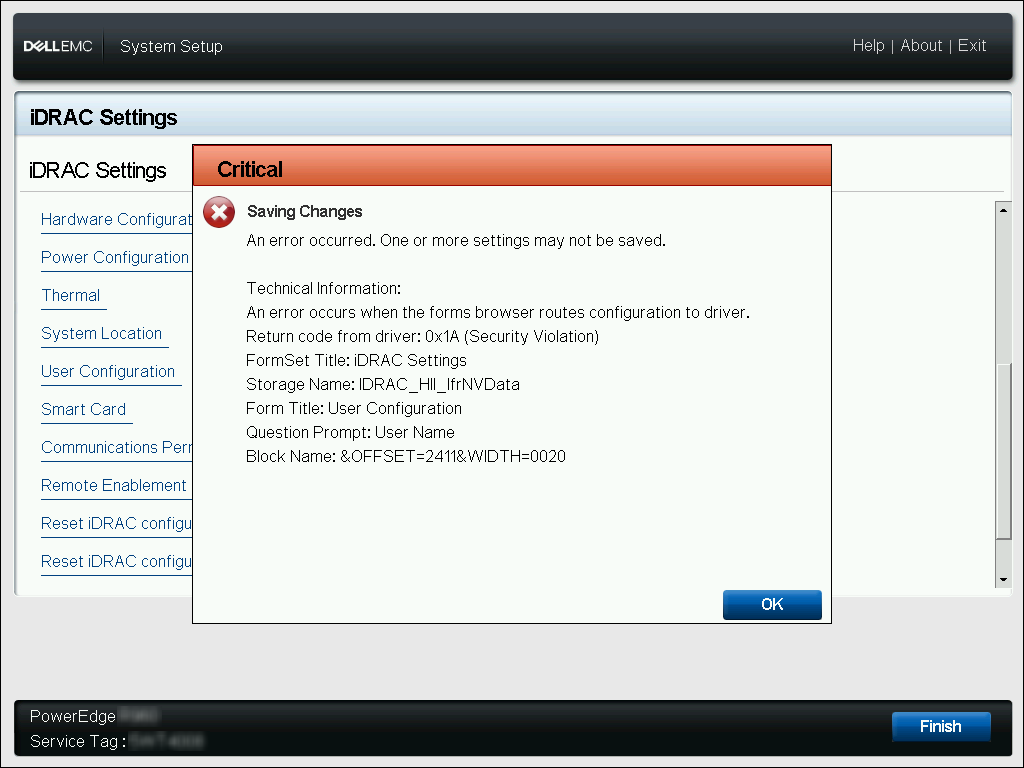
システム設定の重大なエラーの例:
Critical | Saving Changes
An error occurred. One or more settings may not be saved.

Technical Information:
An error occurs when the forms browser routes configuration to driver.
Return code from driver: 0x1A (Security Violation)
FormSet Title: iDRAC Settings
Storage Name: iDRAC_HII_IfrNVData
Form Title: User Configuration
Question Prompt: User Name
Block Name: &OFFSET=2411&WIDTH=0020
Cause
デフォルトでは、iDRAC9は単純なパスワードをブロックするパスワード ポリシーを適用します。iDRAC9パスワード強度ポリシーが「保護なし」以外のオプションに定義されている場合、iDRACインターフェイスを介して簡単なパスワード フレーズを保存することはできません。システム セットアップHIIメニューには、このエラー発生を定義するためのクリア メッセージ エラー バナーが含まれていません。
Resolution
iDRAC9システム セットアップ メニューには、パスワード保護ポリシーを「保護なし」に再定義するオプションがないため、ユーザー定義のパスワードはiDRAC9の定義済みパスワード ポリシーを満たしている必要があります。最小パスワード ポリシー スコアを満たすパスワードを入力しても、この重大なエラーは発生しません。
ローカルRACADMコマンドは、サーバーのホスト オペレーティング システム内から使用して、最小パスワード ポリシー スコア要件を決定できます。
また、ローカルRACADMコマンドを使用して、iDRAC9の最小パスワード ポリシー スコア要件を変更したり、現在のポリシー要件を満たすようにUserID2パスワードを変更したりできます。
# 最小パスワード スコアの変更
# UserID2パスワードの変更
ローカルRACADMコマンドは、サーバーのホスト オペレーティング システム内から使用して、最小パスワード ポリシー スコア要件を決定できます。
racadm>>racadm get idrac.security.minimumpasswordscore
[Key=idrac.Embedded.1#Security.1]
MinimumPasswordScore=Weak Protection
また、ローカルRACADMコマンドを使用して、iDRAC9の最小パスワード ポリシー スコア要件を変更したり、現在のポリシー要件を満たすようにUserID2パスワードを変更したりできます。
# 最小パスワード スコアの変更
racadm>>racadm set idrac.security.minimumpasswordscore 0
[Key=idrac.Embedded.1#Security.1]
Object value modified successfully

0 - No Protection
1 - Weak Protection
2 - Moderate Protection
3 - Strong Protection
# UserID2パスワードの変更
racadm>>racadm set idrac.users.2.password C@lv1n
[Key=idrac.Embedded.1#Users.2]
Object value modified successfully
Affected Products
iDRAC9, iDRAC9 - 4.xx Series, iDRAC9 - 5.xx SeriesArticle Properties
Article Number: 000198025
Article Type: Solution
Last Modified: 10 Dec 2024
Version: 3
Find answers to your questions from other Dell users
Support Services
Check if your device is covered by Support Services.