VxRail: vCenter Serverin päivitys epäonnistui, ja virhe: Alitehtävän suorittaminen epäonnistui: EnableVCVMSSHSubTask, katso lokit yksityiskohtien virheiden varalta
Summary: VxRail-päivitys epäonnistuu ja näyttää virheen: vCenter Serverin päivitys epäonnistui: Alitehtävän suorittaminen epäonnistui: EnableVCVMSSHSubTask, katso lokit yksityiskohtien virheiden varalta. ...
This article applies to
This article does not apply to
This article is not tied to any specific product.
Not all product versions are identified in this article.
Symptoms
VxRail-päivitys epäonnistuu ja näyttää virheen:VxRail Update ran into a problem....
Failed to upgrade vCenter Server: Failed to perform sub task: EnableVCVMSSHSubTask, see logs for detail errors..
Upgrade failed. Unexpected failure during upgrade, check lcm-web.log or lcm.log
Virhe ilmenee, ennen kuin vCenter .ova otetaan käyttöön. 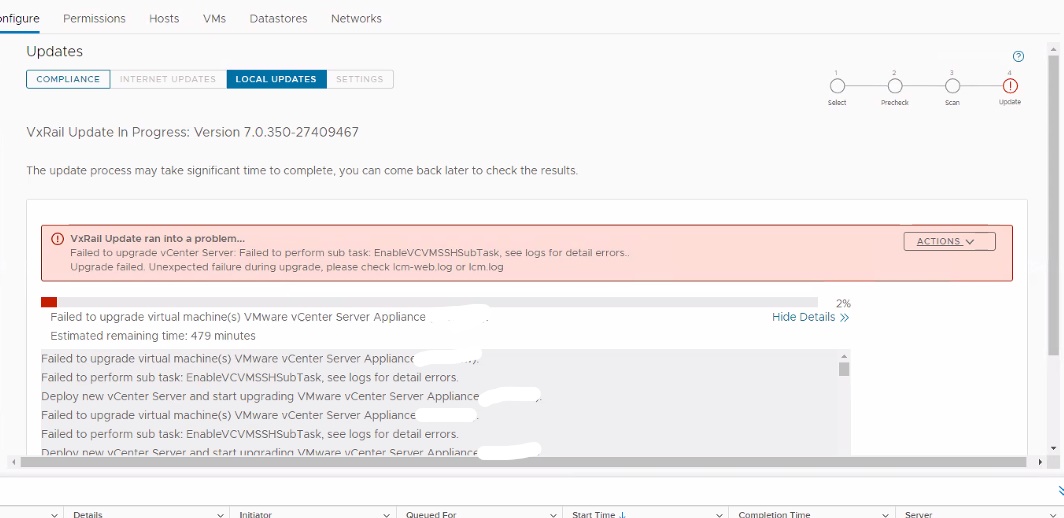
lcm-web.log:
2022-04-11 14:41:25,167 ERROR [LCM] [lcm-vc-0] c.v.l.t.SimpleUpgradeTaskExecutor [SimpleUpgradeTaskExecutor.java:82] Failed to execute task VCLCMUpgradeTask.
java.util.concurrent.ExecutionException: com.vce.lcm.exception.LCMInternalException: Failed to upgrade vCenter Server: Failed to perform sub task: EnableVCVMSSHSubTask, see logs for detail errors..
	at java.base/java.util.concurrent.FutureTask.report(FutureTask.java:122)
	at java.base/java.util.concurrent.FutureTask.get(FutureTask.java:205)
	at com.vce.lcm.task.SimpleUpgradeTaskExecutor.execute(SimpleUpgradeTaskExecutor.java:72)
............
	at com.vce.lcm.core.upgrade.vc.AbstractVCUpgrader.performUpgrade(AbstractVCUpgrader.java:107)
	at com.vce.lcm.core.upgrade.ComponentUpgradeService.performComponentUpgrade(ComponentUpgradeService.java:199)
	at com.vce.lcm.core.upgrade.VcUpgradeServiceImpl.performUpgrade(VcUpgradeServiceImpl.java:108)
	at com.emc.mystic.manager.upgrade.service.LcmVcUpgradeServiceImpl$1.run(LcmVcUpgradeServiceImpl.java:86)
	at java.base/java.util.concurrent.Executors$RunnableAdapter.call(Executors.java:515)
	at java.base/java.util.concurrent.FutureTask.run(FutureTask.java:264)
	at java.base/java.util.concurrent.ThreadPoolExecutor.runWorker(ThreadPoolExecutor.java:1128)
	at java.base/java.util.concurrent.ThreadPoolExecutor$Worker.run(ThreadPoolExecutor.java:628)
	at java.base/java.lang.Thread.run(Thread.java:829)
Caused by: com.vce.lcm.exception.LCMInternalException: Failed to upgrade vCenter Server: Failed to perform sub task: EnableVCVMSSHSubTask, see logs for detail errors..
	at com.vce.lcm.core.upgrade.vc.task.VCLCMUpgradeTask.WaitForVCLCMUpgradeComplete(VCLCMUpgradeTask.java:330)
	at com.vce.lcm.core.upgrade.vc.task.VCLCMUpgradeTask.perform(VCLCMUpgradeTask.java:118)
	at com.vce.lcm.task.UpgradeTask.execute(UpgradeTask.java:58)
	at com.vce.lcm.task.SimpleUpgradeTaskExecutor.lambda$execute$0(SimpleUpgradeTaskExecutor.java:65)
	...
Cause
vSphere Distributed Switch -kytkimen LACP (Link Aggregation Control Protocol) -tukitasoksi on määritetty basic.
Resolution
Tarkista KB VxRail: Päivitys epäonnistuu ja näyttää virheen "Alitehtävän suorittaminen epäonnistui: EnableVCVMSSHSubTask" tai "Alitehtävän suorittaminen epäonnistui: UnlockCDROMSubTask" ensin, jos se ei auta, käytä alla olevaa kiertotapaa.
- Ota tilannevedos VxRail Manager (VxRM) -virtuaalikoneesta.
- Yhdistä VxRM komentoriviliittymän navigaattorin avulla.
- Siirry hakemistoon
/var/lib/vmware-marvin/ - Etsi tiedosto nimeltä
lcm_advanced_mode.properties - Muokkaa tiedoston sisältöä ja muuta arvo arvosta true arvoon false
lcmProperties.vclcm.upgrade.enabled - Muuta arvo arvosta epätosi arvoon true for
lcmProperties.upgrade.advanced.mode.oncd /var/lib/vmware-marvin vi lcm_advanced_mode.properties lcmProperties.skip.witness.upgrade.in.vlcm=false feature.upgrade.on.l3.network=on feature.compliance.daily.check=on lcmProperties.upgrade.advanced.mode.on=true lcmProperties.vclcm.upgrade.enabled=false lcmProperties.upgrade.skip.adc.advanced.mode.on=false lcmProperties.force.legacy.batch.upgrade=false
- Tallenna muutokset.
- Vaihda vDS LACP -tilaksi Enhanced Mode VMware KB:n mukaisesti: https://kb.vmware.com/s/article/2051311
- Käynnistä VxRM-palvelut uudelleen
systemctl restart vmware-marvin
systemctl restart runjars
- Yritä päivitystä uudelleen.
- Kun olet valmis, palauta tiedoston muokatut arvot
/var/lib/vmware-marvin/lcm_advanced_mode.propertieslcmProperties.upgrade.advanced.mode.on=false lcmProperties.vclcm.upgrade.enabled=true

Additional Information
Affected Products
VxRail, VxRail Appliance Series, VxRail SoftwareArticle Properties
Article Number: 000198404
Article Type: Solution
Last Modified: 11 Nov 2025
Version: 4
Find answers to your questions from other Dell users
Support Services
Check if your device is covered by Support Services.