「VxRail:vCenter Serverのアップグレードに失敗しました。エラー: サブタスクの実行に失敗しました: EnableVCVMSSHSubTask、エラーの詳細をログで確認
Summary: VxRailのアップグレードが次のエラーで失敗します。vCenter Serverのアップグレードに失敗しました: サブタスクの実行に失敗しました: EnableVCVMSSHSubTaskの場合は、エラーの詳細をログで確認してください。
This article applies to
This article does not apply to
This article is not tied to any specific product.
Not all product versions are identified in this article.
Symptoms
VxRailのアップグレードが次のエラーで失敗します。VxRail Update ran into a problem....
Failed to upgrade vCenter Server: Failed to perform sub task: EnableVCVMSSHSubTask, see logs for detail errors..
Upgrade failed. Unexpected failure during upgrade, check lcm-web.log or lcm.log
このエラーは、vCenter .ovaが導入される前に発生します。 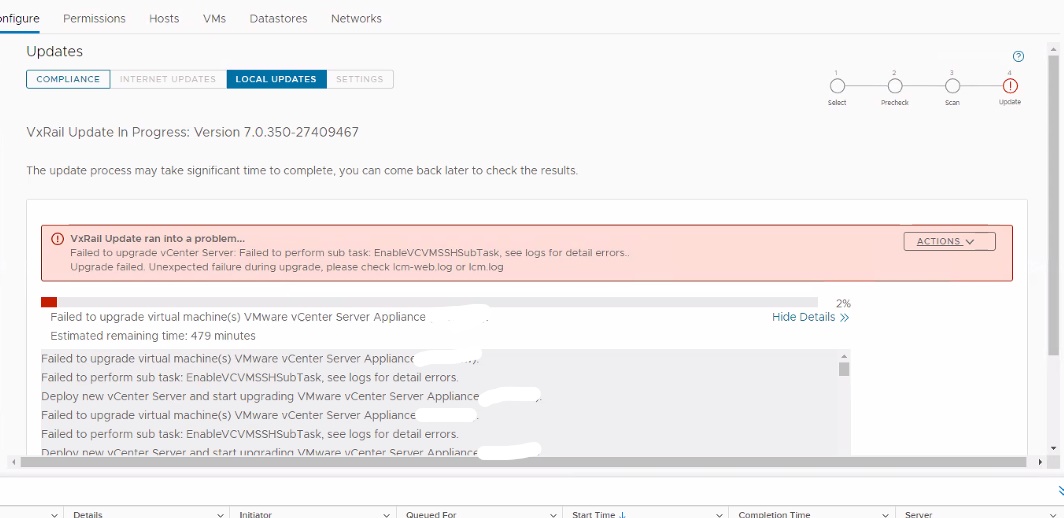
lcm-web.log:
2022-04-11 14:41:25,167 ERROR [LCM] [lcm-vc-0] c.v.l.t.SimpleUpgradeTaskExecutor [SimpleUpgradeTaskExecutor.java:82] Failed to execute task VCLCMUpgradeTask.
java.util.concurrent.ExecutionException: com.vce.lcm.exception.LCMInternalException: Failed to upgrade vCenter Server: Failed to perform sub task: EnableVCVMSSHSubTask, see logs for detail errors..
	at java.base/java.util.concurrent.FutureTask.report(FutureTask.java:122)
	at java.base/java.util.concurrent.FutureTask.get(FutureTask.java:205)
	at com.vce.lcm.task.SimpleUpgradeTaskExecutor.execute(SimpleUpgradeTaskExecutor.java:72)
............
	at com.vce.lcm.core.upgrade.vc.AbstractVCUpgrader.performUpgrade(AbstractVCUpgrader.java:107)
	at com.vce.lcm.core.upgrade.ComponentUpgradeService.performComponentUpgrade(ComponentUpgradeService.java:199)
	at com.vce.lcm.core.upgrade.VcUpgradeServiceImpl.performUpgrade(VcUpgradeServiceImpl.java:108)
	at com.emc.mystic.manager.upgrade.service.LcmVcUpgradeServiceImpl$1.run(LcmVcUpgradeServiceImpl.java:86)
	at java.base/java.util.concurrent.Executors$RunnableAdapter.call(Executors.java:515)
	at java.base/java.util.concurrent.FutureTask.run(FutureTask.java:264)
	at java.base/java.util.concurrent.ThreadPoolExecutor.runWorker(ThreadPoolExecutor.java:1128)
	at java.base/java.util.concurrent.ThreadPoolExecutor$Worker.run(ThreadPoolExecutor.java:628)
	at java.base/java.lang.Thread.run(Thread.java:829)
Caused by: com.vce.lcm.exception.LCMInternalException: Failed to upgrade vCenter Server: Failed to perform sub task: EnableVCVMSSHSubTask, see logs for detail errors..
	at com.vce.lcm.core.upgrade.vc.task.VCLCMUpgradeTask.WaitForVCLCMUpgradeComplete(VCLCMUpgradeTask.java:330)
	at com.vce.lcm.core.upgrade.vc.task.VCLCMUpgradeTask.perform(VCLCMUpgradeTask.java:118)
	at com.vce.lcm.task.UpgradeTask.execute(UpgradeTask.java:58)
	at com.vce.lcm.task.SimpleUpgradeTaskExecutor.lambda$execute$0(SimpleUpgradeTaskExecutor.java:65)
	...
Cause
vSphere Distributed SwitchのLink Aggregation Control Protocol (LACP)のサポート レベルが基本に設定されています。
Resolution
KB VxRail: アップグレードが次のエラーで失敗します。「サブタスクの実行に失敗しました: EnableVCVMSSHSubTask」または「サブタスクの実行に失敗しました: UnlockCDROMSubTask」を実行して も問題が解決しない場合は、次の回避策を適用してください。
- VxRail Manager (VxRM)仮想マシンのスナップショットを作成します。
- CLIナビゲーターを使用してVxRMを接続します。
- ディレクトリーに移動します
/var/lib/vmware-marvin/ - という名前のファイルを見つけます。
lcm_advanced_mode.properties - ファイルの内容を変更し、次の値をtrueから false に変更します。
lcmProperties.vclcm.upgrade.enabled - 次の値をfalseからtrueに変更します。
lcmProperties.upgrade.advanced.mode.oncd /var/lib/vmware-marvin vi lcm_advanced_mode.properties lcmProperties.skip.witness.upgrade.in.vlcm=false feature.upgrade.on.l3.network=on feature.compliance.daily.check=on lcmProperties.upgrade.advanced.mode.on=true lcmProperties.vclcm.upgrade.enabled=false lcmProperties.upgrade.skip.adc.advanced.mode.on=false lcmProperties.force.legacy.batch.upgrade=false
- 変更を保存します。
- 次のVMware KBに従って、vDS LACPモードを 「拡張モード」 に変更します https://kb.vmware.com/s/article/2051311
- VxRMサービスの再起動
systemctl restart vmware-marvin
systemctl restart runjars
- アップグレードを再試行します。
- アップグレードが完了したら、ファイル内の変更された値を元に戻します
/var/lib/vmware-marvin/lcm_advanced_mode.propertieslcmProperties.upgrade.advanced.mode.on=false lcmProperties.vclcm.upgrade.enabled=true

Additional Information
Affected Products
VxRail, VxRail Appliance Series, VxRail SoftwareArticle Properties
Article Number: 000198404
Article Type: Solution
Last Modified: 11 Nov 2025
Version: 4
Find answers to your questions from other Dell users
Support Services
Check if your device is covered by Support Services.