PowerEdge:如何使用 Lifecycle Controller 再利用程序清除 NVRAM
Summary: 有關如何使用淘汰和再利用程序遠端使用 Lifecycle Controller 清除 NVRAM 的步驟。
This article applies to
This article does not apply to
This article is not tied to any specific product.
Not all product versions are identified in this article.
Instructions
使用 LifeCycle Controller 的 NVRAM 有多清晰
若您無法實體存取,或無法關閉系統以使用 NVRAM 跳線時,可以使用淘汰或再利用程序,依照這些步驟從 LCC 執行清除。
•在開機期間使用 F10 鍵開機至 Lifecycle Controller。
•在 LCC 中,選擇左側 的“硬體配置 ”,然後選擇 “重新利用”或“淘汰系統”。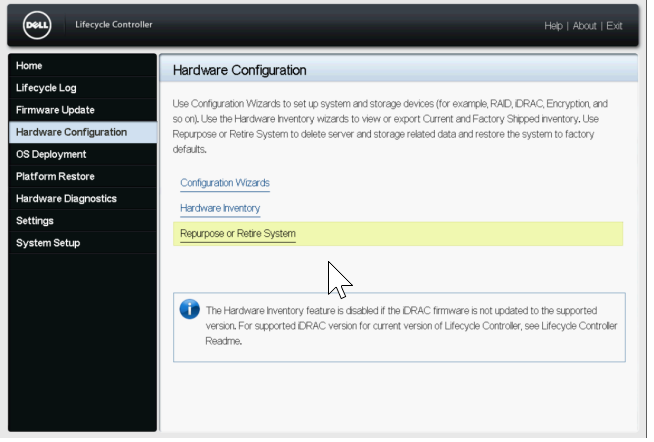
•在“選擇元件”螢幕上,僅選中 BIOS 框(重置預設值並清除 NVRAM)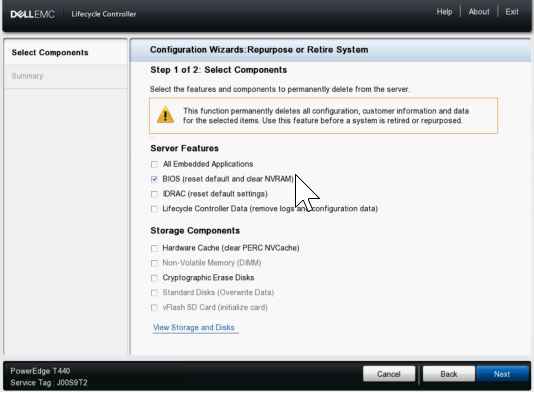
•下一步單擊“下一步”,確認下一頁僅列出 BIOS,然後按兩下“完成”。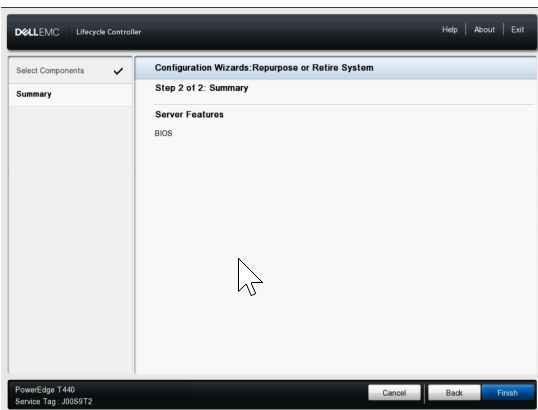
•選擇 “是 ”以繼續進行系統擦除過程。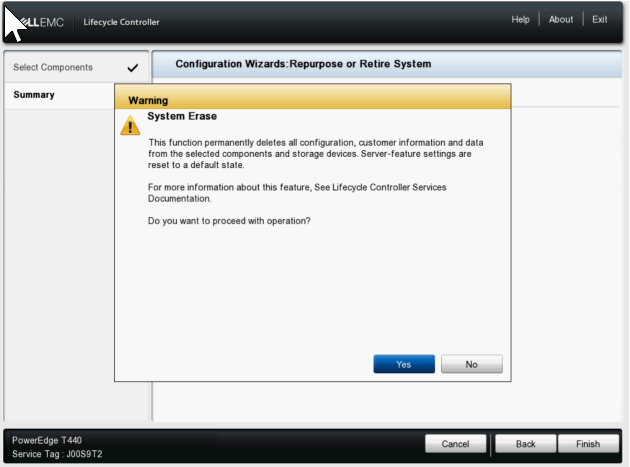
•然後,伺服器繼續重新啟動並啟用 NVRAM 清除設置,然後再次重新啟動以執行清除操作,最後關閉電源。
•接下來,它會在開機時重新開機回到 LCC,將 NVRAM 設定變更為正常,然後在完成後再次關機。
•此時,您必須手動打開伺服器電源。您可以在 IDRAC 中檢查生命週期記錄,以確認顯示 System Erase job completed successfully。
Affected Products
C Series, Modular Infrastructure, Rack Servers, XE Servers, XR Servers, OEM Server Solutions, PowerEdge T130, PowerEdge T140, PowerEdge T150, PowerEdge T160, PowerEdge T330, PowerEdge T340, PowerEdge T350, PowerEdge T360, PowerEdge T430
, PowerEdge T440, PowerEdge T550, PowerEdge T560, PowerEdge T630, PowerEdge T640
...
Products
PowerFlex appliance R650, PowerFlex appliance R6525, PowerFlex appliance R660, PowerFlex appliance R6625, Powerflex appliance R750, PowerFlex appliance R760, PowerFlex appliance R7625, PowerFlex appliance R640, PowerFlex appliance R740XD
, PowerFlex appliance R7525, PowerFlex appliance R840
...
Article Properties
Article Number: 000198446
Article Type: How To
Last Modified: 11 Feb 2025
Version: 4
Find answers to your questions from other Dell users
Support Services
Check if your device is covered by Support Services.