OpenManage Integration for VMware vCenter for VMware: Problema di registrazione versione 5.x a causa della mancata corrispondenza del certificato (mancata corrispondenza dell'identificazione personale)
Summary: Durante la registrazione iniziale, OMIVV 5.x registra correttamente un vCenter, ma il plug-in potrebbe non essere visualizzato in vCenter o in vCenter > Administration > Client Plugins. ...
This article applies to
This article does not apply to
This article is not tied to any specific product.
Not all product versions are identified in this article.
Instructions
NOTA: vCenter richiede il download del plug-in da OMIVV utilizzando il nome di dominio completo (FQDN). Il requisito principale è che OMIVV si trovi in zone di ricerca inversa e diretta DNS.
Scope:
vCenter potrebbe non visualizzare il plug-in come disponibile, anche se viene visualizzato come registrato correttamente nell'interfaccia web dell'appliance OMIVV (https://appliance_name_or_IP/). 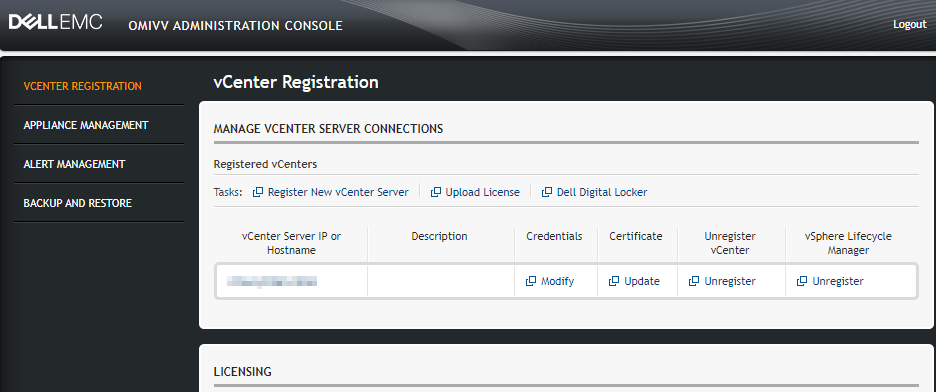
Risoluzione dei problemi:
1. Ottenere i registri di vCenter per esaminare o stabilire una sessione SSH nel VCenter sospetto per visualizzare direttamente i registri.
2. Controllare la vsphere_client_virgo.log che si trova nel seguente percorso:
/var/log/vmware/vsphere-ui/logs
3. Controllare se nel registro è presente un messaggio simile al seguente:
[WARN ] http-bio-9090-exec-10820 com.dell.pg.spectre.common.ApplicationInfoService Exception while getting vCenter/appliance information for https://vcenter.domain.com:443/sdk : com.sun.xml.internal.ws.client.ClientTransportException: HTTP transport error: javax.net.ssl.SSLHandshakeException: java.security.cert.CertificateException: Server certificate chain is not trusted and thumbprint doesn't match
4. Eseguire LSDOCTOR su vCenter per diagnosticare possibili errori relativi al nome o ai problemi di affidabilità del certificato. In base alla descrizione di VMware:
Lookup Service Doctor (lsdoctor) is a tool used to address issues with data stored in the PSC database, as well as data local to a vCenter (regardless of whether the PSC is external or embedded). The tool can be used to detect and correct problems that could cause failures in topology changes (converge, repoint, etc.), upgrades, or failures incurred as a result of maintenance (e.g. incorrectly applying new SSL certificates). This article will outline its functions and use.
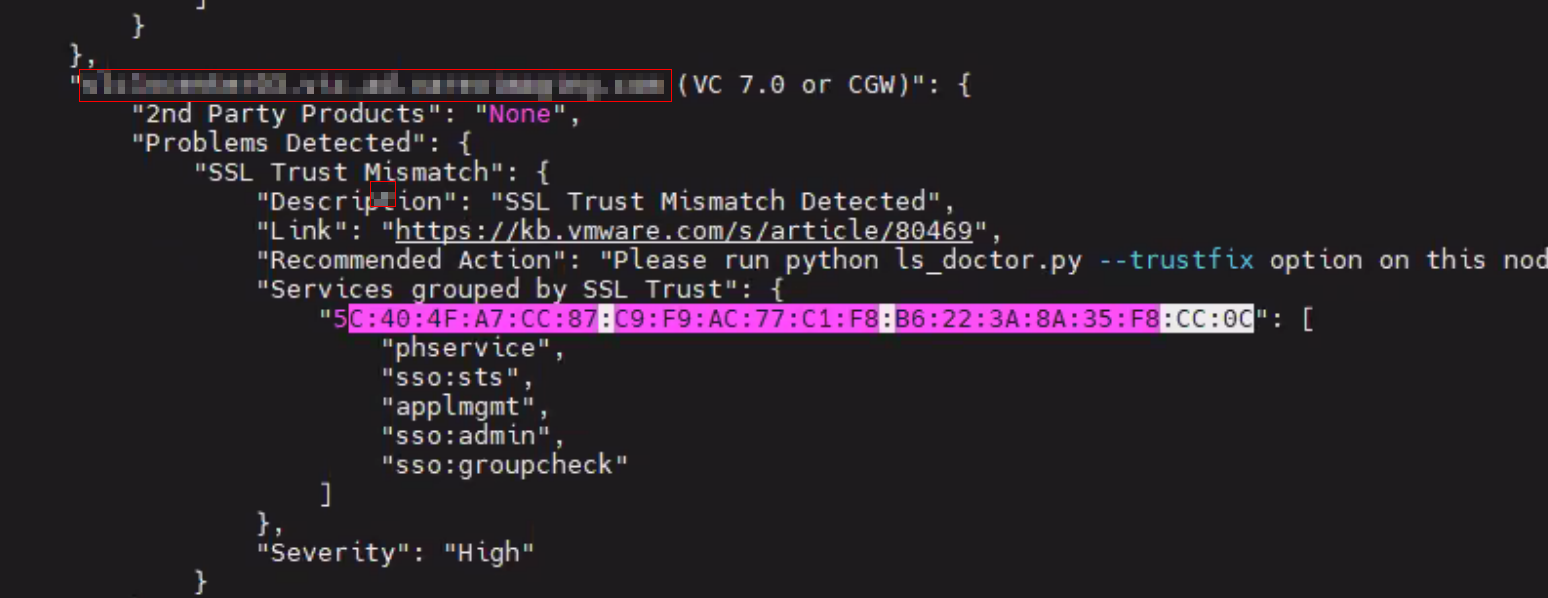
5. LSDOCTOR può scoprire errori come il seguente messaggio "SSL Trust Mismatch Detected":
Soluzione:
Se i sintomi corrispondono, ciò può essere dovuto a uno o più dei seguenti motivi: un certificato è scaduto, vCenter ha un nome diverso dal certificato (modifica del nome), sono presenti errori di mancata corrispondenza dell'attendibilità SSL o il certificato non è stato sincronizzato con Platform Services Controller (PSC).
Questo problema interessa l'estremità vCenter. LSDOCTOR è uno strumento di VMware che può aiutare a esaminare ulteriormente il problema e correggere eventuali errori. Si consiglia di acquisire una snapshot offline prima di apportare modifiche. Per ulteriori informazioni, incluse le istruzioni per il download e l'utilizzo, fare riferimento al seguente link della KB di VMware:
Using the 'lsdoctor' Tool (80469)
Questo problema interessa l'estremità vCenter. LSDOCTOR è uno strumento di VMware che può aiutare a esaminare ulteriormente il problema e correggere eventuali errori. Si consiglia di acquisire una snapshot offline prima di apportare modifiche. Per ulteriori informazioni, incluse le istruzioni per il download e l'utilizzo, fare riferimento al seguente link della KB di VMware:
Using the 'lsdoctor' Tool (80469)
Affected Products
C Series, HS Series, Modular Infrastructure, Rack Servers, Tower Servers, XE Servers, XR Servers, OpenManage Integration for VMware vCenter, PowerEdge XR2, Poweredge C4140, PowerEdge C6400, PowerEdge C6420, PowerEdge C6520, PowerEdge C6525
, PowerEdge C6600, PowerEdge C6615, PowerEdge C6620, PowerEdge FC640, PowerEdge FX2/FX2s, PowerEdge HS5610, PowerEdge HS5620, PowerEdge M1000E, PowerEdge M640, PowerEdge M640 (for PE VRTX), PowerEdge MX5016s, PowerEdge MX7000, PowerEdge MX740C, PowerEdge MX750c, PowerEdge MX760c, PowerEdge MX840C, PowerEdge R240, PowerEdge R250, PowerEdge R260, PowerEdge R340, PowerEdge R350, PowerEdge R360, PowerEdge R440, PowerEdge R450, PowerEdge R470, PowerEdge R540, PowerEdge R550, PowerEdge R570, PowerEdge R640, PowerEdge R6415, PowerEdge R650, PowerEdge R650xs, PowerEdge R6515, PowerEdge R6525, PowerEdge R660, PowerEdge R660xs, PowerEdge R6615, PowerEdge R6625, PowerEdge R670, PowerEdge R740, PowerEdge R740XD, PowerEdge R740XD2, PowerEdge R7415, PowerEdge R7425, PowerEdge R750, PowerEdge R750XA, PowerEdge R750xs, PowerEdge R7515, PowerEdge R7525, PowerEdge R760, PowerEdge R760XA, PowerEdge R760xd2, PowerEdge R760xs, PowerEdge R7615, PowerEdge R7625, PowerEdge R770, PowerEdge R7715, PowerEdge R7725, PowerEdge R840, PowerEdge R860, PowerEdge R940, PowerEdge R940xa, PowerEdge R960, PowerEdge T140, PowerEdge T150, PowerEdge T160, PowerEdge T340, PowerEdge T350, PowerEdge T360, PowerEdge T40, PowerEdge T440, PowerEdge T550, PowerEdge T560, PowerEdge T640, POWEREDGE VRTX, PowerEdge XE2420, PowerEdge XE7100, PowerEdge XE7420, PowerEdge XE7440, PowerEdge XE7745, PowerEdge XE8545, PowerEdge XE8640, PowerEdge XE9640, PowerEdge XE9680, PowerEdge XR11, PowerEdge XR12, PowerEdge XR4000r, PowerEdge XR4000w, PowerEdge XR4000z, PowerEdge XR4510c, PowerEdge XR4520c, PowerEdge XR5610, PowerEdge XR7620, PowerEdge XR8000r, PowerEdge XR8610t, PowerEdge XR8620t
...
Article Properties
Article Number: 000198890
Article Type: How To
Last Modified: 09 Apr 2025
Version: 10
Find answers to your questions from other Dell users
Support Services
Check if your device is covered by Support Services.