Low Battery Status Shown on Dell Pro Keyboard and Mouse KM5221W
Summary: The following article provides information about what to do when the mouse displays a low battery message. This is where the mouse from the Dell Pro Keyboard and Mouse KM5221W has a charged battery. ...
This article applies to
This article does not apply to
This article is not tied to any specific product.
Not all product versions are identified in this article.
Symptoms
Dell Pro Keyboard and Mouse KM5221W
Dell Pro Keyboard and Mouse KM5221W owners may experience a problem with the battery status.
The keyboard and the mouse can show a low battery status while being used with a new or fully charged battery.
Cause
The Keyboard and Mouse's firmware is causing the battery status to be incorrectly displayed as Low.
Resolution
You can resolve this issue by updating the firmware on the keyboard, mouse, and wireless dongle to the following revisions:
Note: Ensure that the wireless USB receiver dongle is plugged into the computer and the keyboard and mouse connected. They must be attached before the updates can be run.
- Keyboard: 1.0.2.5 or newer
- Mouse: 1.0.1.7 or newer
- Wireless Dongle: 0.2.4.0 or newer
Download and use the Dell Peripheral Manager application to update the firmware:
-
Dell Peripheral Manager can be downloaded from:
-
Update the Keyboard Firmware:
-
Click the KM5221W keyboard option in the upper right corner of the Dell Peripheral Manager Screen.
-
Click Update Available (See figure.1)
-
Follow the on-screen instruction to update the firmware.
-
-
Follow the same steps as the keyboard to select and install the firmware for the Mouse and the Wireless Dongle.
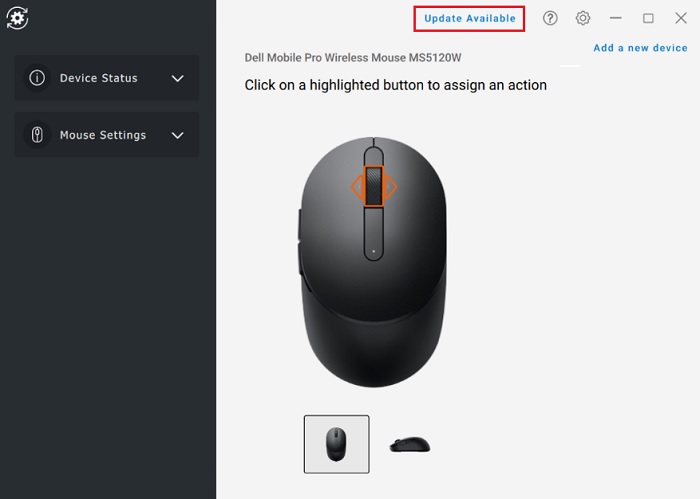
(Figure.1 Mouse Firmware Update Screenshot)
Affected Products
Dell Pro Keyboard and Mouse KM5221WArticle Properties
Article Number: 000199056
Article Type: Solution
Last Modified: 08 Apr 2025
Version: 4
Find answers to your questions from other Dell users
Support Services
Check if your device is covered by Support Services.