Dell Unity: Replication interface creation failed (Error Code: 0x1900000011) (User Correctable)
Summary: While creating the Async/Sync Replication Interface an error is encountered "The specified Network interface could not be created."
This article applies to
This article does not apply to
This article is not tied to any specific product.
Not all product versions are identified in this article.
Symptoms
While creating the Replication Interface an error is encountered "The specified Network interface could not be created."
B  16f8015 [ERROR] System: NAS Server network interface xx_CKMxx123456789 failed while being created. NAS Server NetIF 0x1900000011 failed create interface request with status 0x10
A  6200fb [ERROR] Audit: Creation of Replication Interface xx.xx.xx.xx initiated by User local/admin failed.
Cause
This may be because the network configuration settings inside the Unity storage are causing a problem or may be a customer network configuration issue.
Resolution
Synchronous
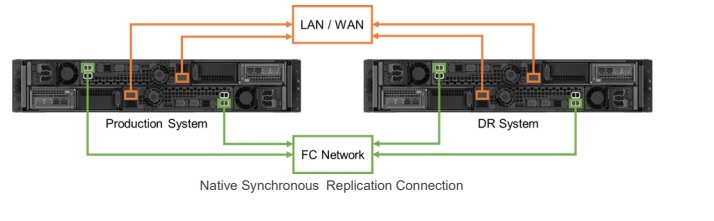
Verify the Sync Management IPs are configured and correct network parameters are set.
Verify the Sync Replication FC port zoning completed.
Verify Management IPs and Sync Management IPs between site is reachable.
Verify the management switch properties to allow more than 2 MAC addresses per physical port.
Asynchronous
Verify the Replication interface IPs are configured, and correct network parameters are set.
Verify Management IPs and Replication interface IPs between site is reachable.

Network Ports
Verify all the required TCP ports are enabled in the customer network environment to enable communication between sites.
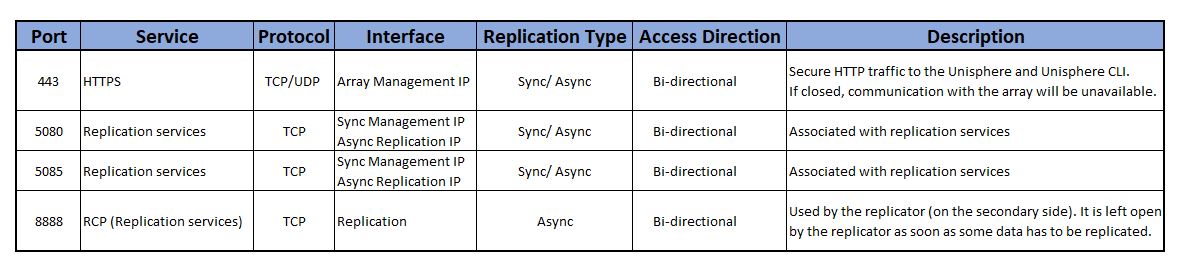
The access direction depends on the replication configuration. Suggested to have "bi-directional" to enable reverse replication without any issues during the Failover activity or during the bi-directional replication configuration.
Verify the Sync Management IPs are configured and correct network parameters are set.
Verify the Sync Replication FC port zoning completed.
Verify Management IPs and Sync Management IPs between site is reachable.
Verify the management switch properties to allow more than 2 MAC addresses per physical port.
Asynchronous
Verify the Replication interface IPs are configured, and correct network parameters are set.
Verify Management IPs and Replication interface IPs between site is reachable.
Network Ports
Verify all the required TCP ports are enabled in the customer network environment to enable communication between sites.
The access direction depends on the replication configuration. Suggested to have "bi-directional" to enable reverse replication without any issues during the Failover activity or during the bi-directional replication configuration.
Affected Products
Dell EMC Unity, Dell EMC Unity Family |Dell EMC Unity All Flash, Dell EMC Unity Family, Dell EMC Unity HybridArticle Properties
Article Number: 000199326
Article Type: Solution
Last Modified: 20 Mar 2023
Version: 5
Find answers to your questions from other Dell users
Support Services
Check if your device is covered by Support Services.