AppSync: How to determine the version in use
Summary: How to determine the version of AppSync in use.
This article applies to
This article does not apply to
This article is not tied to any specific product.
Not all product versions are identified in this article.
Instructions
To determine the current version of AppSync software in use, follow one of the methods listed below:
AppSync UI:
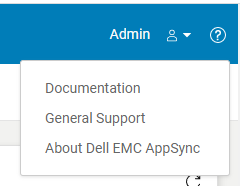
Fig.2
AppSync Logs:
Note: The version of AppSync displayed in "Control Panel\Programs\Programs and Features" is not sufficient as it does not confirm whether AppSync hotfixes have been installed.
AppSync UI:
- Open the AppSync UI and login.
- Click on "?" in the top right of the window. (Fig.1)
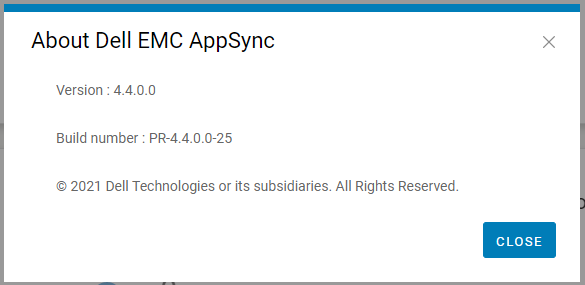
- Click on "About Dell EMC Appsync". (Fig.2)
- Quote this version and build number displayed to Dell AppSync technical support.
Fig.2
AppSync Logs:
- On the AppSync server, navigate to the logs directory in the install location (typically C:\EMC\AppSync\jboss\logs).
- Open server.log using a text editor.
- The first two line indicates the version of AppSync in use and whether any hotfixes are installed.
e.g. Sample server.log snippet (version = 4.3.0.0 & hotfix 3315_R1 is installed)
The current version of AppSync Server is 4.3.0.0_3315_R1
4. Quote this version and hotfix status displayed to Dell AppSync technical support.
The current version of AppSync Server is 4.3.0.0_3315_R1
Note: The version of AppSync displayed in "Control Panel\Programs\Programs and Features" is not sufficient as it does not confirm whether AppSync hotfixes have been installed.
Affected Products
AppSync, AppSyncArticle Properties
Article Number: 000199464
Article Type: How To
Last Modified: 14 May 2026
Version: 7
Find answers to your questions from other Dell users
Support Services
Check if your device is covered by Support Services.