如何在 Dell Security Management Server 中重設 Google Authenticator 以進行多重因素驗證
Summary: 啟用 Google Authenticator 的多重因素驗證時,可能需要重設使用者的 Google Authenticator。
This article applies to
This article does not apply to
This article is not tied to any specific product.
Not all product versions are identified in this article.
Instructions
受影響的產品:
- Dell Security Management Server
- Dell Security Management Server Virtual
受影響的版本:
- v11.4.0 及更新版本
如果使用 Google 身份驗證器啟用多重身份驗證,則有時用戶必須重置身份驗證器,例如丟失手機。以下步驟描述了此過程。
- 使用具有帳戶系統管理員角色的帳戶登入管理主控台。
注意:如需管理員角色的詳細資訊,請參閱 手冊與文件中 Security Management Server 管理員說明文件的管理員角色一節。
- 按一下填入下 的使用者 。
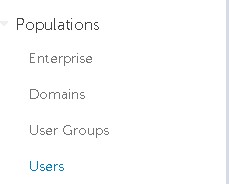
- 按一下需要 Google 驗證器重設的特定 使用者 t。
注意:重設為使用者專屬,因為每個使用者都有自己的 Google Authenticator 權杖。
- 按一下管理員標籤。

- 勾 選重設 Google Authenticator。
- 按一下 更新。

如要聯絡支援部門,請參閱 Dell Data Security 國際支援電話號碼。
請前往 TechDirect,以線上產生技術支援要求。
如需更多深入見解與資源,請加入 Dell 安全性社群論壇。
Affected Products
Dell EncryptionArticle Properties
Article Number: 000199488
Article Type: How To
Last Modified: 01 Jul 2024
Version: 5
Find answers to your questions from other Dell users
Support Services
Check if your device is covered by Support Services.