BIOSで「Dell Security Manager」ウィンドウがポップアップ表示されて、次のプロセスの前にインタラクションがリクエストされる
Summary: この記事では、システムを初めて起動する際のDell Security Managerプロンプトについて説明します。
This article applies to
This article does not apply to
This article is not tied to any specific product.
Not all product versions are identified in this article.
Symptoms
Dell製コンピューターを初めて起動したときに、次のプロンプトが画面に表示されます(図1を参照)。
「A BIOS setup change was made to the Secure Boot configuration.Please accept the changes!
If the change are not accepted within the time remaining, the secure boot settings will be reverted to factory defaults, and the computer will reboot.
To accept the changes, please enter the number sequence as below.
Code - 0000
Time remaining (X) seconds」
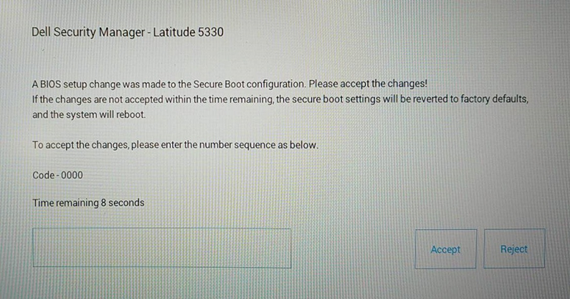
If the change are not accepted within the time remaining, the secure boot settings will be reverted to factory defaults, and the computer will reboot.
To accept the changes, please enter the number sequence as below.
Code - 0000
Time remaining (X) seconds」
図1 Dell Security Manager
Cause
これは、BIOS設定が原因で発生します。[Enable Microsoft UEFI CA]のBIOSオプションは、構成でvProが有効になっているコンピューターでは[OFF]に設定されています。
Resolution
メモ: [Enable Microsoft UEFI CA]が事前に[OFF]に設定されたシステムでは、これは設計どおりに機能しています。
- [Enable Microsoft UEFI CA]をオフのままにするにはPINコードを入力するように促すメッセージに続いて、コンピューターがオペレーティング システムで起動します。
-
15秒以内にPINコードを入力しなかった場合、または[Reject]を選択した場合、コンピューターが再起動し、起動後に次のメッセージが表示されます(図2を参照)。メッセージはF2を押してBIOSセットアップに入るよう促すものです。[Enable Microsoft UEFI CA]は自動的に[ON]に変更されます。
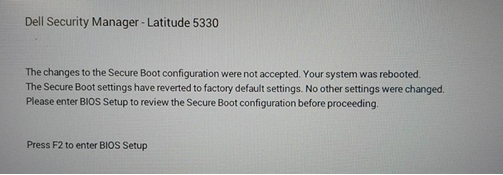
図2 Dell Security Managerの再起動プロンプト
または、[Secure Boot]ページで[Enable Microsoft UEFI CA]を手動で[OFF]に設定することもできます。(図3を参照)
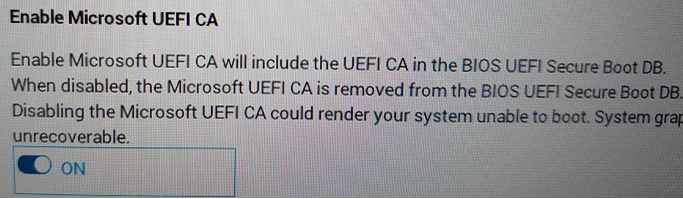
図3 Microsoft UEFI CAの有効化
Additional Information
Affected Products
Latitude 5330, Latitude 7330, Latitude 9430Article Properties
Article Number: 000199681
Article Type: Solution
Last Modified: 14 May 2026
Version: 8
Find answers to your questions from other Dell users
Support Services
Check if your device is covered by Support Services.