NVP vProxy Backups Fail with: Cannot Complete Login due to Incorrect Username or Password
Summary: NetWorker VMware protection backups and attempts to load the VMware Virtual Machine (VM) inventory intermittently fail. Errors regarding the vCenter user account configured in NetWorker fails with "incorrect username or password." The VMware credentials used are correct. ...
This article applies to
This article does not apply to
This article is not tied to any specific product.
Not all product versions are identified in this article.
Symptoms
- NetWorker workflows associated with Group Type: VMware and has Dynamic Association enabled (Tag based association).
- VM backups intermittently fail.
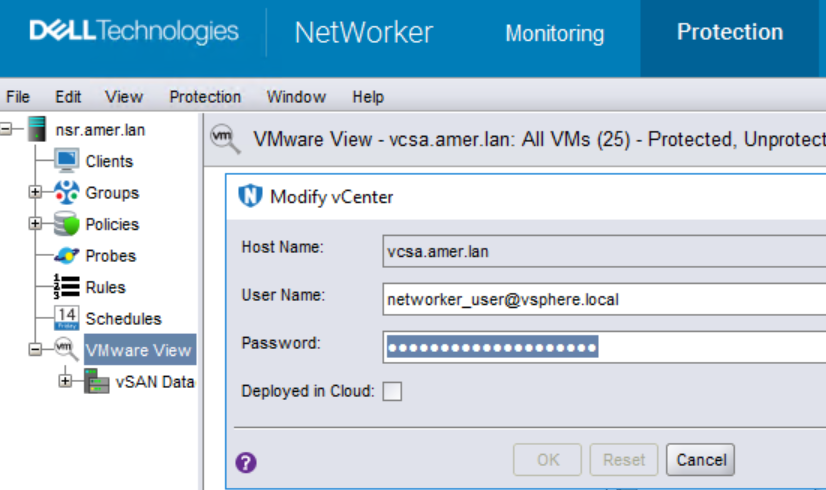
- Attempts to modify the vCenter user password from the NetWorker Management Console (NMC) may fail, but if the same password is entered repeatedly it eventually passes correctly.
- The NetWorker server's
nsrvisd-daemon.logreports the following error:
YYYY-MM-DDTHH:MM:SS-TZ DEBUG:  New state 'Failure': 'Failed to load Category/Tagging metadata.  Failed to login to CIS service at 'HTTPS://NSR_HYPERVISOR/rest/com/vmware/cis/session'. A 'POST' method to CIS service at 'HTTPS://NSR_HYPERVISOR/rest/com/vmware/cis/session' responded with code 401:  Error from CIS service: 'Authentication required.''; old state 'Running': 'Loading inventory ...'.
...
YYYY-MM-DDTHH:MM:SS-TZ ERROR:  Unable to reauthenticate with vCenter 'NSR_HYPERVISOR': ServerFaultCode: Cannot complete login due to an incorrect user name or password.
YYYY-MM-DDTHH:MM:SS-TZ DEBUG:  Session keepalive on vCenter 'NSR_HYPERVISOR': ServerFaultCode: Cannot complete login due to an incorrect user name or password.
Location:
Linux: /opt/nsr/vproxy/logs/nsrvisd/nsrvisd-daemon.log
Windows: C:\Program Files\EMC NetWorker\nsr\vproxy\logs\nsrvisd\nsrvisd-daemon.log/b>
Cause
Intermittent packet loss is observed between the NetWorker server and vCenter server. This issue is occurring at the network level outside of the NetWorker configuration. If the vCenter user credentials used by NetWorker are incorrect, the session POST to the vCenter's CIS service failure would be consistent until corrected. The issue was observed simultaneously as packet loss was also occurring between the NetWorker server and vCenter server. The frequency in which VMware protection operations are impacted depends on how frequent packet loss is observed. When there was no communication issue, VMware protection operations were successful.
Resolution
Monitor for packet loss between the NetWorker server and vCenter server. If any issues are observed, consult with your network administrator or firewall team.
The ping command can be used to check for packet loss from the NetWorker server: ping vCenter_Hostname
NOTE: By default, Linux systems run ping until the command is exited or a count is specified; whereas, Windows systems run four ping checks unless instructed otherwise.
To run a continuous ping on Windows systems, run:
ping -t vCenter_hostname
Example:
[root@NetWorker-server ~]#ping vCenter_Hostname
PING vCenter_Hostname (X.X.X.X) 56(84) bytes of data.
64 bytes from vCenter_Hostname (X.X.X.X): icmp_seq=1 ttl=61 time=0.868 ms
64 bytes from vCenter_Hostname (X.X.X.X): icmp_seq=2 ttl=61 time=0.574 ms
……..
64 bytes from vCenter_Hostname (X.X.X.X): icmp_seq=29 ttl=61 time=0.388 ms
64 bytes from vCenter_Hostname (X.X.X.X): icmp_seq=30 ttl=61 time=0.431 ms
64 bytes from vCenter_Hostname (X.X.X.X): icmp_seq=34 ttl=61 time=0.556 ms
64 bytes from vCenter_Hostname (X.X.X.X): icmp_seq=35 ttl=61 time=0.477 ms
^C
--- vCenter_Hostname ping statistics ---
35 packets transmitted, 32 received, 8% packet loss, time 34793ms
rtt min/avg/max/mdev = 0.318/0.493/0.868/0.113 ms
Additional Information
Similar errors may be observed if the vSphere API (VAPI) memory configuration has not been modified and the environment has out scaled the current settings: NetWorker: VMware groups failing with error failed to load inventory from vCenter
The vCenter Virtual Provisioning X Daemon (VPXD) load can be reduced by configuring NetWorker to run its inventory process less frequently: NVP vProxy: NetWorker nsrvim process runs every 15 minutes causing a high workload on vCenter Server and potential VPXD unavailability
Affected Products
NetWorkerProducts
NetWorker FamilyArticle Properties
Article Number: 000199755
Article Type: Solution
Last Modified: 02 May 2025
Version: 5
Find answers to your questions from other Dell users
Support Services
Check if your device is covered by Support Services.