PowerStore: Health Check: Platform DIMM Correctable Error Check Failed (platform_dimm_ce_check_failed).
Summary: Health Check failed with a message of "Platform DIMM correctable error check failed. Please check the problematic DIMMs and replace as necessary, refer to KB000199841 for additional details (platform_dimm_ce_check_failed)". ...
This article applies to
This article does not apply to
This article is not tied to any specific product.
Not all product versions are identified in this article.
Symptoms
PowerStore Manager may display the following message when performing a Health Check of a PowerStore cluster as part of routine maintenance or when preparing a PowerStore cluster for a nondisruptive software upgrade (NDU): Platform DIMM correctable error check failed. Please check the problematic DIMMs and replace as necessary, refer to KB000199841 for additional details (platform_dimm_ce_check_failed).
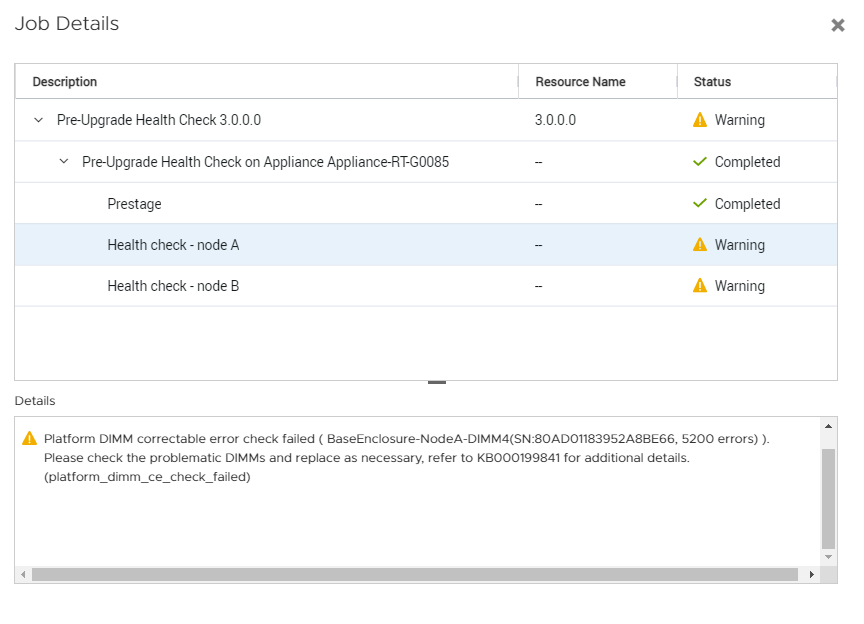
In the example above, DIMM 4 with Serial Number (S/N) 80AD01183952A8BE66 of Node A in the Base Enclosure should be considered for replacement.
In the example above, DIMM 4 with Serial Number (S/N) 80AD01183952A8BE66 of Node A in the Base Enclosure should be considered for replacement.
Cause
DIMM modules within a PowerStore node have accumulated more than 5,000 Correctable Errors (CE) within 24 hours.
Replacement of DIMM modules reported by Health Check is highly recommended before proceeding with a software upgrade.
Replacement of DIMM modules reported by Health Check is highly recommended before proceeding with a software upgrade.
Resolution
Contact Dell EMC Global Remote Support for assistance planning the needed DIMM replacements prior to performing software upgrade.
Please refer to the KB PowerStore: Customer advisory ET004498 proactive field replacement of DIMMs (PowerStore: Customer advisory ET004498 proactive field replacement of DIMMs)
The script procedure is available in the following article PowerStore: How to determine if an appliance requires proactive DIMM replacements (svc_dimm_pfr)
svc_dimm_pfr script is recommended to be run on the system to determine which DIMMs are required to be replaced.
Please refer to the KB PowerStore: Customer advisory ET004498 proactive field replacement of DIMMs (PowerStore: Customer advisory ET004498 proactive field replacement of DIMMs)
The script procedure is available in the following article PowerStore: How to determine if an appliance requires proactive DIMM replacements (svc_dimm_pfr)
svc_dimm_pfr script is recommended to be run on the system to determine which DIMMs are required to be replaced.
Affected Products
PowerStore, PowerStore 1000T, PowerStore 1200T, PowerStore 3000T, PowerStore 3200T, PowerStore 5000T, PowerStore 500T, PowerStore 5200T, PowerStore 7000T, PowerStore 9000TProducts
PowerStore 9000X, PowerStore 9200TArticle Properties
Article Number: 000199841
Article Type: Solution
Last Modified: 23 Feb 2023
Version: 2
Find answers to your questions from other Dell users
Support Services
Check if your device is covered by Support Services.