NetWorker:ライセンスのインストールが「無効なホスト」というエラーで失敗する
Summary: Dell EMC NetWorker: Unable to check out 'NETWORKER_UPDATE': status - -9 'Invalid host.(-9,57)
This article applies to
This article does not apply to
This article is not tied to any specific product.
Not all product versions are identified in this article.
Symptoms
NMC(NetWorker管理コンソール)でライセンスを検証しているときに、次のエラーが発生しました。
Checking CLP connection using "D:\Program Files\EMC NetWorker\nsr/lic/licspec.properties".
Checking license properties file "D:\Program Files\EMC NetWorker\nsr/lic/licspec.properties"
Found 'license path=D:\Program Files\EMC NetWorker\nsr\lic\dpa.lic'
Checking license file 'D:\Program Files\EMC NetWorker\nsr\lic\dpa.lic'
License file 'D:\Program Files\EMC NetWorker\nsr\lic\dpa.lic' is unserved
172537:nsrlic: Unable to check out 'NETWORKER_UPDATE': status - -9 'Invalid host. (-9,57)'
172537:nsrlic: Unable to check out 'NETWORKER_CAPACITY': status - -9 'Invalid host. (-9,57)'
172527:nsrlic: License file 'D:\Program Files\EMC NetWorker\nsr\lic\dpa.lic' issues found: 0
FAILED
Cause
バックアップ サーバーは2つのNICで構成されているため、ライセンスの適用中に別のNICに接続しようとしていました。に戻ります。
Resolution
ネットワーク共有センターから他のIPを無効にします。
ネットワーク共有センターに移動します。
アダプター オプションを変更します。
次に、別のセカンダリIP(バックアップIPではない)
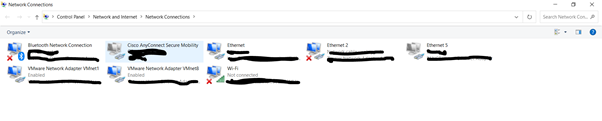
を無効にします他のIPが無効になったら、次の手順でライセンスの適用を再試行します。
1.NetWorkerサーバーで、NMCの[管理]ウィンドウを表示し、サーバーを右クリックして、リストからプロパティ
を選択します。[Server Properties]ウィンドウが表示されます。
OKをクリックします。
ていることを確認します。
ライセンスが正常に適用されたら、無効にしたIPを有効にします。
ネットワーク共有センターに移動します。
アダプター オプションを変更します。
次に、別のセカンダリIP(バックアップIPではない)
を無効にします他のIPが無効になったら、次の手順でライセンスの適用を再試行します。
1.NetWorkerサーバーで、NMCの[管理]ウィンドウを表示し、サーバーを右クリックして、リストからプロパティ
を選択します。[Server Properties]ウィンドウが表示されます。
A。[ライセンス]タブを選択します。
B。CLPライセンス テキスト フィールドで、参照をクリックします。
C。ライセンス ファイルの場所に移動し、ライセンス ファイルを選択します。
D。[Validate license]をクリックします。[ライセンスの検証] ボタンは、内容が検証されるまで無効になります。nsrlic-Cコマンドを使用して、ステータスを確認できます
。
2.サーバーのプロパティウィンドウのライセンスタブで、次のフィールドの値が正しいことを確認し、B。CLPライセンス テキスト フィールドで、参照をクリックします。
C。ライセンス ファイルの場所に移動し、ライセンス ファイルを選択します。
D。[Validate license]をクリックします。[ライセンスの検証] ボタンは、内容が検証されるまで無効になります。nsrlic-Cコマンドを使用して、ステータスを確認できます
。
OKをクリックします。
● ソリューション ID
● CLP SWID
3.NMCの[管理]ウィンドウで、[サーバー]をクリックしてから[登録]を選択します。右側のペインに、[Authorized - No expiration]日を示すCLP容量ライセンスのエントリーが表示され● CLP SWID
ていることを確認します。
ライセンスが正常に適用されたら、無効にしたIPを有効にします。
Additional Information
https://dl.dell.com/content/docu104858_networker-19-5-licensing-guide.pdf?language=en-us
Affected Products
NetWorker FamilyArticle Properties
Article Number: 000199901
Article Type: Solution
Last Modified: 07 May 2025
Version: 2
Find answers to your questions from other Dell users
Support Services
Check if your device is covered by Support Services.