Networker:授權安裝失敗,並出現錯誤「主機無效」
Summary: Dell EMC NetWorker:「Unable to check out 'NETWORKER_UPDATE': status - -9 'Invalid host.(-9,57)
This article applies to
This article does not apply to
This article is not tied to any specific product.
Not all product versions are identified in this article.
Symptoms
在 NMC (NetWorker 管理主控台) 上驗證授權時,出現以下錯誤:
Checking CLP connection using "D:\Program Files\EMC NetWorker\nsr/lic/licspec.properties".
Checking license properties file "D:\Program Files\EMC NetWorker\nsr/lic/licspec.properties"
Found 'license path=D:\Program Files\EMC NetWorker\nsr\lic\dpa.lic'
Checking license file 'D:\Program Files\EMC NetWorker\nsr\lic\dpa.lic'
License file 'D:\Program Files\EMC NetWorker\nsr\lic\dpa.lic' is unserved
172537:nsrlic: Unable to check out 'NETWORKER_UPDATE': status - -9 'Invalid host. (-9,57)'
172537:nsrlic: Unable to check out 'NETWORKER_CAPACITY': status - -9 'Invalid host. (-9,57)'
172527:nsrlic: License file 'D:\Program Files\EMC NetWorker\nsr\lic\dpa.lic' issues found: 0
FAILED
Cause
備份伺服器配置了 2 個 NIC,因此在套用授權時,它會嘗試連線到不同的 NIC。。
Resolution
從網路共用中心停用其他 IP:
前往網路共用中心。
變更配接器選項。
然後停用不同的次要 IP [不是備份 IP]
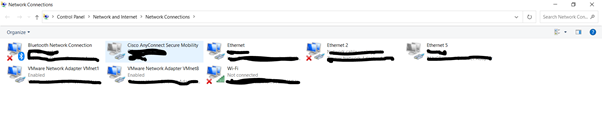
停用其他 IP 後,請嘗試透過以下步驟再次套用授權:
1.在 NetWorker 伺服器上,啟動 NMC 管理視窗,在伺服器上按一下滑鼠右鍵,然後從
清單中選取內容。將出現「伺服器屬性」 視窗。
確定」。
CLP 容量許可證條目,指示授權 - 無到期日期。
成功套用授權後 啟用您已停用的 IP。
前往網路共用中心。
變更配接器選項。
然後停用不同的次要 IP [不是備份 IP]
停用其他 IP 後,請嘗試透過以下步驟再次套用授權:
1.在 NetWorker 伺服器上,啟動 NMC 管理視窗,在伺服器上按一下滑鼠右鍵,然後從
清單中選取內容。將出現「伺服器屬性」 視窗。
a.選取授權標籤。
b.在 CLP 許可證文字欄位中,按兩下瀏覽。
c.瀏覽至授權檔案的位置,然後選取授權檔案。
d.按一下驗證授權。驗證授權按鈕將會停用,直到內容驗證為止。您可以使用 nsrlic -C 命令來檢查
狀態。
2.在「伺服器屬性」視窗中的「授權」選項卡上,確保以下欄位具有正確的值,然後按兩下b.在 CLP 許可證文字欄位中,按兩下瀏覽。
c.瀏覽至授權檔案的位置,然後選取授權檔案。
d.按一下驗證授權。驗證授權按鈕將會停用,直到內容驗證為止。您可以使用 nsrlic -C 命令來檢查
狀態。
確定」。
● 解決方案 ID
● 中電 SWID
3.在「NMC 管理」視窗中,按一下伺服器,然後選取註冊。確認右側窗格顯示● 中電 SWID
CLP 容量許可證條目,指示授權 - 無到期日期。
成功套用授權後 啟用您已停用的 IP。
Additional Information
https://dl.dell.com/content/docu104858_networker-19-5-licensing-guide.pdf?language=en-us
Affected Products
NetWorker FamilyArticle Properties
Article Number: 000199901
Article Type: Solution
Last Modified: 07 May 2025
Version: 2
Find answers to your questions from other Dell users
Support Services
Check if your device is covered by Support Services.