Data Protection Advisor - 執行指令檔前後出現 Error 400
Summary: 執行具有相關指令檔的報告時發生錯誤 400。
This article applies to
This article does not apply to
This article is not tied to any specific product.
Not all product versions are identified in this article.
Symptoms
嘗試執行具有相關指令檔的報告時,會發生此錯誤。
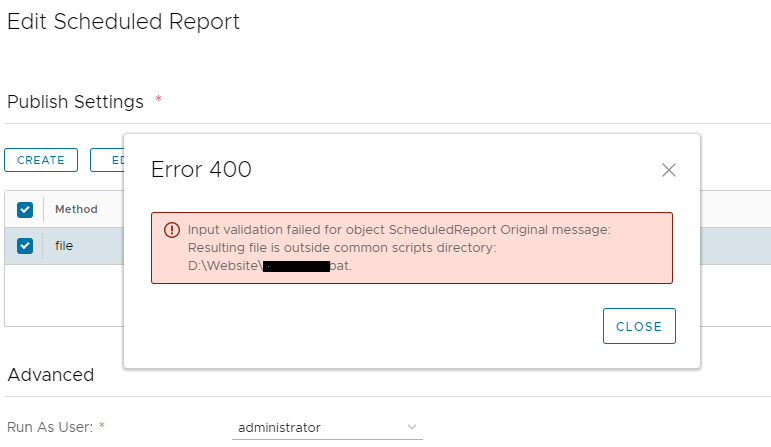
在伺服器記錄中會看到 (application server: <install dir>\emc\dpa\services\logs\server):
Error 400:
Resulting file is outside common scripts directory
在伺服器記錄中會看到 (application server: <install dir>\emc\dpa\services\logs\server):
2021-01-22 11:24:10,556 ERROR [com.emc.dpa.restapi.util.DPAExceptionMapper] (http-/0.0.0.0:9002-3) Exception caught. Building error response. Exception was...: javax.ejb.EJBTransactionRolledbackException: Input validation failed for object ScheduledReport Original message: Resulting file is outside common scripts directory: <Path to customer defined script> (exception.input_validation_error)
.
Caused by: com.emc.dpa.common.exception.DPAException: Input validation failed for object ScheduledReport Original message: Resulting file is outside common scripts directory: <Path to customer defined script> (exception.input_validation_error)
Cause
出現此錯誤的原因是 DPA 預期指令檔位於特定目錄中。
如果指令檔放置在設計目錄路徑之外,則不會處理指令檔。
如果指令檔放置在設計目錄路徑之外,則不會處理指令檔。
Resolution
根據管理員指南:
您必須將指令檔放入 <install-dir>/services/shared/commands
將指令檔放入上述位置即可解決問題。
您必須將指令檔放入 <install-dir>/services/shared/commands
將指令檔放入上述位置即可解決問題。
Affected Products
Data Protection AdvisorArticle Properties
Article Number: 000200217
Article Type: Solution
Last Modified: 10 Nov 2022
Version: 4
Find answers to your questions from other Dell users
Support Services
Check if your device is covered by Support Services.