PowerEdge: Las unidades conectadas a una PERC NO se detectan en instalaciones de Windows o VMware si el orden de dispositivos de firmware (FDO) está habilitado
Summary: Información sobre cómo NO se detectan las unidades detrás de una PERC en la instalación de Windows/VMware ESXi si el orden de dispositivos de firmware (FDO) está habilitado.
This article applies to
This article does not apply to
This article is not tied to any specific product.
Not all product versions are identified in this article.
Symptoms
Las unidades detrás de PERC NO se detectan en la instalación de Windows/VMware ESXi si el orden de dispositivos de firmware (FDO) está habilitado en PERC10/PERC11, como se muestra a continuación.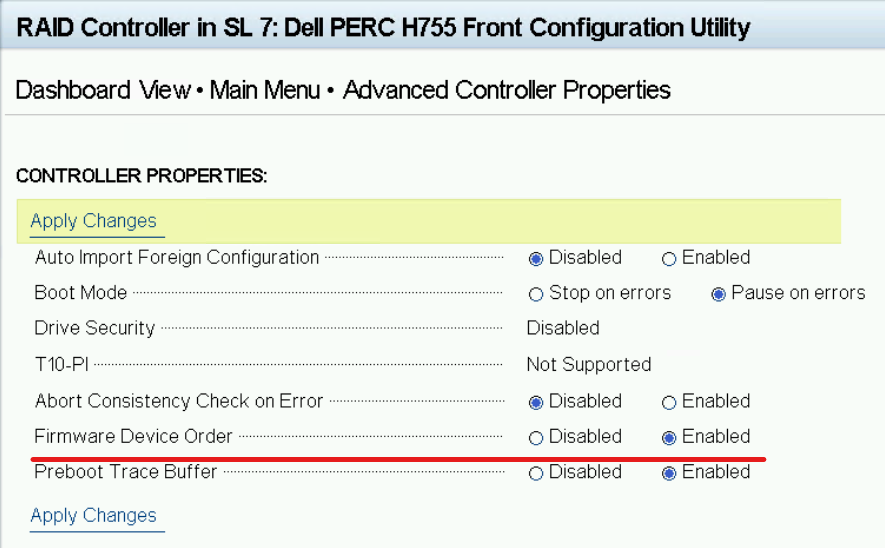
Cause
Windows y VMware ESXi NO son compatibles con el orden de dispositivos de firmware (FDO).
Resolution
Este es un comportamiento esperado.
Windows y VMware ESXi son incompatibles con el orden de dispositivos de firmware (FDO).
Se menciona en el documento en línea PERC-11-Linux-Firmware-Device-Ordering-DfD, página #5.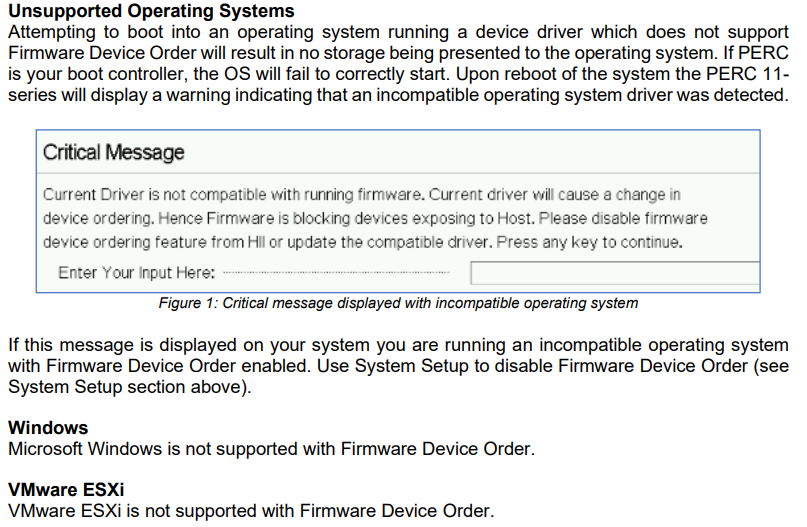
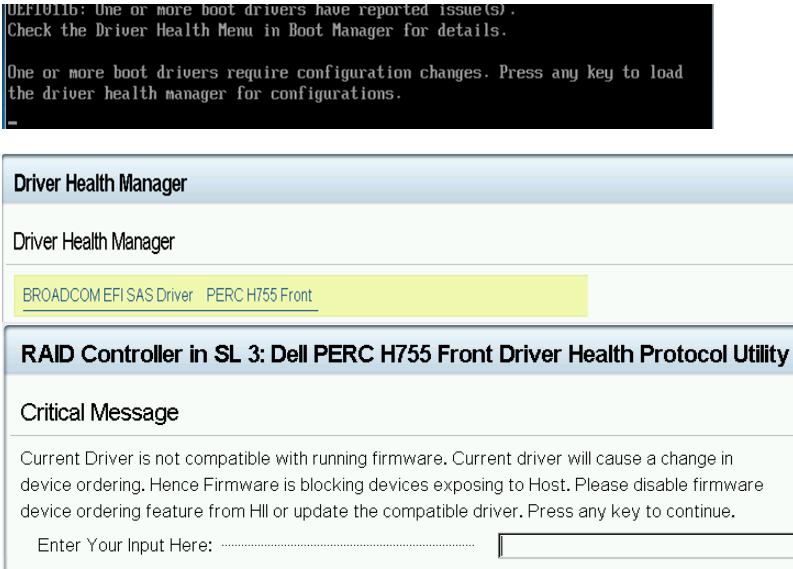
Si habilita FDO, el siguiente mensaje de advertencia aparece durante la POST si intenta instalar Windows/VMware ESXi y reinicia el servidor.
Affected Products
Microsoft Windows Server 2016, Microsoft Windows Server 2019, Microsoft Windows Server 2022, PowerEdge RAID Controller H350 Adapter SAS, PowerEdge RAID Controller H355 Front SAS, PowerEdge RAID Controller H355 Adapter SAS
, PowerEdge RAID Controller H365i Adapter, PowerEdge RAID Controller H365i Front DC-MHS, PowerEdge RAID Controller H750 Adapter SAS, PowerEdge RAID Controller H755 Adapter, PowerEdge RAID Controller H755 MX Adapter, PowerEdge RAID Controller H755N Front NVMe, PowerEdge RAID Controller H755 Front SAS, PowerEdge C6520, PowerEdge C6525, PowerEdge C6615, PowerEdge C6620, PowerEdge HS5610, PowerEdge HS5620, PowerEdge MX750c, PowerEdge R250, PowerEdge R260, PowerEdge R350, PowerEdge R360, PowerEdge R450, PowerEdge R550, PowerEdge R650, PowerEdge R650xs, PowerEdge R6515, PowerEdge R6525, PowerEdge R660, PowerEdge R660xs, PowerEdge R6615, PowerEdge R6625, PowerEdge R750, PowerEdge R750XA, PowerEdge R750xs, PowerEdge R7515, PowerEdge R7525, PowerEdge R760, PowerEdge R760XA, PowerEdge R760xd2, PowerEdge R760xs, PowerEdge R7615, PowerEdge R7625, PowerEdge R860, PowerEdge R960, PowerEdge T150, PowerEdge T160, PowerEdge T350, PowerEdge T360, PowerEdge T550, PowerEdge T560, PowerEdge XR11, PowerEdge XR12, PowerEdge XR4510c, PowerEdge XR4520c, PowerEdge XR5610, PowerEdge XR7620, PowerEdge XR8610t, PowerEdge XR8620t, VMware ESXi 7.x, VMware ESXi 8.x
...
Article Properties
Article Number: 000200300
Article Type: Solution
Last Modified: 13 Jun 2025
Version: 2
Find answers to your questions from other Dell users
Support Services
Check if your device is covered by Support Services.