PowerStore:透過 4 連接埠卡 bond0 連接埠的 iSCSI 和 NVMe/TCP 不支援直接連接的主機
Summary: 4 連接埠卡 bond0 連接埠 (連接埠 0 和 1) 不支援將 iSCSI 主機直接連接至 PowerStore。
This article applies to
This article does not apply to
This article is not tied to any specific product.
Not all product versions are identified in this article.
Symptoms
當主機透過連接埠 0 和 1 直接連接至 PowerStore 時,會產生網路 ICMP 連線警示。
警示範例:
PowerStore Manager 使用者介面 (UI) 顯示:
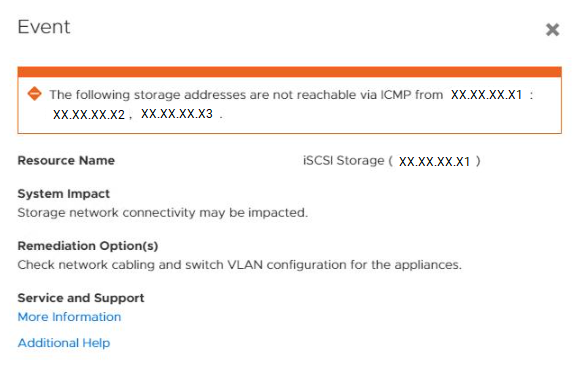
節點 A iSCSI 目標 IP 位址 XX.XX.XX.X1 無法 ping 節點 B iSCSI 目標 IP 位址 XX.XX.XX.X2 和 XX.XX.XX.X3。
警示範例:
"event_code": "0x01807802", |
PowerStore Manager 使用者介面 (UI) 顯示:
節點 A iSCSI 目標 IP 位址 XX.XX.XX.X1 無法 ping 節點 B iSCSI 目標 IP 位址 XX.XX.XX.X2 和 XX.XX.XX.X3。
Cause
當主機直接連接至 PowerStore 時,沒有 iSCSI 資料交換器。
持續網路驗證 (ONV) 會建立 ICMP 連線警示,因為節點無法 ping 彼此的儲存 IP 位址。
當主機直接連接至 PowerStore 時,無法清除與儲存網路相關的 ICMP 連線警示。
持續網路驗證 (ONV) 會建立 ICMP 連線警示,因為節點無法 ping 彼此的儲存 IP 位址。
當主機直接連接至 PowerStore 時,無法清除與儲存網路相關的 ICMP 連線警示。
Resolution
使用 bond0 連接埠進行主機連線需要 ToR 交換器,因為這些連接埠用於 PowerStore 內部通訊。
支援直接連接的 iSCSI 或 NVMe/TCP 主機,在 4 連接埠卡上的連接埠 0 和 1 (bond0) 除外。
若為 PowerStore 500T 機型,則 4 連接埠卡上的最後兩個連接埠會保留供日後使用,且不適用於主機連線。
持續網路驗證仍會使用目前的 PowerStoreOS 版本建立 ICMP 連線警示。未來 PowerStoreOS 版本會重新設計 ONV 邏輯,以抑制與 iSCSI 直接連接主機相關的 ICMP 連線警示。
支援直接連接的 iSCSI 或 NVMe/TCP 主機,在 4 連接埠卡上的連接埠 0 和 1 (bond0) 除外。
若為 PowerStore 500T 機型,則 4 連接埠卡上的最後兩個連接埠會保留供日後使用,且不適用於主機連線。
持續網路驗證仍會使用目前的 PowerStoreOS 版本建立 ICMP 連線警示。未來 PowerStoreOS 版本會重新設計 ONV 邏輯,以抑制與 iSCSI 直接連接主機相關的 ICMP 連線警示。
Affected Products
PowerStore, PowerStore 1000T, PowerStore 3000T, PowerStore 5000T, PowerStore 500T, PowerStore 7000T, PowerStore 9000TArticle Properties
Article Number: 000200739
Article Type: Solution
Last Modified: 05 Jun 2023
Version: 4
Find answers to your questions from other Dell users
Support Services
Check if your device is covered by Support Services.