PowerStore:管理網路重新組態未完成。
Summary: 如果客體虛擬機器 (VM) 與 VMware 分散式交換器中斷連線,管理網路重新組態將無法完成。
This article applies to
This article does not apply to
This article is not tied to any specific product.
Not all product versions are identified in this article.
Symptoms
在管理位址變更後,管理網路重新組態必須讓 PowerStore X VM 網路「重新整理」。這是使用虛擬機器的重新配置完成。
Cause
來賓 VM 不會從此刷新操作中篩選出來,因此會應用於群集中的任何 VM。如果有一些 VM 從 VMware 分散式交換器 (VDS) 狀態中斷連線,則作業不會完成,且管理重新設定會回滾。
Resolution
所有叢集虛擬機器 (VM) 都必須開啟電源,才能繼續進行管理網路重新設定。任何已關閉電源或掛起的虛擬機都必須打開電源。
- 選取必須開啟電源的虛擬機器: vCenter → Datacenter →叢 集→ 虛擬機器
- 在 VM 上按一下滑鼠右鍵,然後開啟 VM 電源:電源→ 電源開啟
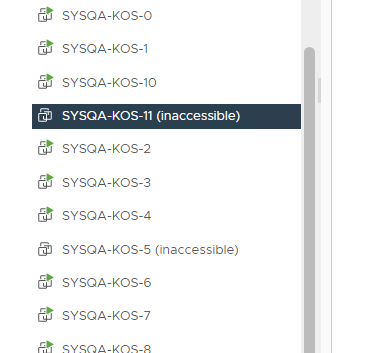
任何顯示為無法存取的虛擬機器都必須重新設定,以恢復與 VDS 的連線:
- 選取必須開啟電源的虛擬機器: vCenter → Datacenter →叢 集→ 虛擬機器
- 前往 VM 組態:虛擬機器→ 摘要→虛擬機器 硬體→ 編輯設定
- 確定至少有一個 VM 網路配接卡已連接至 PowerStore VDS。
圖 1:無法存取的虛擬機器範例
Affected Products
PowerStore 1000X, PowerStore 3000X, PowerStore 5000X, PowerStore 7000X, PowerStore 9000XArticle Properties
Article Number: 000200799
Article Type: Solution
Last Modified: 29 Jul 2025
Version: 4
Find answers to your questions from other Dell users
Support Services
Check if your device is covered by Support Services.