Dell Precision 5560およびXPS 9510がOS起動前の環境でUSBから起動できない
Summary: Dell Precision 5560またはXPS 9510がPre-OS環境で外部USBデバイスからの起動に失敗した場合の対処方法。
This article applies to
This article does not apply to
This article is not tied to any specific product.
Not all product versions are identified in this article.
Symptoms
CFIオペレーティング システムがインストールされたPrecision 5560およびXPS 9510 PCが、OS起動前環境で外部USBデバイスの起動に失敗します。
Cause
オペレーティング システムがCFI注文の場合、BIOSセットアップの選択である[Enable USB Boot Support]は自動的に無効になります。
Resolution
次の手順に従って、起動前環境で外部USBデバイスを起動します。
- 電源を入れている間にF2を押して、セットアップ メニューを起動します。
- [Integrated Devices]をクリックし、[Enable USB Boot Support]をクリックします(図1)。
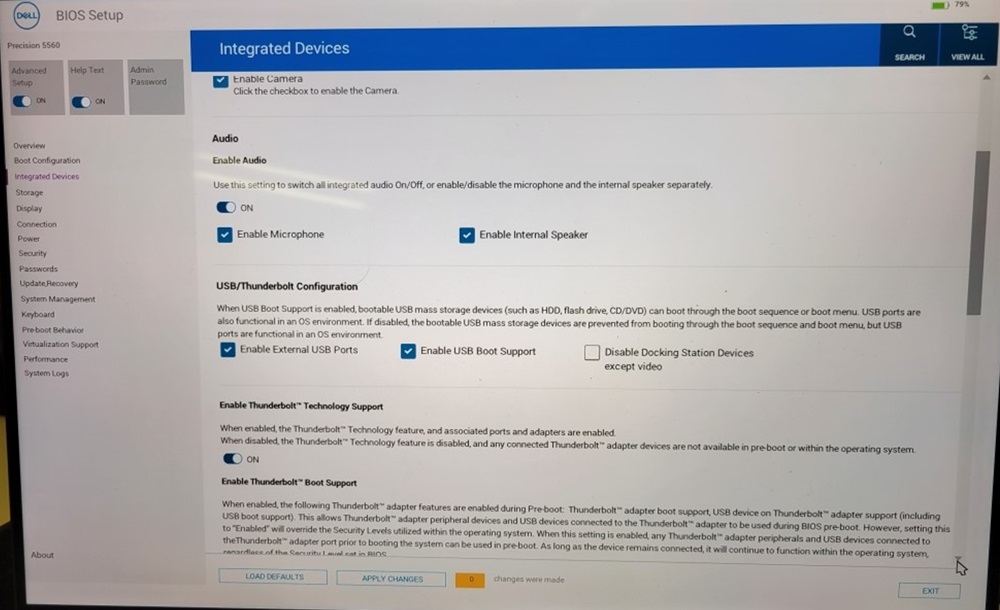
図1: 内蔵デバイス - [Apply Changes]をクリックして終了します。
Affected Products
Precision 5560, XPS 15 9510Article Properties
Article Number: 000200933
Article Type: Solution
Last Modified: 24 Apr 2025
Version: 6
Find answers to your questions from other Dell users
Support Services
Check if your device is covered by Support Services.