Connectrix: Narzędzia internetowe, menedżer elementów, brak wyświetlania stanu kondycji portu na pulpicie nawigacyjnym w przypadku wersji FOS wcześniejszych niż 9.x
Summary: Ten problem występuje w Narzędziach internetowych, Menedżerze elementów przełączników z oprogramowaniem wewnętrznym w wersji wcześniejszej niż 9.x, gdzie dane o kondycji portów nie są wyświetlane, mimo że porty są w trybie online. ...
This article applies to
This article does not apply to
This article is not tied to any specific product.
Not all product versions are identified in this article.
Symptoms
Kondycja portu bez żadnych danych: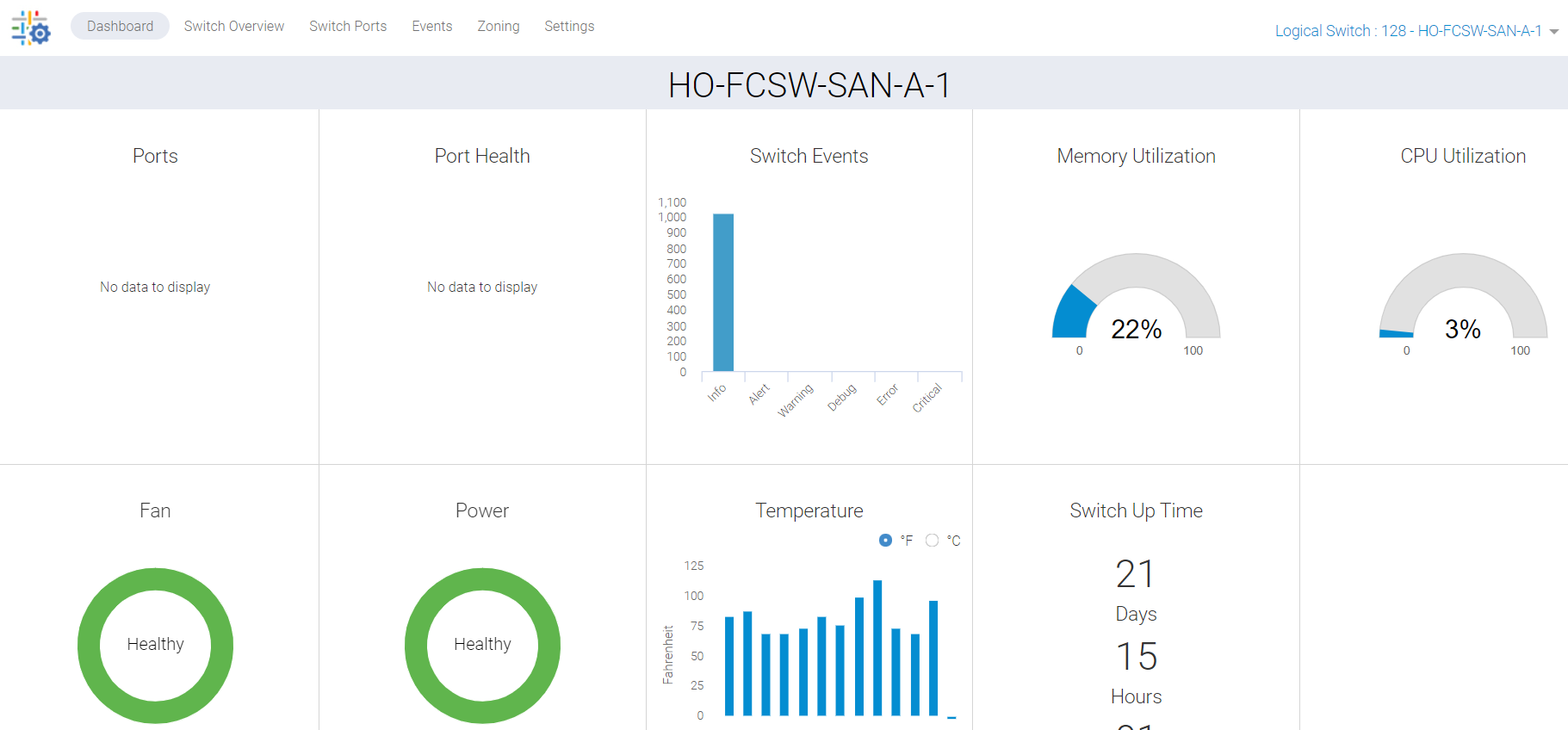
Rysunek 1: Zrzut ekranu przedstawiający kondycję portu bez danych
Cause
Ten problem wynika z następujących powodów:
- Porty nie wyświetlają się na zielono na karcie przeglądu przełącznika, dlatego stan portu nie jest wyświetlany na pulpicie nawigacyjnym
- Brakująca synchronizacja z powodu zatrzymania procesu w tle
Resolution
Musimy odświeżyć te dane, a istnieją dwa plany działania:
PLAN 1:
Do wykonania tej czynności na przełączniku wymagany jest dostęp użytkownika root. Uruchom ponownie usługi HTTP dla narzędzi internetowych.
SAN-SWITCH1:root> /fabos/libexec/webdconfigure
http attributes (yes, y, no, n): [no] y

HTTP Restart (yes, y, no, n): [no] y
HTTP enabled (yes, y, no, n): [yes] y
ErrorLog Enabled (yes, y, no, n): [no]
AccessLog Enabled (yes, y, no, n): [no]
SSLLog Enabled (yes, y, no, n): [no]
HTTP Port: (1..60000) [80]
Secure HTTP Port: (1..60000) [443]
HTTP IsAlive Check Enabled (yes, y, no, n): [yes]
HTTP Max HeapSize: (256..1024) [512]

webtools attributes (yes, y, no, n): [no]
cal attributes (yes, y, no, n): [no]
Lub
PLAN 2:
Wykonaj następujące polecenie:
Departmental model: #hareboot

Director class model: #hafailover
Affected Products
Connectrix B-Series Fabric OS 9.X, Connectrix B-Series SoftwareArticle Properties
Article Number: 000201036
Article Type: Solution
Last Modified: 17 Dec 2024
Version: 5
Find answers to your questions from other Dell users
Support Services
Check if your device is covered by Support Services.