NetWorker: NMC, nsrwatch, nsradmin interfaces become inaccessible due to port exhaustion
Summary: NetWorker server with many devices intermittently becomes unresponsive through the NetWorker Management Console, nsrwatch, and nsradmin command-line utilities.
This article applies to
This article does not apply to
This article is not tied to any specific product.
Not all product versions are identified in this article.
Symptoms
- The NetWorker server intermittently becomes unresponsive through the NetWorker Management Console (NMC),
nsrwatchandnsradmincommand-line utilities. - The NetWorker datazone is configured with many devices. The NetWorker server may have additional storage nodes managing devices; however, there are many devices configured overall. The number of devices is near or exceeding 100.
- The NetWorker server's
..\nsr\logs\daemon.rawcontains many Remote Procedure Call (RPC) errors regarding the NetWorker port range:
MM/DD/YYYY HH:MM:SS AM  3 2 107 12236 17644 0 NSR_SERVER_NAME nsrmmdbd RPC error Unable to create the connection with 'nsrd' to host 'localhost' with address '127.0.0.1' at port number 9537.
MM/DD/YYYY HH:MM:SS AM  5 2 107 12236 17644 0 NSR_SERVER_NAME nsrmmdbd RPC critical Check whether the client services are running on the host '127.0.0.1'.
- There are hundreds of
nsrmmdprocesses running on the server. - Restarting NetWorker server services temporarily resolves the issue.
- NetWorker server is installed on Microsoft Windows.
Cause
Due to the number of devices configured through the NetWorker server, server port exhaustion is occurring, causing RPC connection issues for NetWorker server services.
Resolution
- Adjust TCP keepalive parameters on the NetWorker server.
NOTE: See the NetWorker Performance Optimization Planning Guide for additional information and recommendations for TCP tuning. https://www.dell.com/support/product-details/product/networker/docs
- Set the TCP KeepAliveTime to 5 minutes. This parameter determines the interval between keepalive probes sent to check if a connection is still alive. If there is no activity on a TCP connection for the specified time, the system sends a keepalive probe to ensure that the connection is still active. The system to send keepalive probes every 5 minutes of inactivity. This helps in maintaining active connections and detecting dead connections more promptly.
- Set the TCP TimeWaitDelay to 30 seconds. This parameter determines the amount of time the system will wait for a connection to close after a FIN (finish) packet is sent. The FIN packet is used to gracefully close a TCP connection. The system waits 30 seconds before closing the connection completely after the FIN packet is sent. This can help in freeing up resources more quickly, especially in environments with high network traffic.
Windows:
a. On the NetWorker server open regedit and, go to: HKEY_LOCAL_MACHINE\System\CurrentControlSet\Services\Tcpip\Parameters
b. Set KeepAliveTime to 300000 millisecond (5 minutes)
c. Set TcpTimedWaitDelay to 30 (decimal)
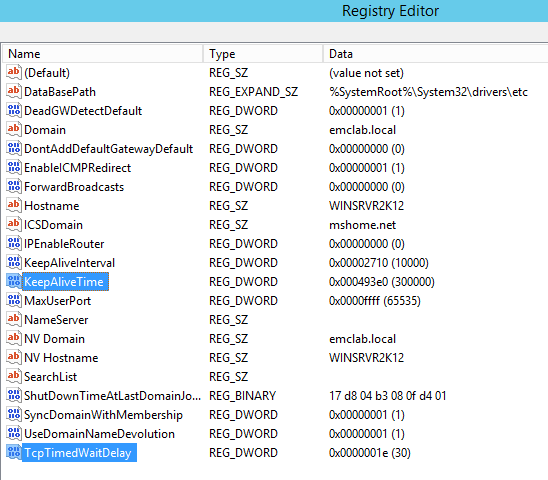
NOTE: If either of the above changes do not exist on the server, they can be created. Changes to the system registry require a system reboot.
Linux:
The ipv4.tcp parameters on a Linux system can be identified using the
sysctl command:
sudo sysctl net.ipv4.tcp_keepalive_time
sudo sysctl net.ipv4.tcp_fin_timeout
Example:
nve:~ # sysctl net.ipv4.tcp_keepalive_time
net.ipv4.tcp_keepalive_time = 7200
nve:~ #
nve:~ # sysctl net.ipv4.tcp_fin_timeout
net.ipv4.tcp_fin_timeout = 60
New parameters can be tested using the following syntax:
sudo sysctl -w net.ipv4.tcp_fin_timeout=300 Other values can be tested.
sudo sysctl -w net.ipv4.tcp_keepalive_time=30 Other values can be tested.
NOTE: These changes are only temporary and will be reverted to their previous setting after a system reboot. If the settings improve functionality, they can be permanently set in the
/etc/sysctl.conf and applied with the sysctl --system command.
- From the NetWorker Management Console (NMC), check the Devices->Storage Node properties of each of the storage nodes that are configured in the NetWorker server. If checked, clear the dynamic nsrmmds checkbox:

NOTE: View->Diagnostic view must be enabled to see the Dynamic nsrmmds checkbox. This is to avoid additional
nsrmmd processes getting started and consuming ports when many devices exist in the environment.
Additional Information
nsrmmd - Provides device support, mount requests, multiplexes save set data during multiclient backup and demuliplex recover data. Forwards storage information to nsrmmdbd on the NetWorker server.
The NetWorker port range can be returned by running nsrports on the NetWorker server. Default:
Service ports: 7937-9936
Connection ports: 0-0
Connection ports: 0-0
Affected Products
NetWorkerProducts
NetWorker Family, NetWorker SeriesArticle Properties
Article Number: 000201089
Article Type: Solution
Last Modified: 01 May 2025
Version: 5
Find answers to your questions from other Dell users
Support Services
Check if your device is covered by Support Services.