AppSync:使用 LDAP 群組使用者登入時,無法在 AppSync GUI 上看到副本。
Summary: 當我們將 LDAP 群組新增至 AppSync UI,並使用群組中的 LDAP 使用者登入 UI 時,我們無法在 UI 的「複製管理>任何應用程式>複製」中列出複製。
This article applies to
This article does not apply to
This article is not tied to any specific product.
Not all product versions are identified in this article.
Symptoms
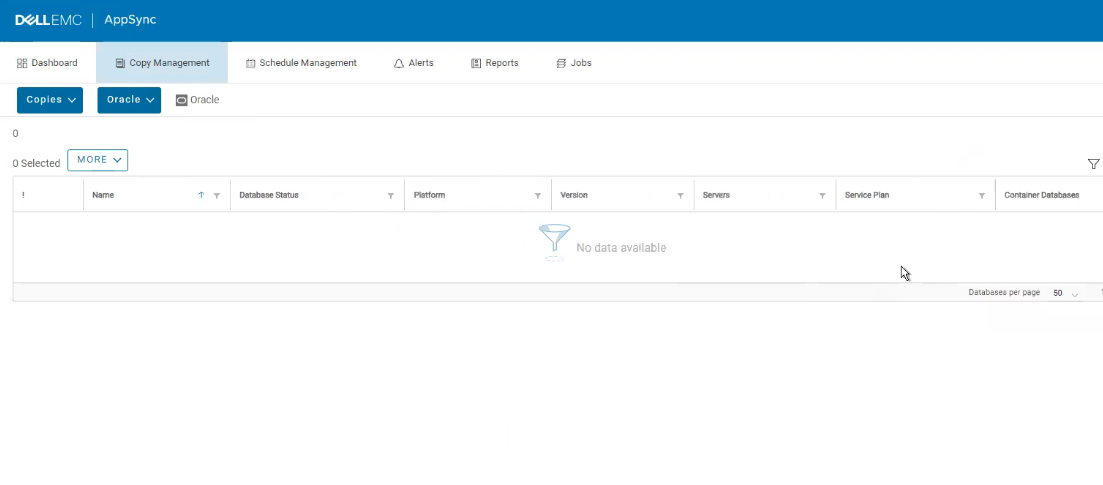
以下是 AppSync GUI 的螢幕擷取畫面,我們可以看到副本沒有顯示:

Cause
根據工程團隊的說法,在 4.4.0 和 4.4.1 中將群組新增至 AppSync 時,群組屬性中遺失「canchangepermits」金鑰。
Resolution
因應措施 #1
因應措施 #2
解決方案:
需要 hotfix 才能解決此問題。
請聯絡 Dell 支援部門,並參閱此 KB 號碼。
請參閱 AppSync 4.4.0 和 4.4.0.1 版本版本的版本資訊,以判斷原生包含修正程式的版本。
- 從 AppSync 移除 LDAP 群組。
- 將 LDAP 群組新增至 AppSync,確保已選取「Enable ACL Management」核取方塊。
- 現在取消勾選 AppSync 中 LDAP 群組的 「Enable ACL Management」核取方塊
因應措施 #2
使用內部 AppSync 使用者。
解決方案:
需要 hotfix 才能解決此問題。
請聯絡 Dell 支援部門,並參閱此 KB 號碼。
請參閱 AppSync 4.4.0 和 4.4.0.1 版本版本的版本資訊,以判斷原生包含修正程式的版本。
Article Properties
Article Number: 000201484
Article Type: Solution
Last Modified: 18 Sep 2025
Version: 4
Find answers to your questions from other Dell users
Support Services
Check if your device is covered by Support Services.