NWUI konnte die aktuelle Anzahl für das Dashboard-Monitoring nicht abrufen
Summary: Die NetWorker-Webbenutzeroberfläche (NWUI) wird zum Managen der NetWorker-Datenzone verwendet. Die Registerkarte "NWUI-Dashboard" zeigt den Fehler "Aktuelle Anzahl für das Dashboard konnte nicht abgerufen werden" an und zeigt keine Details der Policies, Workflows und Aktionen an. ...
This article applies to
This article does not apply to
This article is not tied to any specific product.
Not all product versions are identified in this article.
Symptoms
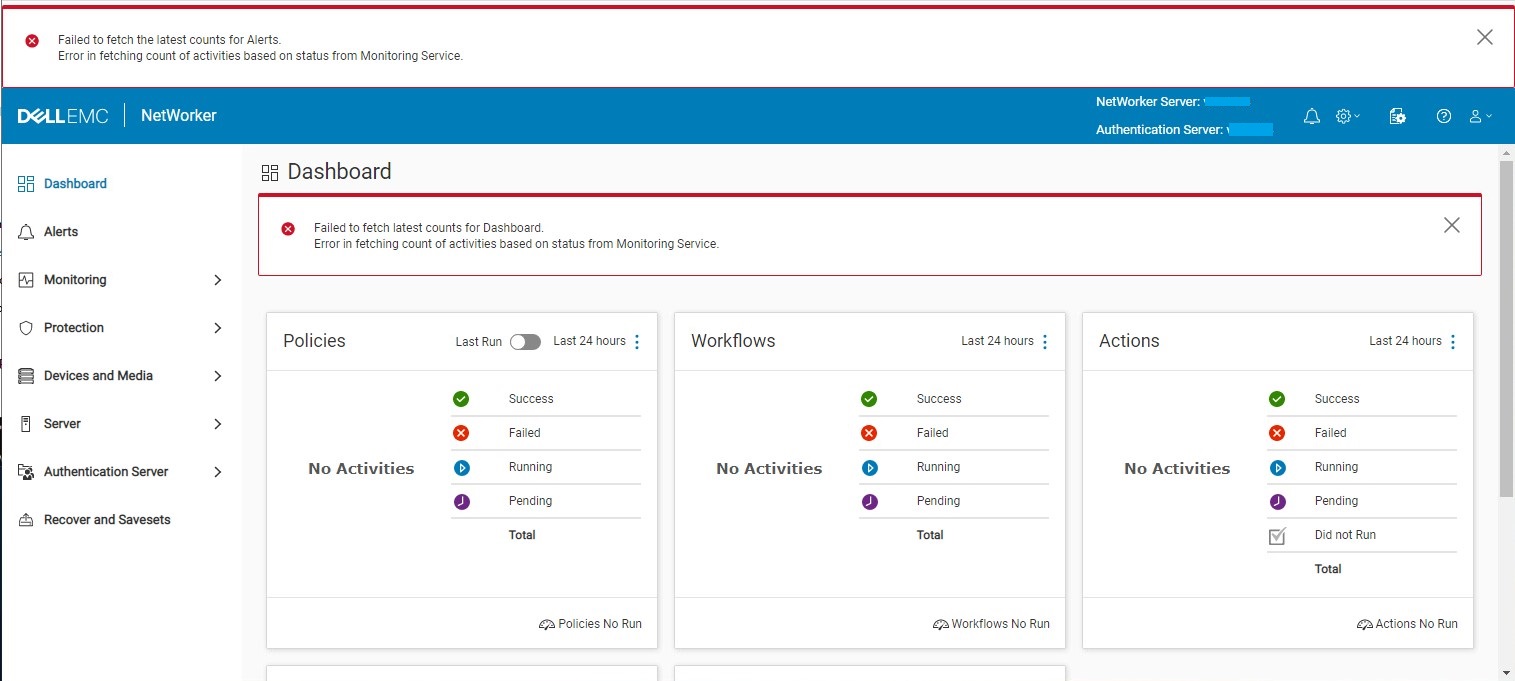
Die NWUI-Konsole zeigt Folgendes an:
Failed to fetch latest counts for Dashboard
Error is fetching count of activities based on status from Monitoring Service
Die Spalte C:\Program Files\EMC NetWorker\nsr\authc-server\tomcat\logs\nwui.log zeigt:
HH:MM:SS [https-jsse-nio-9090-exec-2] ERROR c.e.n.c.n.i.MonitoringApi - Error in fetching count of activities based on status from Monitoring Service. javax.net.ssl.SSLHandshakeException: sun.security.validator.ValidatorException: PKIX path validation failed: java.security.cert.CertPathValidatorException: signature check failedCause
Das NWUI-Monitor-Keystore-Zertifikat ist im NetWorker Runtime Environment-(NRE-)Keystore nicht verfügbar. Das NWUI-Monitoring benötigt Berechtigungen im NRE-Keystore, um sich bei der NetWorker-Datenzone zu authentifizieren. Die Ursache für das fehlende NWUI-Monitoringprozess-Keystore-Zertifikat ist nicht bekannt.
Der NRE-Keystore sollte die emcnwuimonitoring Zertifikatdetails:
C:\Program Files\NRE\java\jre1.8.0_321\bin>keytool.exe -list -keystore ..\lib\security\cacerts | findstr emcnwuimonitoring
Enter keystore password:  changeit
emcnwuimonitoring, Apr 27, 2022, trustedCertEntry,

C:\Program Files\NRE\java\jre1.8.0_321\bin>
Resolution
Das NWUI-Monitoring-Keystore-Zertifikat muss in den NRE-Keystore importiert werden.
- Öffnen Sie ein Eingabeaufforderungsfenster mit der Option "Als Administrator ausführen" .
- Wechseln Sie zum NRE-Bin-Verzeichnis. Der NRE-Pfad variiert je nach installierter NRE-Version und Serverbetriebssystem:
Linux:
cd /opt/nre/java/latest/bin/
Windows:
cd "C:\Program Files\NRE\java\jre1.8.0_321\bin>"
- Listen Sie die NRE-Keystore-Inhalte auf, um die zu validieren
emcnwuimonitoringexistiert nicht. Das Standardkennwort lautet"changeit."
Linux:
./keytool -list -keystore ../lib/security/cacerts | grep emcnwuimonitoring
Windows:
keytool.exe -list -keystore ..\lib\security\cacerts | findstr emcnwuimonitoring
- Importieren Sie den NWUI-Monitoring-Keystore in den NRE-Keystore:
Linux:
./keytool -import -alias emcnwuimonitoring -file /nsr/nwui/monitoring/app/conf/emcnwuimonitoring.cer -keystore ../lib/security/cacertsWindows:
keytool.exe -importcert -alias emcnwuimonitoring -file "C:\Program Files\EMC NetWorker\nwui\monitoring\app\conf\emcnwuimonitoring.cer" -keystore ..\lib\security\cacerts
- Beenden Sie die
"NetWorker Backup and Recover Server"Dienst:
Linux:
nsr_shutdown
Windows:
net stop nsrd
- Starten Sie die
"NetWorker Backup and Recover Server"Dienst:
Linux:
systemctl start networkerWindows:
net start nsrd
- Listen Sie die NRE-Keystore-Inhalte auf, um die zu validieren
emcnwuimonitoringexistiert mit dem Standardkennwort"changeit".
Linux:
./keytool -list -keystore ../lib/security/cacerts | grep emcnwuimonitoring
Windows:
keytool.exe -list -keystore ..\lib\security\cacerts | findstr emcnwuimonitoring
- Überprüfen Sie, ob das Symptom in der NWUI nicht mehr auftritt.
Article Properties
Article Number: 000201603
Article Type: Solution
Last Modified: 18 Nov 2025
Version: 4
Find answers to your questions from other Dell users
Support Services
Check if your device is covered by Support Services.