Latitude 5430 ha un indirizzo MAC errato sull'etichetta del cartone
Summary: Alcuni computer Latitude 5430 potrebbero avere l'indirizzo MAC errato sulla scatola di spedizione. Di seguito è riportato come trovare gli indirizzi MAC corretti.
This article applies to
This article does not apply to
This article is not tied to any specific product.
Not all product versions are identified in this article.
Symptoms
Piattaforme interessate:
- Latitude 5430
Cause
Non applicabile
Resolution
Il cliente può ottenere il proprio indirizzo MAC nel BIOS o in Windows.
BIOS:

Windows:
- Premere il tasto Win + R.

- Digitare
cmdquindi fare clic su OK.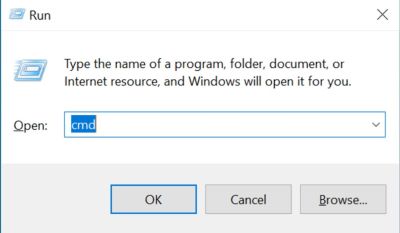
- Digitare
getmac/vquindi fare clic sul tasto Invio per controllare l'indirizzo MAC.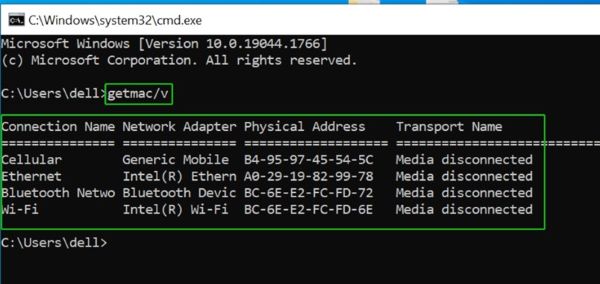
Affected Products
Latitude 5430Article Properties
Article Number: 000202419
Article Type: Solution
Last Modified: 24 Apr 2025
Version: 5
Find answers to your questions from other Dell users
Support Services
Check if your device is covered by Support Services.