Latitude 5430 má na kartonovém štítku chybnou adresu MAC
Summary: Některé počítače Latitude 5430 mohou mít na přepravní krabici nesprávnou adresu MAC. Níže je uvedeno, jak najít správné MAC adresy.
This article applies to
This article does not apply to
This article is not tied to any specific product.
Not all product versions are identified in this article.
Symptoms
Dotčené platformy:
- Latitude 5430
Cause
Není k dispozici
Resolution
Zákazník může získat svou MAC adresu v systému BIOS nebo v systému Windows.
BIOS:

Windows:
- Stiskněte klávesu Win + R.
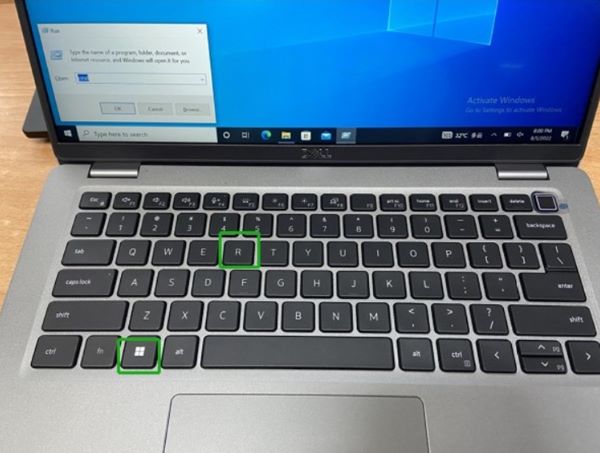
- Zadejte
cmda potom klikněte na tlačítko OK.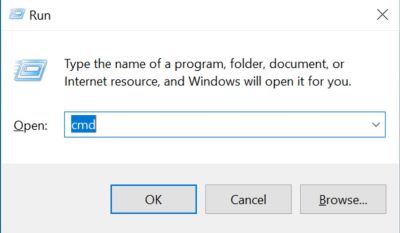
- Zadejte
getmac/va poté kliknutím na klávesu Enter zkontrolujte adresu MAC.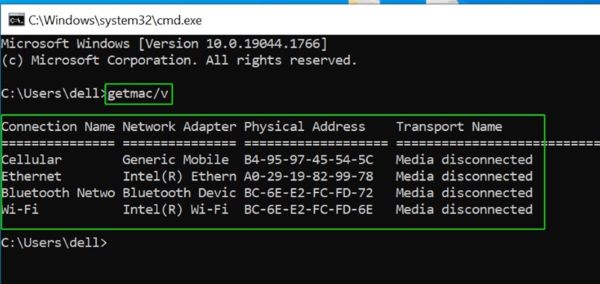
Affected Products
Latitude 5430Article Properties
Article Number: 000202419
Article Type: Solution
Last Modified: 24 Apr 2025
Version: 5
Find answers to your questions from other Dell users
Support Services
Check if your device is covered by Support Services.