安全連線閘道和 SRS:開機進入緊急模式時還原損毀的磁碟分割
Summary: 當 Secure Remote Services 或安全連線閘道開機進入緊急模式時,這是因為分割區損毀。本文為這種情況提供了解決方案。
This article applies to
This article does not apply to
This article is not tied to any specific product.
Not all product versions are identified in this article.
Instructions
若為 Secure Remote Services (SRS),最可能損毀的磁碟分割為 /var/log
若為安全連線閘道 (SCG),最可能發生損毀的磁碟分割為 /var/lib/docker
以下指示均有效。檢查每種情況下的相關分區。
開啟 VM 主控台 (VMware 或 Hyper-V)。
在提示字元中輸入根密碼。
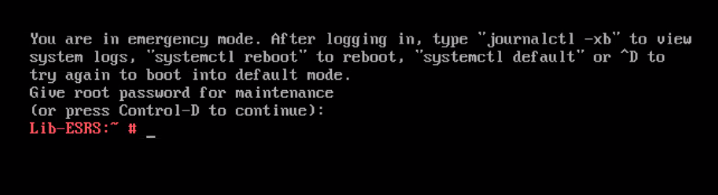
按照 VMware 控制台中的指示打開日誌。
使用斜線命令搜尋。請參閱以下範例
此命令會在記錄中反白顯示「error」一詞的實例。在下面的示例中,我們看到 /var/log 包含錯誤,第一行位於頂部。請注意,錯誤一詞將突出顯示。

仔細查看,您會看到與錯誤消息在同一行或大約同一行,即缺少分區的路徑名。
對於 SRS 和 SCG,最常見的兩個磁碟分割分別為 /var/log 和 /var/lib/docker。
識別出損毀的磁碟分割後,請查看您是否可以使用以下兩種最常見的情況來還原它:

注意:-y 選項告訴命令自動應答提示,以修復文件系統檢查程式發現的損壞。
修復損毀後,請掛接磁碟分割:
確認系統可看到分割區:
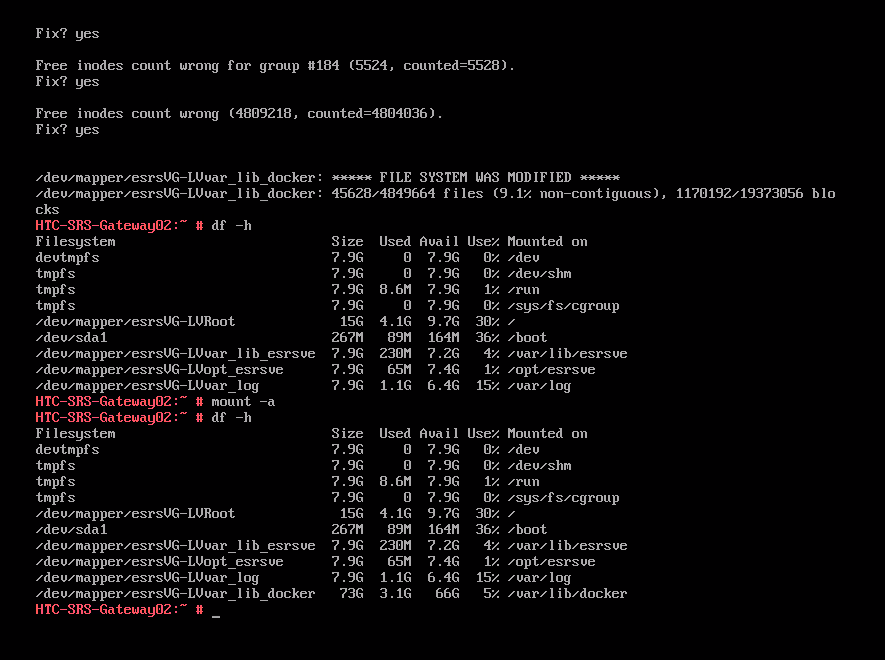
如果分割區已還原,請重新開機。
應掛載所有分區,並且所有服務都應運行。
現在嘗試登入閘道的 Web 使用者介面:
已修復損毀的分割區,系統正在備份並再次執行。
若為安全連線閘道 (SCG),最可能發生損毀的磁碟分割為 /var/lib/docker
以下指示均有效。檢查每種情況下的相關分區。
開啟 VM 主控台 (VMware 或 Hyper-V)。
在提示字元中輸入根密碼。
按照 VMware 控制台中的指示打開日誌。
journalctl -xb
使用斜線命令搜尋。請參閱以下範例
/error
此命令會在記錄中反白顯示「error」一詞的實例。在下面的示例中,我們看到 /var/log 包含錯誤,第一行位於頂部。請注意,錯誤一詞將突出顯示。
仔細查看,您會看到與錯誤消息在同一行或大約同一行,即缺少分區的路徑名。
對於 SRS 和 SCG,最常見的兩個磁碟分割分別為 /var/log 和 /var/lib/docker。
識別出損毀的磁碟分割後,請查看您是否可以使用以下兩種最常見的情況來還原它:
fsck -y /var/log或
fsck -y /var/lib/docker
注意:-y 選項告訴命令自動應答提示,以修復文件系統檢查程式發現的損壞。
修復損毀後,請掛接磁碟分割:
mount -a
確認系統可看到分割區:
df -h
如果分割區已還原,請重新開機。
reboot
應掛載所有分區,並且所有服務都應運行。
現在嘗試登入閘道的 Web 使用者介面:
SCG: https://<gateway IP>:5700或
SRS; https://<gateway IP>:9443
已修復損毀的分割區,系統正在備份並再次執行。
Affected Products
Secure Remote Services Virtual Edition, Secure Connect Gateway - Virtual EditionArticle Properties
Article Number: 000202483
Article Type: How To
Last Modified: 11 May 2025
Version: 3
Find answers to your questions from other Dell users
Support Services
Check if your device is covered by Support Services.