PowerFlex:無法新增加速裝置,無法開啟 SDS 裝置
Summary: 無法將 dax 裝置新增至 SDS 節點。
This article applies to
This article does not apply to
This article is not tied to any specific product.
Not all product versions are identified in this article.
Symptoms
dax 裝置已成功建立。
可以使用下列方式在主機上看到 dax 裝置:
使用簡報伺服器新增 dax 裝置時,您會看到:

可以使用下列方式在主機上看到 dax 裝置:
#ndctl list -N
使用簡報伺服器新增 dax 裝置時,您會看到:
Cause
程式庫 libpmem 已從 SDS 節點移除或未安裝。
檢查 lipmem 套裝沒有任何傳回。
軟體定義儲存 (SDS) 會使用此程式庫與 NVDIMM 互動。
這解釋了為什麼 SDS 服務無法讀取 NVDIMM。
檢查 lipmem 套裝沒有任何傳回。
#rpm -qa | grep libpmem*
軟體定義儲存 (SDS) 會使用此程式庫與 NVDIMM 互動。
這解釋了為什麼 SDS 服務無法讀取 NVDIMM。
Resolution
將 libpmem 安裝在 SDS 上。
安裝套件後,請將 SDS 重新開機。
SDS 重新啟動後,您可以將 dax 裝置新增至 SDS。
在此範例中,版本為:libpmem-1.5.1-2.1.el7.x86_64
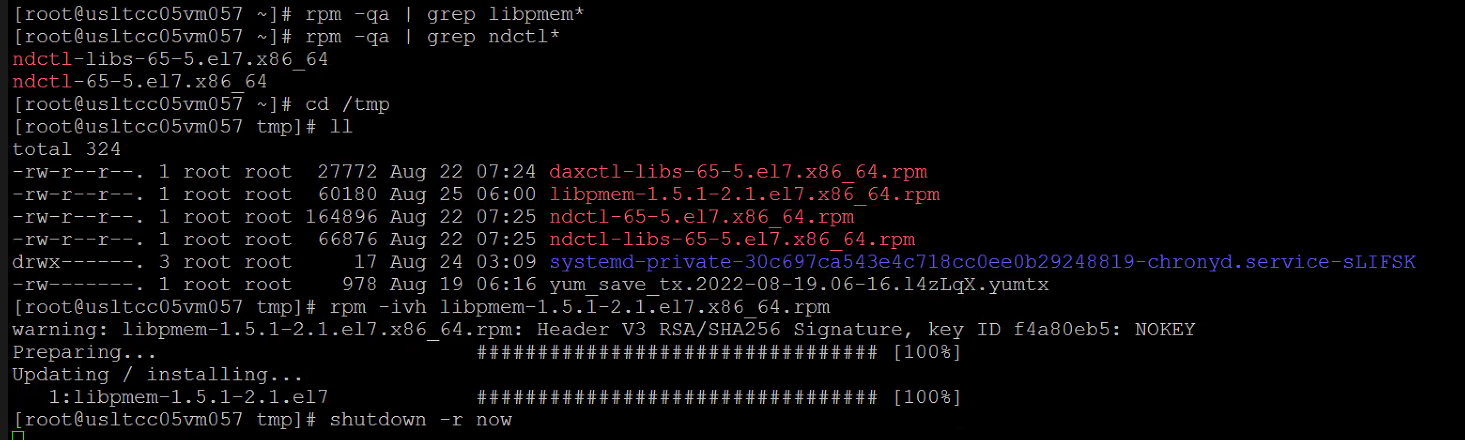
安裝套件後,請將 SDS 重新開機。
SDS 重新啟動後,您可以將 dax 裝置新增至 SDS。
在此範例中,版本為:libpmem-1.5.1-2.1.el7.x86_64
Affected Products
PowerFlex SoftwareProducts
Converged Infrastructure, PowerFlex rack, VxFlex Product FamilyArticle Properties
Article Number: 000202755
Article Type: Solution
Last Modified: 27 Nov 2025
Version: 5
Find answers to your questions from other Dell users
Support Services
Check if your device is covered by Support Services.