Dellビデオ会議モニターのスピーカーの使用時に音が出ない
Summary: この記事では、モニター スピーカーを使用する場合のオーディオの問題について説明します。
This article applies to
This article does not apply to
This article is not tied to any specific product.
Not all product versions are identified in this article.
Symptoms
Dellモニターが再生デバイスとして選択されている場合、音が聞こえません。
影響を受けるモニター:
- Dell 24インチ ビデオ会議モニター C2422HE
- Dell 27インチ ビデオ会議モニター C2722DE
- Dell 34インチ ビデオ会議用曲面モニター C3422WE
Cause
Realtekドライバー、オーディオ ドライバー、ウィンドウ アップデート、BIOSアップデート、モニター ファームウェアがアップデートされない場合があります。
Resolution
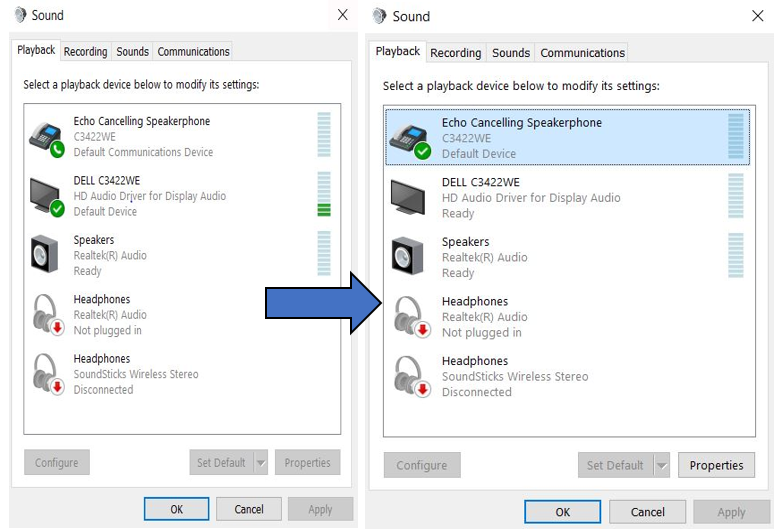
[サウンド]設定に移動し、[サウンドの再生]をオーディオのデフォルト デバイスとして[Echo Cancelling Speakerphone]に設定します。
Affected Products
Dell 24 Video Conferencing Monitor C2422HE, Dell 27 Video Conferencing Monitor C2722DE, Dell 34 Video Conferencing Curved Monitor C3422WEArticle Properties
Article Number: 000203402
Article Type: Solution
Last Modified: 22 Apr 2025
Version: 6
Find answers to your questions from other Dell users
Support Services
Check if your device is covered by Support Services.