Windows Server:RDS 工作组环境中的错误
Summary: 本文解决了 RDS 工作组环境中的错误
This article applies to
This article does not apply to
This article is not tied to any specific product.
Not all product versions are identified in this article.
Symptoms
远程桌面许可证在工作组环境中不起作用。
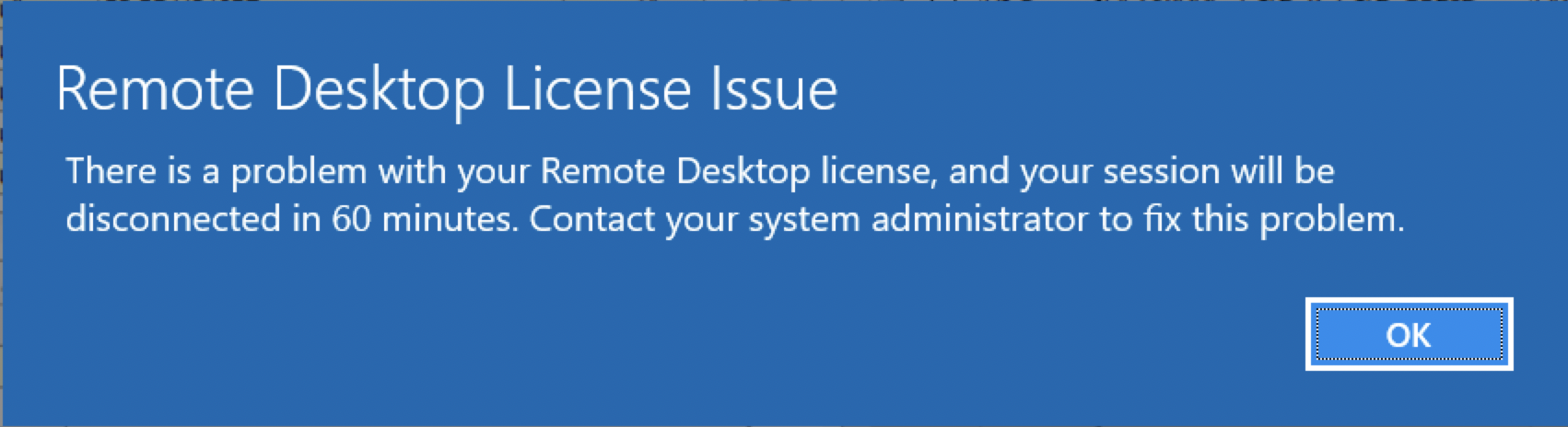
用户收到以下错误:
远程桌面许可证有问题,会话将在 60 分钟内断开连接。联系您的系统管理员以解决此问题。
 <
<
Cause
工作组环境中仅支持“每设备”远程桌面许可证。
Resolution
将远程桌面许可证更改为“每设备”许可证。这可以在远程桌面许可证管理器中通过右键单击“每用户”许可证并选择转换为“每设备”许可证来完成。
如果需要每用户许可证,则必须创建一个域,并将所有服务器加入该域。
在工作组环境中,应将服务器的许可证模式设置为“每设备”为 2,并且应将许可证服务器名称配置为允许颁发远程桌面许可证。
这可以在以下注册表位置进行配置:转至开始 > 运行,然后键入regedit,然后按Enter键。
4 = 每用户
2 = 每设备
许可证服务器也可通过此处的注册表进行设置:
如果需要每用户许可证,则必须创建一个域,并将所有服务器加入该域。
在工作组环境中,应将服务器的许可证模式设置为“每设备”为 2,并且应将许可证服务器名称配置为允许颁发远程桌面许可证。
这可以在以下注册表位置进行配置:转至开始 > 运行,然后键入regedit,然后按Enter键。
HKEY_LOCAL_MACHINE\SYSTEM\CurrentControlSet\Control\Terminal Server\RCM\Licensing Core
DWORD LicensingMode
4 = 每用户
2 = 每设备
许可证服务器也可通过此处的注册表进行设置:
HKEY_LOCAL_MACHINE\SYSTEM\CurrentControlSet\Services\TermService\Parameters\LicenseServers

REG_MULTI_SZ SpecifiedLicenseServers = Servername
Affected Products
Microsoft Windows Server 2019, Microsoft Windows 2008 Server R2Products
Microsoft Windows Server 2016, Microsoft Windows 2008 Server Service Pack 2, Microsoft Windows 2012 Server, Microsoft Windows 2012 Server R2Article Properties
Article Number: 000203627
Article Type: Solution
Last Modified: 05 Sep 2025
Version: 7
Find answers to your questions from other Dell users
Support Services
Check if your device is covered by Support Services.