PowerEdge: PERC11 o 10: l'utility di configurazione HII e iDRAC non supportano l'espansione dell'array
Summary: Il controller RAID PowerEdge (PERC11, PERC10), l'utility di configurazione HII (Human Interface Infrastructure) e l'iDRAC non supportano l'espansione degli array.
This article applies to
This article does not apply to
This article is not tied to any specific product.
Not all product versions are identified in this article.
Symptoms
Quando i dischi rigidi in un gruppo di dischi vengono sostituiti con dischi più grandi, l'opzione "Expand Virtual Disk" non è disponibile nell'utility di configurazione PERC HII: Elenco a discesa Configurazione di sistema -> Configurazione PERC -> Operazione VDFigura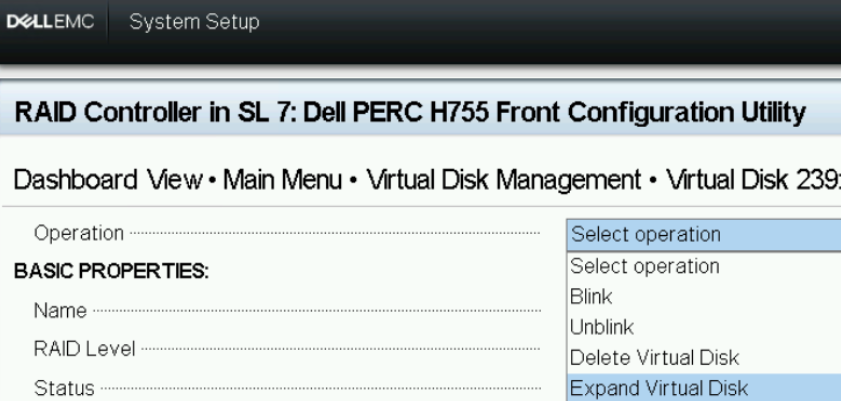
1: Utilità di configurazione HII - VD Operation
L'opzione 'Edit Disk Capacity' è disponibile nell'elenco a discesa iDRAC WebGUI-Storage>->"Virtual Disks" -> VD Actions.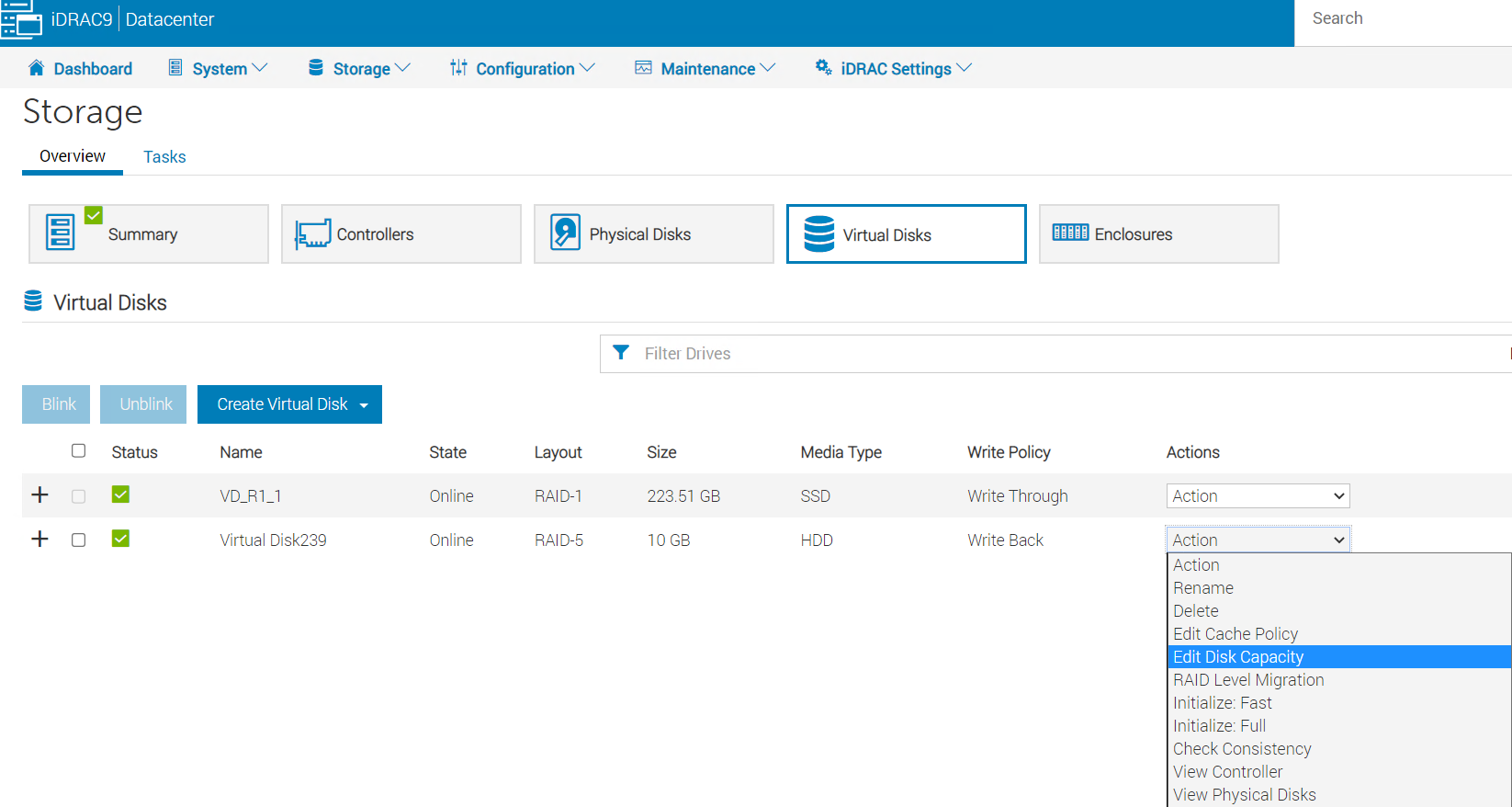
Figura 2: iDRAC WebGUI-Storage-Virtual>> Disk
Dopo aver selezionato "Edit Disk Capacity", "Available Space" mostra 0,00 GB.
Figura 3: pagina iDRAC WebGUI>-'Expand Virtual Disk Capacity'.
L'operazione non riesce quando si tenta di espandere la capacità del disco virtuale inserendo la dimensione massima disponibile nel campo "Capacity".
Figura 4: Messaggio
di errore della coda processi Se è disponibile spazio in un array esistente, utilizzare l'utilità PERCCLI per espandersi.PERCCLI /cx/vx show expansion" mostra lo spazio disponibile in NoArrExp.
Figura 5. PERCCLI prodotto NoArrExp
Tuttavia, se i dischi rigidi in un gruppo di dischi sono stati sostituiti con dischi più grandi, lo spazio disponibile viene visualizzato in WithArrExp nell'output di "PERCCLI /cx/vx show expansion."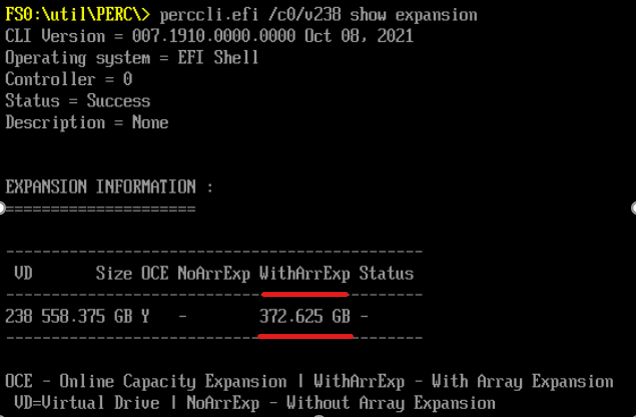
Figura 6: PERCCLI prodotto WithArrExp
Cause
L'utilità di configurazione PERC HII e iDRAC non supportano l'espansione della capacità dell'array.
Resolution
Espansione della capacità dell'array utilizzando Dell PERCCLI utilità:
-
1. Run "perccli /cx/vx show expansion" to determine the available expansion space.

2. Then run "perccli /cx/vx expand Size=<xx> expandarray" to perform the array expansion.

            The expand command will expand the virtual drive within the existing array if there is available space, or expand into additional capacity if the drives have been replaced with larger ones.
            The <xx> size value is specified in GB.
            If the "expandarray" option is specified, the full array capacity will be expanded.
            If this option is not specified, only the virtual drive capacity will be expanded rather than the full array.
Dopo aver sostituito tutti i membri dell'array con unità più grandi, utilizzare il comando PERCCLI per espandere il disco virtuale esistente a una dimensione maggiore utilizzando il comando "expandarray" parametro.
Questo comportamento è documentato anche nella Guida dell'utente di PERC11 nella sezione "Funzioni del controller RAID PowerEdge 11" -> "Riconfigurazione dei dischi virtuali":https://www.dell.com/support/home/en-us/product-support/product/perc-h755/docs
Affected Products
OEMR R240, OEMR R250, OEMR XE R250, OEMR R260, OEMR XE R260, OEMR R340, OEMR R350, OEMR XE R350, OEMR R360, OEMR XE R360, OEMR R440, PowerEdge XR2, OEMR R450, OEMR R540, OEMR R550, OEMR R640, OEMR XL R640, OEMR R6415, OEMR R650, OEMR R650xs
, OEMR R6515, OEMR R6525, OEMR R660, OEMR XL R660, OEMR R660xs, OEMR R6615, OEMR R6625, OEMR R740, OEMR XL R740, OEMR R740xd, OEMR XL R740xd, OEMR R740xd2, OEMR R7415, OEMR R7425, OEMR R750, OEMR R750xa, OEMR R750xs, OEMR R7515, OEMR R7525, OEMR R760, OEMR R760xa, OEMR R760XD2, OEMR XL R760, OEMR R760xs, OEMR R7615, OEMR R7625, OEMR R840, OEMR R860, OEMR R940, OEMR R940xa, OEMR R960, OEMR T140, OEMR T150, OEMR T340, OEMR T350, OEMR T360, OEMR T440, OEMR T550, OEMR T560, OEMR T640, OEMR XL T640, OEMR XL R240, OEMR XL R340, OEMR XL R660xs, OEMR XL R6615, OEMR XL R6625, OEMR XL R760xs, OEMR XL R7615, OEMR XL R7625, OEMR XR11, OEMR XR12, PowerEdge RAID Controller H745, PowerEdge RAID Controller H745P MX, PowerEdge RAID Controller H750 Adapter SAS, PowerEdge RAID Controller H755 Adapter, PowerEdge RAID Controller H755 MX Adapter, PowerEdge RAID Controller H755N Front NVMe, PowerEdge RAID Controller H755 Front SAS, Poweredge C4140, PowerEdge C6420, PowerEdge C6520, PowerEdge C6525, PowerEdge C6615, PowerEdge C6620, PowerEdge FC640, PowerEdge HS5610, PowerEdge HS5620, PowerEdge M640, PowerEdge M640 (for PE VRTX), PowerEdge MX740C, PowerEdge MX750c, PowerEdge MX760c, PowerEdge MX840C, PowerEdge R240, PowerEdge R250, PowerEdge R260, PowerEdge R340, PowerEdge R350, PowerEdge R360, PowerEdge R440, PowerEdge R450, PowerEdge R540, PowerEdge R550, PowerEdge R640, PowerEdge R6415, PowerEdge R650, PowerEdge R650xs, PowerEdge R6515, PowerEdge R6525, PowerEdge R660, PowerEdge R660xs, PowerEdge R6615, PowerEdge R6625, PowerEdge R740, PowerEdge R740XD, PowerEdge R740XD2, PowerEdge R7415, PowerEdge R7425, PowerEdge R750, PowerEdge R750XA, PowerEdge R750xs, PowerEdge R7515, PowerEdge R7525, PowerEdge R760, PowerEdge R760XA, PowerEdge R760xd2, PowerEdge R760xs, PowerEdge R7615, PowerEdge R7625, PowerEdge R840, PowerEdge R860, PowerEdge R940, PowerEdge R940xa, PowerEdge R960, PowerEdge RAID Controller H740P, PowerEdge T140, PowerEdge T150, PowerEdge T160, PowerEdge T340, PowerEdge T350, PowerEdge T360, PowerEdge T440, PowerEdge T550, PowerEdge T560, PowerEdge T640, PowerEdge XR11, PowerEdge XR12
...
Article Properties
Article Number: 000203958
Article Type: Solution
Last Modified: 09 Jan 2025
Version: 4
Find answers to your questions from other Dell users
Support Services
Check if your device is covered by Support Services.