Po instalaci aplikace Dell Pair se nezobrazí oznámení o párování Dell Swift Pair
Summary: Zjistěte podrobné pokyny, jak postupovat, když se v systému Windows nezobrazují oznámení o funkci Rychlé párování Bluetooth a je nainstalována aplikace Dell Pair.
This article applies to
This article does not apply to
This article is not tied to any specific product.
Not all product versions are identified in this article.
Symptoms
Nativní oznámení o rychlém párování Bluetooth v systému Windows 10 nebo Windows 11 se nemusí zobrazit, když se zařízení Bluetooth přiblíží do rozsahu detekce počítače.
Software Dell Pair podporuje následující funkce:
- Zjišťování zařízení Dell, jako je myš a klávesnice, pokud jsou v dosahu detekce pro spárování přes Bluetooth.
- Párování zařízení prostřednictvím technologie Bluetooth.
Dotčené platformy:
- Latitude 7320
- Latitude 7420
- Latitude 7520
- Latitude 7330
- Latitude 7430
- Latitude 7530
- Latitude 9330
- Latitude 9430
- Dell Pro 13 Premium
- Precision 5470
- Precision 5570
- Precision 5770
- Precision 7670
- Precision 7770
- XPS 13 9315
- XPS 13 Plus 9320
- XPS 15 9520
- XPS 17 9720
Dotčený software:
- Dell Pair
Dotčené operační systémy:
- Windows 11
- Windows 10 (verze sestavení 10.0.19041 a vyšší)
Cause
Software Dell Pair využívá funkci Swift Pair. Některé počítače se mohou zpožďovat při oznamování Swift Pair, když je nainstalován software Dell Pair.
Resolution
Zastavte službu párování Dell a poté vypněte a znovu zapněte možnost oznámení Swift Pair, aby se obnovilo chování Swift Pair.
- Stiskněte tlačítko Start systému Windows.
- Vyhledejte a otevřete Správce úloh.
- Vyhledejte službu Dell Pair, klikněte na ni pravým tlačítkem a vyberte možnost Ukončit úlohu.
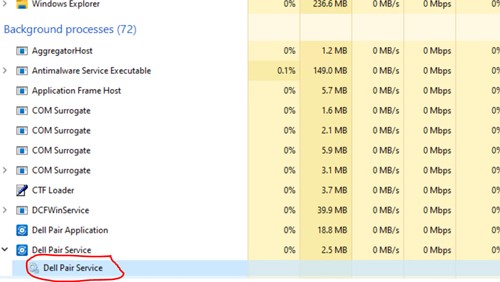
- Vypněte a znovu zapněte oznámení o funkci Swift Pair.
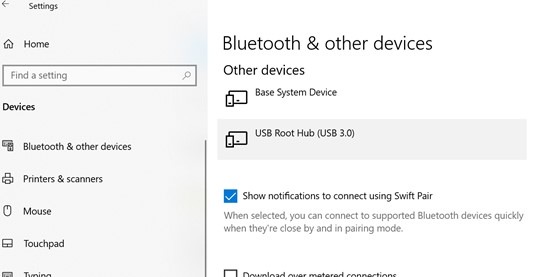
- Windows 11: Otevřete Nastavení systému Windows, přejděte na Bluetooth a zařízení, Zařízení, Přidat zařízení a poté Nastavení zařízení. Zrušte výběr možnosti Show notifications to connect using Swift Pair a poté ji znovu vyberte.
- Windows 10: Otevřete Nastavení systému Windows, přejděte na Zařízení a poté na Bluetooth a další zařízení. Zrušte výběr možnosti Show notifications to connect using Swift Pair a poté ji znovu vyberte.
Affected Products
Dell Pair, Dell Pro 13 Premium PA13250, Latitude 7320, Latitude 7330, Latitude 9330, Latitude 7420, Latitude 7430, Latitude 9430, Latitude 7520, Latitude 7530, Precision 5470, Precision 5570, Precision 7670, Precision 5770, Precision 7770
, XPS 13 9315, XPS 13 Plus 9320, XPS 15 9520, XPS 17 9720
...
Article Properties
Article Number: 000204141
Article Type: Solution
Last Modified: 24 Apr 2025
Version: 5
Find answers to your questions from other Dell users
Support Services
Check if your device is covered by Support Services.