PowerMax için Unisphere: Uzak Sistem Günlüğü Yapılandırması "java.net.SocketException" Hata Mesajıyla Başarısız Oluyor: Bağlantı sıfırlama"
Summary: Uzak syslog yapılandırması şu hatayı vererek başarısız oluyor: "java.net.SocketException: Bağlantı sıfırlandı."
This article applies to
This article does not apply to
This article is not tied to any specific product.
Not all product versions are identified in this article.
Symptoms
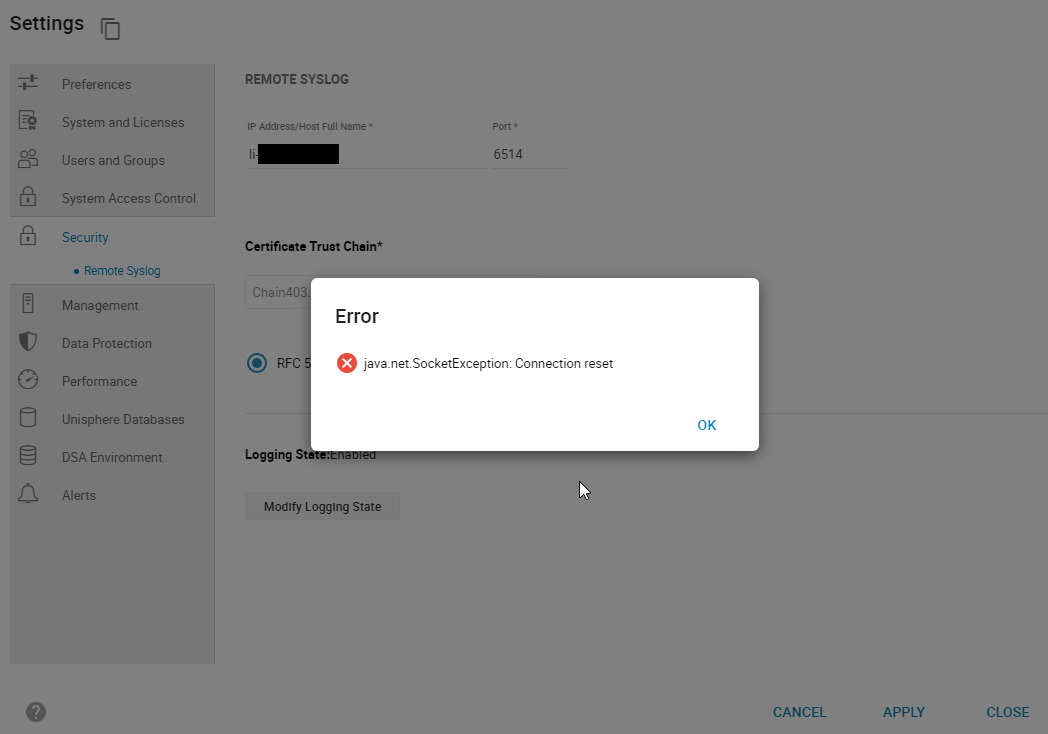
PowerMax için Unisphere'de Güvenlik Uzak > sistem günlüğünü ayarlamadan > Uzak Sistem Günlüğü'nü yapılandırmaya çalışırken şu hatayla başarısız olur:
smas.log yalnızca aşağıdaki girişlere sahiptir:
java.net.SocketException: Connection reset
Şekil 1: Error:
java.net.SocketException: Bağlantı sıfırlama
smas.log yalnızca aşağıdaki girişlere sahiptir:
2022-03-04 14:49:11,568 ERROR [em.bp.SECURITY] (default task-40) SecurityCommandProcessor.processConfigureRemoteSyslogCommand:java.net.SocketException: Connection reset
2022-03-04 14:51:39,978 ERROR [em.bp.SECURITY] (default task-14) SecurityCommandProcessor.processConfigureRemoteSyslogCommand:java.net.SocketException: Connection reset
2022-03-07 15:50:51,998 ERROR [em.bp.SECURITY] (default task-31) SecurityCommandProcessor.processConfigureRemoteSyslogCommand:java.net.SocketException: Connection reset
Cause
Bu hata bir ağ sorunundan kaynaklanmaktadır.
Resolution
Kullanıcının ağ ekibi, trafiğin 6514 numaralı bağlantı noktası için engellendiğini tespit etti. Ağ sorunu çözüldükten sonra Uzak sistem günlüğünü yapılandırabilirler.
Affected Products
Unisphere for PowerMaxArticle Properties
Article Number: 000204186
Article Type: Solution
Last Modified: 11 Jul 2024
Version: 3
Find answers to your questions from other Dell users
Support Services
Check if your device is covered by Support Services.