Windows Server本地使用命令行获取TSR日志(RACADM/ISM/IPMITOOL)
Summary: 分别介绍了安装iDRAC Tools使用racadm/ipmitool获取日志,和安装iDRAC Service Module使用Invoke-SupportAssistCollection获取日志的方法。
This article applies to
This article does not apply to
This article is not tied to any specific product.
Not all product versions are identified in this article.
Instructions
目录:
- 适用场景
- 安装iDRAC Tools使用racadm命令获取TSR日志
- 安装iDRAC Service Module使用Invoke-SupportAssistCollection.exe获取TSR日志 (仅适用于iDRAC9)
- 使用IPMITool命令获取TSR日志 (仅适用于iDRAC9)
适用场景
Windows Server本地使用命令行获取TSR日志的方法,适用于以下场景:iDRAC Web无法访问或无法正常工作;
iDRAC未配置,未连接iDRAC电缆;
iDRAC已连接并配置,但客户不知道用户名密码;
NOTE:
- 文中涉及的iDRAC Tools 或 iDRAC Service Module均需要使用管理员权限在系统中安装,安装过程中请务必认真阅读软件安装说明;
- racadm保存TSR日志到本地时候,iDRAC会短暂的给操作系统插入一个USB存储介质Avocent Mass Storage Function用于传输TSR日志文件;
- 安装ISM会默认启用USB NIC的OS to iDRAC Pass-through功能,在系统中会多出一个Remote NDIS Compatible Device网卡设备用于和iDRAC进行通讯;
- 一般情况下安装iDRAC Tools或iDRAC Service Module对业务环境不会照成影响,如无法评估相关风险或不想对OS产生任何改动,请优先考虑使用iDRAC获取TSR日志。
安装iDRAC Tools使用racadm命令获取TSR日志
双击运行iDRAC Tools安装程序并完成安装。
-
racadm techsupreport collect(支持iDRAC7,8,9 推荐使用)
racadm techsupreport collect -t sysinfo,ttylog

查看该作业队列进度,并等待至100%。
racadm jobqueue view -i JID_656225274681
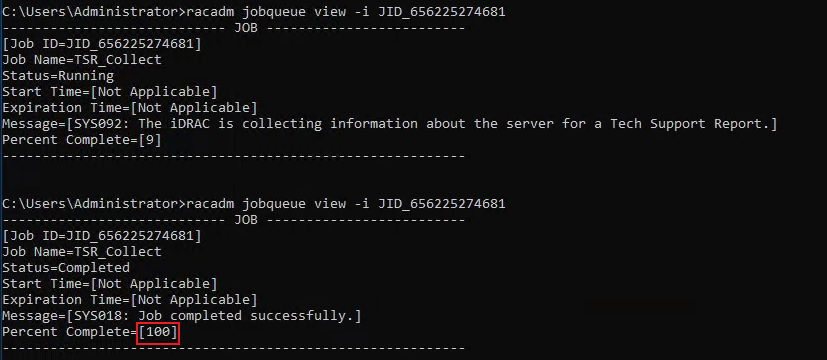
导出TSR日志到服务器本地C盘根目录,并命名为TSR.zip。
racadm techsupreport export -f c:\TSR.zip

NOTE: 文件保存的过程中IDRAC会短暂的给操作系统插入一个USB存储介质Avocent Mass Storage Function用于传输TSR日志文件
(更多关于racadm techsupreport参数请参考racadm用户手册)。
- racadm supportassist collect(仅适用于IDRAC9)
接受EULA
racadm supportassist accepteula

racadm supportassist collect -t sysinfo,ttylog,debug

查看该作业队列进度,并等待至100%。
racadm jobqueue view -i JID_656371010394
导出TSR日志,命令为tsrlog.zip并保存在C盘根目录。
racadm supportassist exportlastcollection -f c:\tsrlog.zip

安装iDRAC Service Module使用Invoke-SupportAssistCollection.exe获取TSR日志 (仅适用于iDRAC9)
双击iDRAC Service Module安装程序,依照安装向导完成安装。(全部默认选项安装即可,安装完ISM会默认启用USB NIC的OS to iDRAC Pass-through功能)打开CMD命令行窗口,输入 cd C:\Program Files\Dell\SysMgt\iSM\shared\bin 切换目录。
执行Invoke-SupportAssistCollection.exe程序。
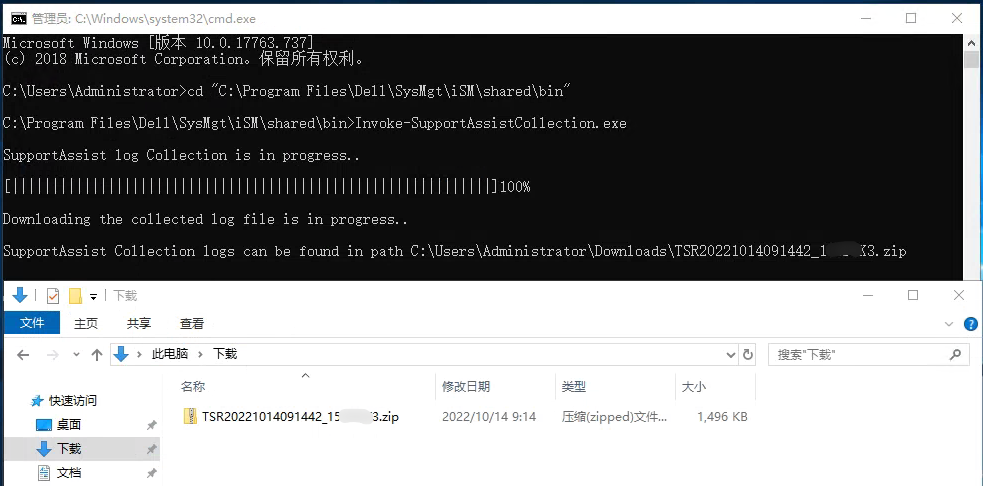
此方法收集的TSR日志不包含TTY日志,更多关于Invoke-SupportAssistCollection请参考ISM用户手册 第43页。
使用IPMITool命令获取TSR日志 (仅适用于iDRAC9)
双击运行iDRAC Tools安装程序并完成安装,即可使用IPMITool。
使用此方法,iDRAC会把TSR日志放在一个只读的虚拟可移动USB介质并插入给操作系统,需要手动将TSR日志文件复制出来保存。
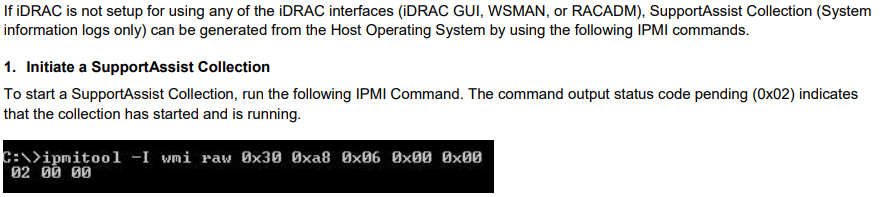

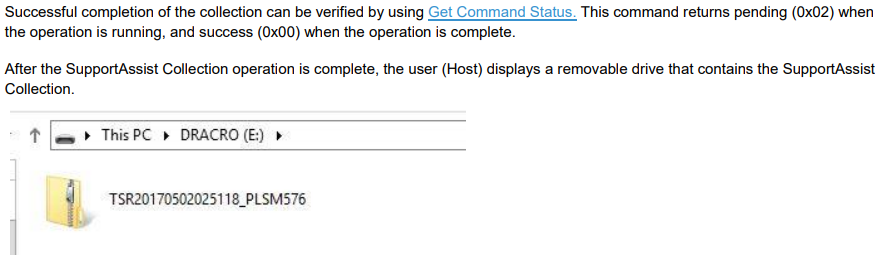
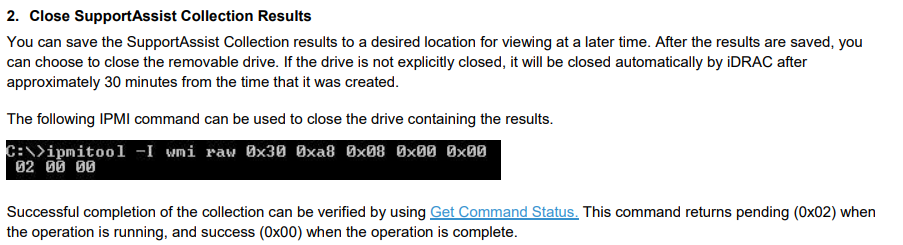

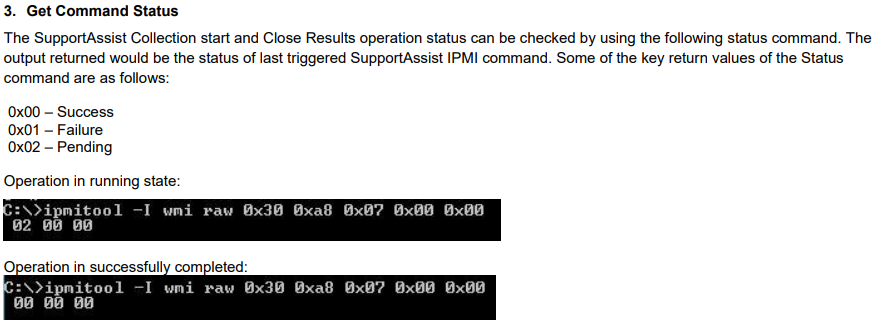

使用此方法,iDRAC会把TSR日志放在一个只读的虚拟可移动USB介质并插入给操作系统,需要手动将TSR日志文件复制出来保存。
Affected Products
PowerEdge, Enterprise Systems ManagementArticle Properties
Article Number: 000204214
Article Type: How To
Last Modified: 13 Dec 2022
Version: 4
Find answers to your questions from other Dell users
Support Services
Check if your device is covered by Support Services.