NetWorker : Configuration de NetWorker pour l’utilisation de SNMP
Summary: Configuration du NetWorker Server pour utiliser le trap SNMP
This article applies to
This article does not apply to
This article is not tied to any specific product.
Not all product versions are identified in this article.
Instructions
1. Assurez-vous que les packages suivants sont installés sur le serveur récepteur des traps SNMP.
3. Sur l’hôte récepteur SNMP, ajoutez une ligne ci-dessous avec les informations ci-dessus dans /etc/snmp/snmptrapd.conf
- net-snmp-agent-libs
- net-snmp-libs
- net-snmp
/opt/nsr/snmp/NETWORKER-MIB.txt
root@networker-mc:~# cat /etc/snmp/snmptrapd.conf
# Example configuration file for snmptrapd
#
# No traps are handled by default, you must edit this file!
#
authCommunity   log,execute,net public
Pour SNMPv3, consultez : Configuration
de NetWorker SNMPV35. Démarrez snmptrapd sur l’hôte récepteur SNMP :
# snmptrapd -f -C -c /etc/snmp/snmptrapd.conf -Lf /var/log/snmptrap.log -M /usr/share/snmp/mibs -m NETWORKER-MIB &
6. Configurer la tâche NetWorker pour envoyer une note d’interruption
SNMP ;
- La configuration de la sauvegarde au niveau d’action prend uniquement en charge SNMPv2
- La configuration de sauvegarde au niveau de la politique prend en charge SNMPv2 et v3
Pour SNMP v2 : /usr/sbin/nsrtrap <snmp receiver IP> -c community-string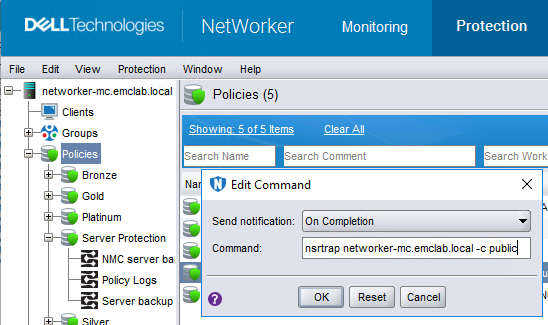
7. vous pouvez également configurer « SNMP Notification request » à partir de l’onglet Server de NMC. Veuillez consulter le manuel ci-joint.
8. Vous pouvez suivre le journal /var/log/snmptrap.log pour voir si SNMP est envoyé pour les tâches.
root@networker-mc:~# tail -n 71 /var/log/snmptrap.log
2024-03-05 13:02:58 networker-mc.emclab.local [UDP: [192.168.25.10]:58200->[192.168.25.10]:162]:
SNMPv2-SMI::mib-2.1.3.0 = Timeticks: (301267624) 34 days, 20:51:16.24   SNMPv2-SMI::snmpModules.1.1.4.1.0 = OID: NETWORKER-MIB::nwServerNotification    SNMPv2-SMI::mib-2.1.1.0 = STRING: "--- Server Backup Action Report ---
Policy name:Server Protection
Workflow name:Server backup
Action name:Server db backup
Action status:succeeded
Action start time:03/05/24 13:02:33
Action duration:0 hours 0 minutes 25 seconds
--- Successful Server Backup Save Sets ---
        3353828926/1709661758 networker-mc.emclab.local: index:networker-mc.emclab.local level=1, 53 MB, 62 files
        ...(removed for brevity)...
        3152502350/1709661774 networker-mc.emclab.local: bootstrap level=full, 9668 KB, 294 files
--- Bootstrap backup report ---
      date     time       ssid        volume            device                      access info
  02/05/2024 10:00:24 AM  3485530120  ddveBootstrap.002 ddve.emclab.local_Bootstrap ddve.emclab.local:/networker-mc/Bootstrap
...(removed for brevity)...
  03/05/2024 01:02:54 PM  3152502350  ddveBootstrap.002 ddve.emclab.local_Bootstrap ddve.emclab.local:/networker-mc/Bootstrap
--- Failed Server Backup Save Sets ---
        none"
2024-03-05 13:02:59 networker-mc.emclab.local [UDP: [192.168.25.10]:45415->[192.168.25.10]:162]:
SNMPv2-SMI::mib-2.1.3.0 = Timeticks: (301267768) 34 days, 20:51:17.68   SNMPv2-SMI::snmpModules.1.1.4.1.0 = OID: NETWORKER-MIB::nwServerNotification    SNMPv2-SMI::mib-2.1.1.0 = STRING: "---Summary notification report---
Policy name:Server Protection
        Workflow name:Server backup, Workflow status:succeeded, Workflow start time:03/05/24 13:02:32, Duration:0 hours 0 minutes 27 seconds
                Action name:Server db backup, Action status:succeeded, Action start time:03/05/24 13:02:33, Duration:0 hours 0 minutes 25 seconds
                Action name:Expiration, Action status:succeeded, Action start time:03/05/24 13:02:58, Duration:0 hours 0 minutes 1 seconds"
root@networker-mc:~#
Additional Information
Vous trouverez des informations supplémentaires sur les traps SNMP dans le NetWorker Administration Guide : https://www.dell.com/support/home/product-support/product/networker/docs
Affected Products
NetWorker FamilyArticle Properties
Article Number: 000204267
Article Type: How To
Last Modified: 05 Mar 2024
Version: 2
Find answers to your questions from other Dell users
Support Services
Check if your device is covered by Support Services.