Dell Unity: NAS 서버에서 도메인 컨트롤러 서버에 연결할 수 없다고 보고됨(사용자가 수정 가능)
Summary: 하나 이상의 도메인 컨트롤러가 RODC(Read-Only Domain Controller)인 경우 고객이 NAS 서버에서 도메인 컨트롤러에 연결할 수 없다는 알림을 받습니다.
This article applies to
This article does not apply to
This article is not tied to any specific product.
Not all product versions are identified in this article.
Symptoms
NAS 서버는 도메인 컨트롤러에 연결할 수 없다는 간헐적인 경고를 보고했습니다.
svc_cifssupport -pingdc 명령은 DC NETLOGON 장애 및 DOWNGRADE_DETECTED
svc_cifssupport -pingdc 명령은 DC NETLOGON 장애 및 DOWNGRADE_DETECTED
spa:/service/user# svc_cifssupport cifs_test -pingdc -compname cifs_test -dc WIN2016 -verbose
cifs_test : done

PINGDC GENERAL INFORMATION

DC SERVER:
Netbios name  : WIN2016

CIFS SERVER:
Compname      : cifs_test
Domain        : peeps.lab

Error 13160939576: cifs_test :  PingDC failure: The compname 'cifs_test' could not successfully contact the DC 'WIN2016' because of NT errors (SUCCESS) at step Request Domain Sid. Details of the issue: origin=9000, '' DC='DC NETLOGON pipe failure'/'DOWNGRADE_DETECTED' This issue may prevent user authentication to this domain. Error 13160939579: cifs_test :  PingDC failure: The compname 'cifs_test' could not successfully contact the DC 'WIN2016'. Failed to access the pipe NETLOGON at step Open NETLOGON Secure Channel:  Action failed with status=DOWNGRADE_DETECTED
Cause
NAS 서버가 연결되지 않는 도메인 컨트롤러는 RODC(Read-Only Domain Controller)입니다.
RODC는 "암호 복제 정책"에 따라 사용자 및 컴퓨터 암호만 저장합니다. 거부 그룹이 아닌 허용 그룹에 있는 계정의 암호만 RODC에 복제할 수 있습니다.
NAS 서버가 도메인에 연결되면 컴퓨터 계정과 암호가 Wirteable Domain 컨트롤러에 저장되며 기본적으로 RODC에 복제되지 않습니다.
따라서 NAS 서버가 RODC에 보안 채널을 설정하려고 하면 RODC에 NAS 서버의 컴퓨터 암호가 없으므로 "STATUS_NO_TRUST_SAM_ACCOUNT" 및 "DOWNGRADE_DETECTED"가 반환됩니다.
RODC는 "암호 복제 정책"에 따라 사용자 및 컴퓨터 암호만 저장합니다. 거부 그룹이 아닌 허용 그룹에 있는 계정의 암호만 RODC에 복제할 수 있습니다.
NAS 서버가 도메인에 연결되면 컴퓨터 계정과 암호가 Wirteable Domain 컨트롤러에 저장되며 기본적으로 RODC에 복제되지 않습니다.
따라서 NAS 서버가 RODC에 보안 채널을 설정하려고 하면 RODC에 NAS 서버의 컴퓨터 암호가 없으므로 "STATUS_NO_TRUST_SAM_ACCOUNT" 및 "DOWNGRADE_DETECTED"가 반환됩니다.
Resolution
이 문제를 해결하려면 고객이 NAS 서버의 계정 암호를 RODC에 복제할 수 있도록 RODC의 암호 복제 정책에 NAS 서버의 컴퓨터 계정을 추가해야 합니다.
1. 쓰기 가능한 도메인 컨트롤러에 로그인합니다.
2. "active directory Usrs and Computers"3을
엽니다. "도메인 컨트롤러" OU
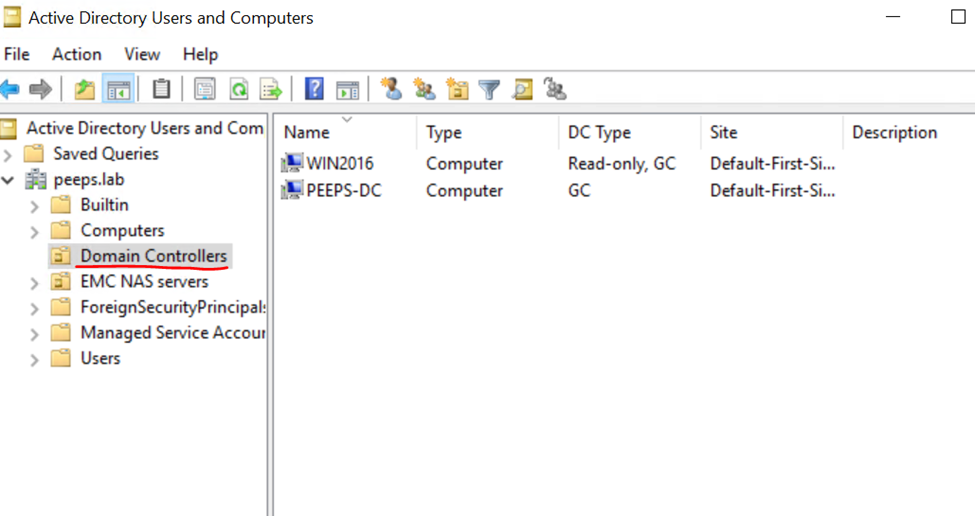
4로 이동합니다. "Passowrd 복제 정책"을 구성하는 데 필요한 RODC를 선택하고 속성을 클릭합니다.
5. "Password replication Policy" 탭으로 이동하여 NAS 서버의 컴퓨터 계정을 ALLOW 그룹에 추가합니다.
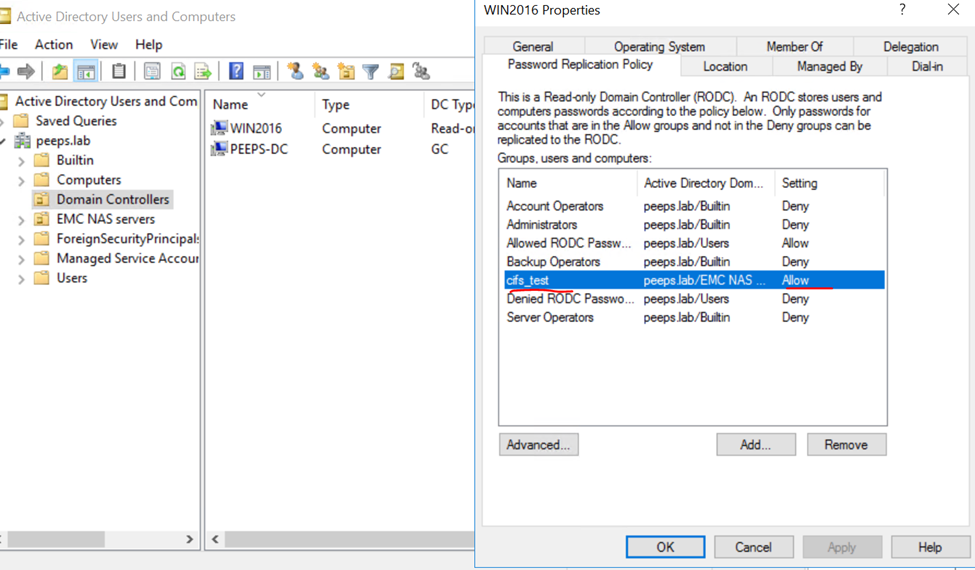
이제 pingdc 명령을 다시 실행합니다. 이번에는 pingdc가 오류 없이 완료됩니다.
1. 쓰기 가능한 도메인 컨트롤러에 로그인합니다.
2. "active directory Usrs and Computers"3을
엽니다. "도메인 컨트롤러" OU
4로 이동합니다. "Passowrd 복제 정책"을 구성하는 데 필요한 RODC를 선택하고 속성을 클릭합니다.
5. "Password replication Policy" 탭으로 이동하여 NAS 서버의 컴퓨터 계정을 ALLOW 그룹에 추가합니다.
이제 pingdc 명령을 다시 실행합니다. 이번에는 pingdc가 오류 없이 완료됩니다.
spa:/service/user# svc_cifssupport cifs_test -pingdc -compname cifs_test -dc WIN2016 -verbose
cifs_test : done

PINGDC GENERAL INFORMATION

DC SERVER:
Netbios name  : WIN2016

CIFS SERVER:
Compname      : cifs_test
Domain        : peeps.lab
Additional Information
참조:
https://www.rebeladmin.com/2014/10/password-replication-in-rodc/
https://www.rebeladmin.com/2014/10/password-replication-in-rodc/
Affected Products
Dell EMC UnityArticle Properties
Article Number: 000204287
Article Type: Solution
Last Modified: 15 May 2026
Version: 4
Find answers to your questions from other Dell users
Support Services
Check if your device is covered by Support Services.