Dell Unity:NAS 伺服器回報網域控制器伺服器無法連線 (可由使用者更正)
Summary: 當已設定一或多個網網域控制站為 RAIDC (唯讀網網域控制站) 時,客戶會收到 NAS 伺服器上的警示,報告網網域控制站無法連線
This article applies to
This article does not apply to
This article is not tied to any specific product.
Not all product versions are identified in this article.
Symptoms
NAS 伺服器回報間歇性警告,指出網網域控制站無法連線。
svc_cifssupport -pingdc 命令顯示 DC NETLOGON 故障和DOWNGRADE_DETECTED
svc_cifssupport -pingdc 命令顯示 DC NETLOGON 故障和DOWNGRADE_DETECTED
spa:/service/user# svc_cifssupport cifs_test -pingdc -compname cifs_test -dc WIN2016 -verbose
cifs_test : done

PINGDC GENERAL INFORMATION

DC SERVER:
Netbios name  : WIN2016

CIFS SERVER:
Compname      : cifs_test
Domain        : peeps.lab

Error 13160939576: cifs_test :  PingDC failure: The compname 'cifs_test' could not successfully contact the DC 'WIN2016' because of NT errors (SUCCESS) at step Request Domain Sid. Details of the issue: origin=9000, '' DC='DC NETLOGON pipe failure'/'DOWNGRADE_DETECTED' This issue may prevent user authentication to this domain. Error 13160939579: cifs_test :  PingDC failure: The compname 'cifs_test' could not successfully contact the DC 'WIN2016'. Failed to access the pipe NETLOGON at step Open NETLOGON Secure Channel:  Action failed with status=DOWNGRADE_DETECTED
Cause
NAS 伺服器無法連線的網網域控制站為 RAIDC (唯讀網網域控制站)。
RODC 僅根據其「密碼複製原則」來儲存使用者和電腦密碼。只有在 Allow 群組中且不屬於 Deny 群組中的帳戶的密碼才能複製到 RODC。
NAS 伺服器加入網域後,其電腦帳戶和密碼會儲存在可操作網網域控制站中,預設不會複本到 RAIDC。
因此,當 NAS 伺服器嘗試建立對 RODC 的安全通道時,RODC 沒有 NAS 伺服器的電腦密碼,因此會傳回「STATUS_NO_TRUST_SAM_ACCOUNT」和「DOWNGRADE_DETECTED」
RODC 僅根據其「密碼複製原則」來儲存使用者和電腦密碼。只有在 Allow 群組中且不屬於 Deny 群組中的帳戶的密碼才能複製到 RODC。
NAS 伺服器加入網域後,其電腦帳戶和密碼會儲存在可操作網網域控制站中,預設不會複本到 RAIDC。
因此,當 NAS 伺服器嘗試建立對 RODC 的安全通道時,RODC 沒有 NAS 伺服器的電腦密碼,因此會傳回「STATUS_NO_TRUST_SAM_ACCOUNT」和「DOWNGRADE_DETECTED」
Resolution
若要解決此問題,客戶需要將 NAS 伺服器的電腦帳戶新增至 RODC 的密碼複寫原則,以便將 NAS 伺服器的帳戶密碼複寫到 RODC。
1.登入可寫入網網域控制站。
2.開啟「Active Directory Usrs and Computers」
3.移至「網網域控制站」OU
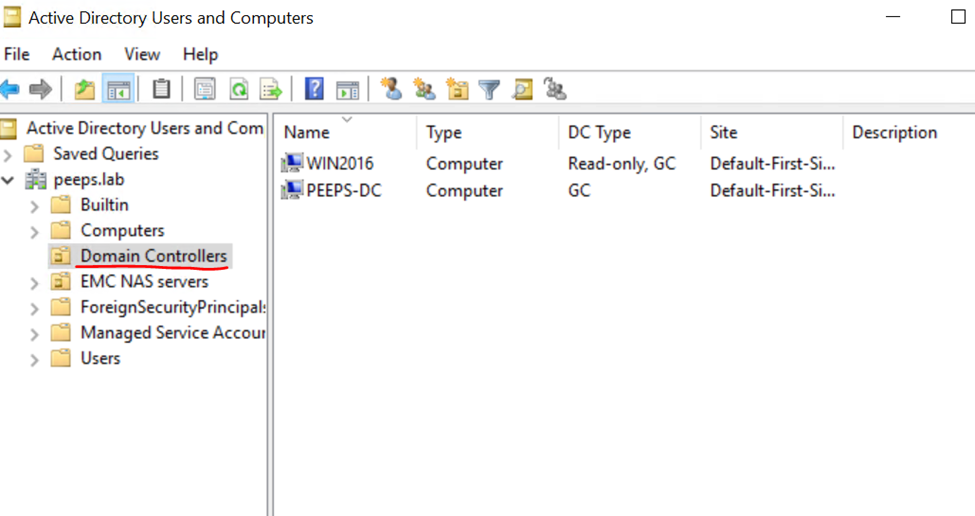
4。選取您需要設定「Passowrd 複製原則」的 RAIDC,然後按一下屬性。
5.前往「密碼複製原則」標籤,然後將 NAS 伺服器的電腦帳戶新增至 ALLOW 群組。
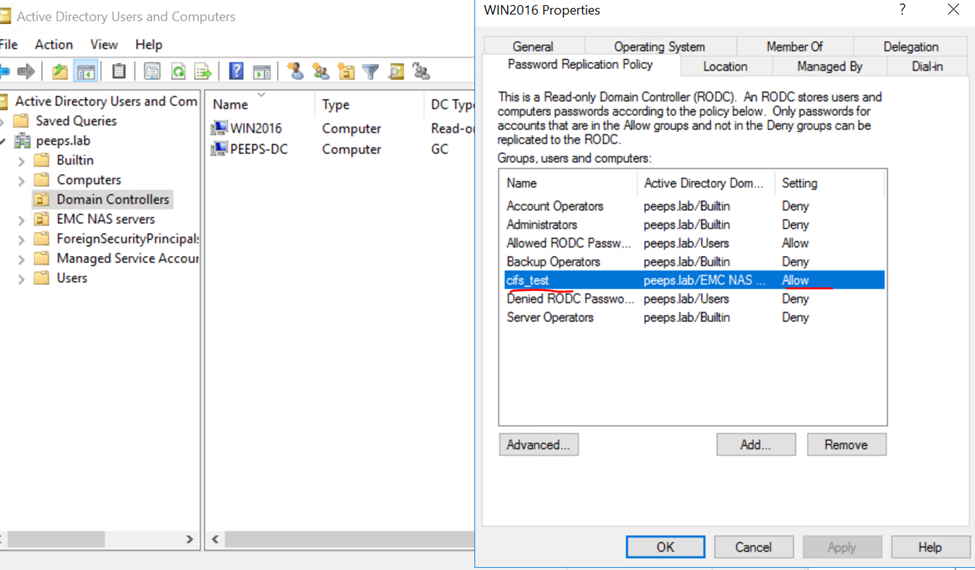
現在再次執行 pingdc 命令,此時 pingdc 將完成且不會發生錯誤。
1.登入可寫入網網域控制站。
2.開啟「Active Directory Usrs and Computers」
3.移至「網網域控制站」OU
4。選取您需要設定「Passowrd 複製原則」的 RAIDC,然後按一下屬性。
5.前往「密碼複製原則」標籤,然後將 NAS 伺服器的電腦帳戶新增至 ALLOW 群組。
現在再次執行 pingdc 命令,此時 pingdc 將完成且不會發生錯誤。
spa:/service/user# svc_cifssupport cifs_test -pingdc -compname cifs_test -dc WIN2016 -verbose
cifs_test : done

PINGDC GENERAL INFORMATION

DC SERVER:
Netbios name  : WIN2016

CIFS SERVER:
Compname      : cifs_test
Domain        : peeps.lab
Additional Information
參考資料:
HTTPs://www.rebeladmin.com/2014/10/password-replication-in-rodc/
HTTPs://www.rebeladmin.com/2014/10/password-replication-in-rodc/
Affected Products
Dell EMC UnityArticle Properties
Article Number: 000204287
Article Type: Solution
Last Modified: 15 May 2026
Version: 4
Find answers to your questions from other Dell users
Support Services
Check if your device is covered by Support Services.