Isilon: How to delete a directory created in Isilon Web User Interface
Summary: The Isilon Web User Interface (WebUI) allows for the creation of directories, however, it does not allow deletion. This is by design. It must be deleted from the shell or from the hosts mounting its parent directory. These are some considerations to take before deleting directories. ...
This article applies to
This article does not apply to
This article is not tied to any specific product.
Not all product versions are identified in this article.
Instructions
Question
How to delete a directory created in the WebUI.
Answer:
You can only delete directories created in the WebUI with the shell or from hosts' mounted to the parent directory. The File System Explorer in the WebUI itself does not provide a mechanism for the deletion of directories.
Considerations:
- Features such as SyncIQ and Quota for the directory must be removed in advance.
- Permissions on the directory must be met.
Delete directory from mounted hosts:
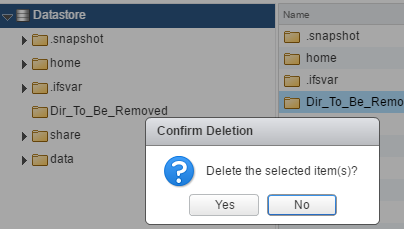
Or:
# rm -r /vmfs/volumes/Datastore/Dir_To_Be_Removed
In this case it looks to have succeeded but does not disappear at shell or WebUI check the permissions.
In this example, root/wheel, a default permission when creating a directory at Isilon, is not mapped with root/root of ESXi.
ESXi shell:
# ls -ld /vmfs/volumes/Datastore/Dir_To_Be_Removed/
drwxrwxr-x    1 root     root             0 Apr  3 01:51 /vmfs/volumes/Datastore/Dir_To_Be_Removed/
Isilon shell:
# ls -ld /ifs/Dir_To_Be_Removed
drwxrwxr-x +  2 root  wheel  0 Apr  3 10:51 /ifs/Dir_To_Be_Removed
If mapping a uid/gid across client/server shares, the share must be exported with the User/Group account through name service such as NIS, AD, and so forth.
To delete the directory at Isilon shell:
# rm -r /vmfs/volumes/Datastore/Dir_To_Be_Removed
Use the TreeDelete job to delete directories from an Isilon Cluster:
TreeDelete is a job option that allows an administrator to delete single or multiple directories from a cluster.
See KB 000018980 - Isilon: How to use the TreeDelete job to delete a directory
Errors deleting a directory:
If a feature such as SyncIQ or Quotas is enabled for that directory, you receive the following error:
rm: /ifs/Dir_To_Be_Removed: Operation not permitted
In such a case, the Quota or SyncIQ policy for the directory must be removed.
Affected Products
IsilonArticle Properties
Article Number: 000204930
Article Type: How To
Last Modified: 27 Apr 2026
Version: 3
Find answers to your questions from other Dell users
Support Services
Check if your device is covered by Support Services.