How to collect logs from Cisco IMC Supervisor
Summary: This KB shows how to collect the support logs from Cisco IMC(CIMC) Supervisor.
This article applies to
This article does not apply to
This article is not tied to any specific product.
Not all product versions are identified in this article.
Instructions
Question
Facts
Answer
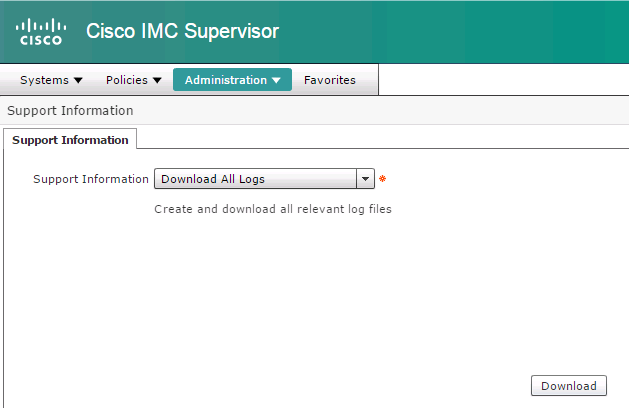
4. Click Download which will save all logs to your download folder.
How to collect the support logs from Cisco IMC(CIMC) Supervisor?
Facts
Any versions of Cisco IMC Supervisor.
Answer
1. Web browse to CIMC Supervisor.
2. Go to Administration --> Support Information.
3. Select Download All Logs in the drop-down menu as shown below.
4. Click Download which will save all logs to your download folder.
Additional Information
| VCE System | All |
| Component | UCS |
Article Properties
Article Number: 000204940
Article Type: How To
Last Modified: 17 Nov 2022
Version: 2
Find answers to your questions from other Dell users
Support Services
Check if your device is covered by Support Services.