PowerEdge: iDRAC9 SCP Export Timeout or missing Config Components
Summary: When exporting a System Config Profile from a Dell EMC-Integrated Dell Remote Access Controller 9 (iDRAC9), the operation may timeout or complete with missing configuration components for 'iDRAC,LifecycleController,System,EventFilters'. ...
This article applies to
This article does not apply to
This article is not tied to any specific product.
Not all product versions are identified in this article.
Symptoms
Issuing an SCP Export directly or from a management console may timeout or complete with missing configuration components for 'iDRAC,LifecycleController,System,EventFilters'. For example, this may occur while 'creating a template from a reference device' within OpenManage Enterprise.
When the issue occurs, the first attempt to export fails to complete due to a timeout. Subsequent exports are complete without user-facing errors but exclude some components.
Examples
First Occurrence
IDRAC SCP Export:

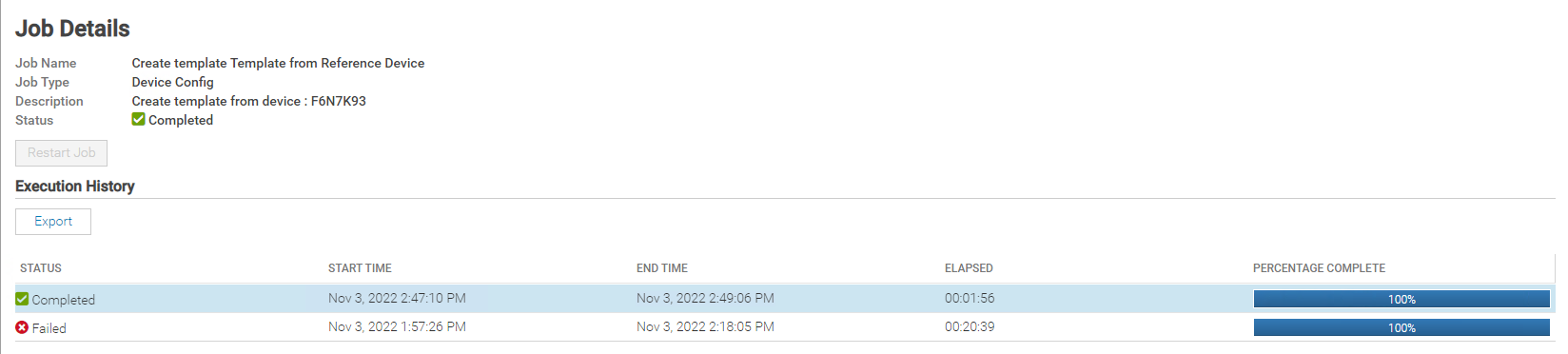
OPENMANAGE ENTERPRISE (OME) and OPENMANAGE ENTERPRISE MODULAR (OME-M) Template from Reference Device:

Subsequent Occurrence
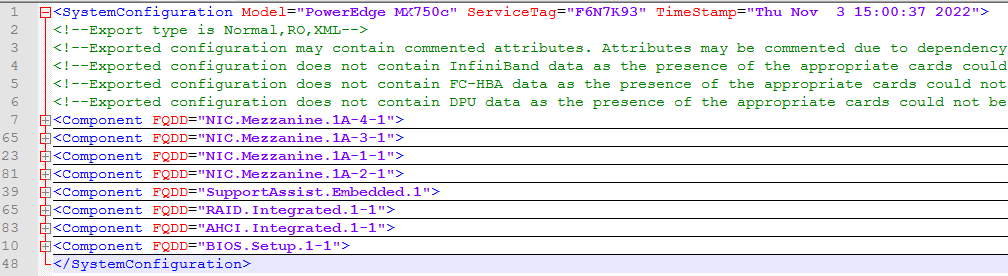
Exporting an SCP after encountering the timeout completes without user-facing errors but is missing components for 'iDRAC,LifecycleController,System,EventFilters.
LifeCycleLog shows export completed successfully.

OME Job shows completed successfully.
 The resulting XML from the SCP or Template is missing iDRAC/System/LifecycleController/Eventfilter Component tags.
Cause
This issue happens when a string attribute has a value containing '--' which is not properly escaped. This leads to a runaway thread that never marks SM_EXPORT_STATUS_COMPLETE for [iDRAC].
Resolution
To recover from this condition reboot iDRAC and modify the attribute to not contain '--'.
Example: iDRAC.Embedded.1:NIC.1 DNSRacName dc647esx-10--DC1-idrac
$ racadm racreset
$ racadm set <attribute> <value>
$ racadm set idrac.nic.dnsracname dc647esx-10-dc1-idrac
Engineering corrects this behavior to properly handle string attributes which contain '--' in iDRAC9 firmware 6.10.30.00
Affected Products
iDRAC9, PowerEdge XR2, PowerEdge R240, PowerEdge R250, PowerEdge R260, PowerEdge R340, PowerEdge R350, PowerEdge R360, PowerEdge R440, PowerEdge R450, PowerEdge R470, PowerEdge R540, PowerEdge R550, PowerEdge R640, PowerEdge R6415, PowerEdge R650
, PowerEdge R650xs, PowerEdge R6515, PowerEdge R6525, PowerEdge R660, PowerEdge R660xs, PowerEdge R6615, PowerEdge R6625, PowerEdge R670, PowerEdge R740, PowerEdge R740XD, PowerEdge R740XD2, PowerEdge R7415, PowerEdge R7425, PowerEdge R750, PowerEdge R750XA, PowerEdge R750xs, PowerEdge R7515, PowerEdge R7525, PowerEdge R760, PowerEdge R760XA, PowerEdge R760xd2, PowerEdge R760xs, PowerEdge R7615, PowerEdge R7625, PowerEdge R770, PowerEdge R7715, PowerEdge R7725, PowerEdge R840, PowerEdge R860, PowerEdge R940, PowerEdge R940xa, PowerEdge R960, PowerEdge T140, PowerEdge T150, PowerEdge T160, PowerEdge T340, PowerEdge T350, PowerEdge T360, PowerEdge T40, PowerEdge T440, PowerEdge T550, PowerEdge T560, PowerEdge T640, PowerEdge XR11, PowerEdge XR12, PowerEdge XR4000r, PowerEdge XR4000w, PowerEdge XR4000z, PowerEdge XR4510c, PowerEdge XR4520c, PowerEdge XR5610, PowerEdge XR7620, PowerEdge XR8000r, PowerEdge XR8610t, PowerEdge XR8620t
...
Article Properties
Article Number: 000205145
Article Type: Solution
Last Modified: 15 May 2026
Version: 4
Find answers to your questions from other Dell users
Support Services
Check if your device is covered by Support Services.