NetWorker: nsrclone between two SU on the same DDR device that is connected using two different boost users
Summary: This article describes the NetWorker clone functionality limitation between two devices on the same DDR regarding Data Domain Fast Copy.
This article applies to
This article does not apply to
This article is not tied to any specific product.
Not all product versions are identified in this article.
Symptoms
In the NetWorker configuration, it is possible to add two different DDBoost devices using different users who are created on the DDR as you can see on the following listing:
During the clone action in the /nsr/logs/daemon.raw (or C:\Program Files\EMC NetWorker\nsr\logs for Windows installation) log got the following information:
sysadmin@ddve03# user show list

User list from node "localhost".
Name          Uid    Role       Last Login From   Last Login Time            Status    Disable Date
-----------   ----   --------   ---------------   ------------------------   -------   ------------
sysadmin      100    admin      10.1.199.1        Thu Nov 10 10:59:44 2022   enabled   never
secadmin      1000   security   <unknown>         never                      enabled   never
boostuser01   601    none       <unknown>         never                      enabled   never
boostuser02   602    none       <unknown>         never                      enabled   never
-----------   ----   --------   ---------------   ------------------------   -------   ------------

sysadmin@ddve03# ddboost user show
DD Boost user   Using Token Access
-------------   ------------------
boostuser01     -
boostuser02     -
-------------   ------------------

sysadmin@ddve03# mtree list
Name                   Pre-Comp (GiB)   Status
--------------------   --------------   -----------
/data/col1/backup                 0.0   RW
/data/col1/SU01                   0.0   RW
/data/col1/SU02                   0.0   RW
--------------------   --------------   -----------

sysadmin@ddve03# ddboost storage-unit show
Name        Pre-Comp (GiB)   Status   User          Report Physical
                                                       Size (MiB)
---------   --------------   ------   -----------   ---------------
SU01                   0.0   RW       boostuser01                 -
SU02                   0.0   RW       boostuser02                 -
---------   --------------   ------   -----------   ---------------
During the clone action in the /nsr/logs/daemon.raw (or C:\Program Files\EMC NetWorker\nsr\logs for Windows installation) log got the following information:
123316 11/10/22 11:15:13  nsrworkflow NSR notice Starting action 'Fs/Filesystem/clone' with command: 'nsrclone -a "*policy name=Fs" -a "*policy workflow name=Filesystem" -a "*policy action name=clone" -s networker -b ClonePool -J networker -o -F -S'.
123321 11/10/22 11:15:13  nsrworkflow NSR notice Action 'Fs/Filesystem/clone's log is in '/nsr/logs/policy/Fs/Filesystem/clone_384243.raw'.
38758 11/10/22 11:15:13  nsrd NSR info policy notice: action backup succeeded
71193 11/10/22 11:15:13  nsrd NSR info Protection Policy Notice: Starting action 'clone' for workflow 'Fs/Filesystem'
70920 11/10/22 11:15:19  nsrd NSR info Enhanced cloning:root browsing
70896 11/10/22 11:15:22  nsrd NSR info networker:cloning session saving to pool 'ClonePool' (ClonePool.001)
71193 11/10/22 11:15:22  nsrd NSR info Media Info: clone save set /tmp (ssid=3379351339) for client networker.lab.local was aborted and removed from volume ClonePool.001
70913 11/10/22 11:15:22  nsrd NSR info cloning session:/tmp (11/10/22) done reading
71659 11/10/22 11:15:22  nsrd NSR info networker:cloning session done saving to pool 'ClonePool' (ClonePool.001)
70919 11/10/22 11:15:22  nsrd NSR info Enhanced cloning:root done browsing
71193 11/10/22 11:15:24  nsrd NSR info Error Alert: Clone operation failed with error: 'NSRCLONE failed for one or more savesets.'.
123325 11/10/22 11:15:24  nsrworkflow NSR notice Action 'Fs/Filesystem/clone' failed.
38758 11/10/22 11:15:24  nsrd NSR info policy notice: action clone failed
133555 11/10/22 11:15:24  nsrworkflow NSR notice Workflow 'Fs/Filesystem' failed.
38758 11/10/22 11:15:24  nsrd NSR info policy notice: workflow Filesystem failed
89017 11/10/22 11:15:24  nsrd NSR notice Scheduled resource list: NSR Protection Policy Fs exited with return code 1.
71193 11/10/22 11:15:40  nsrd NSR info Write completion Notice: Writing to volume BackupPool.001 completed
71193 11/10/22 11:16:00  nsrd NSR info Write completion Notice: Writing to volume ClonePool.001 completed
Cause
During the cloning process, the Fast Copy mechanism on the DDOS layer does not have the possibility to change the UID/GID of copying files.
Resolution
Use the same user to connect the Boost Devices from the same DDR.
1. Log in to the Data Domain device over SSH using the sysadmin account.
2. Change the storage-unit (SU) owner using the following command: ddboost storage-unit modify SU02 user username
1. Log in to the Data Domain device over SSH using the sysadmin account.
2. Change the storage-unit (SU) owner using the following command: ddboost storage-unit modify SU02 user username
sysadmin@ddve03# ddboost storage-unit modify SU02 user boostuser01

The 'ddboost modify' command should not be used to modify the 'user' of a BOOSTFS storage-unit.
        Are you sure? (yes|no) [no]: yes
ok, proceeding.
Storage-unit "SU02" modified for user "boostuser01".
3. You can confirm that the setting was changed with: ddboost storage-unit show
sysadmin@ddve03# ddboost storage-unit show
Name        Pre-Comp (GiB)   Status   User          Report Physical
                                                       Size (MiB)
SU01                   0.0   RW       boostuser01                 -
SU02                   0.0   RW       boostuser01                 -
---------   --------------   ------   -----------   ---------------
4. Log in to the NetWorker Management Console and update the device under Devices->Devices. The boost user details can be changed in the Configuration tab of the device properties.
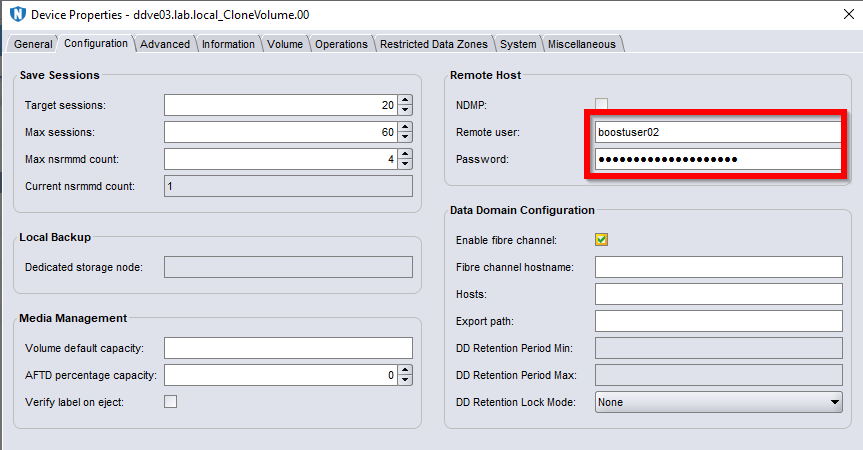
5. Change the user and password to the one set with the ddboost storage-unit modify command run earlier on the Data Domain.
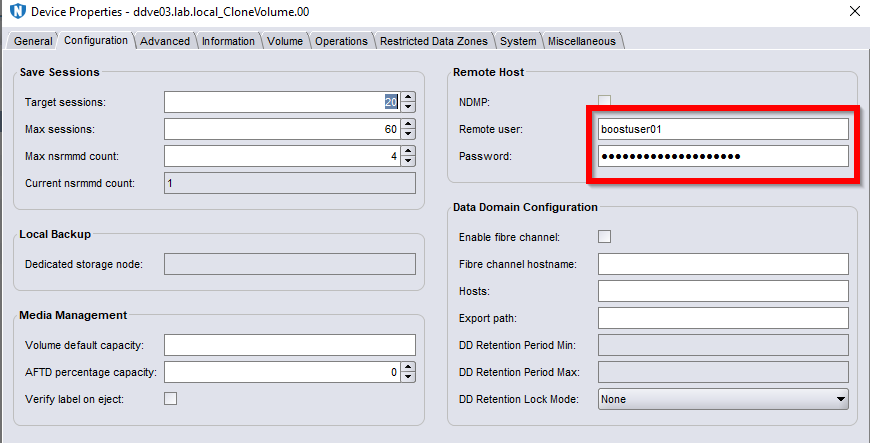
6. Unmount and remount the device to confirm it mounts successfully using the new credentials.
Products
Data Domain, Data Domain Boost, NetWorkerArticle Properties
Article Number: 000205208
Article Type: Solution
Last Modified: 14 Nov 2022
Version: 1
Find answers to your questions from other Dell users
Support Services
Check if your device is covered by Support Services.