Kabelforbundet Precision 7865 1 Gbs-netværksfejl under Ubuntu 20.04
Summary: Denne artikel beskriver, hvad du skal gøre, hvis den kablede 1 Gbs Ethernet-port ikke fungerer korrekt på den Precision 7865, der kører Ubuntu 20.04.
This article applies to
This article does not apply to
This article is not tied to any specific product.
Not all product versions are identified in this article.
Symptoms
Precision 7865-computere oplever en kabelbaseret 1 Gbs Ethernet-fejl efter frakobling og gentilslutning af et LAN-kabel under Ubuntu 20.04.
Bemærk: Precision 7865 har to Ethernet-porte, en 1 Gbs- og en 10 Gbs-port. Dette problem påvirker kun 1 Gbs-porten.
Bemærk: Precision 7865 har to Ethernet-porte, en 1 Gbs- og en 10 Gbs-port. Dette problem påvirker kun 1 Gbs-porten.
Cause
Realtek LAN-controlleren oplever strømstyringsfejl, der påvirker 1 Gbs-porten.
Resolution
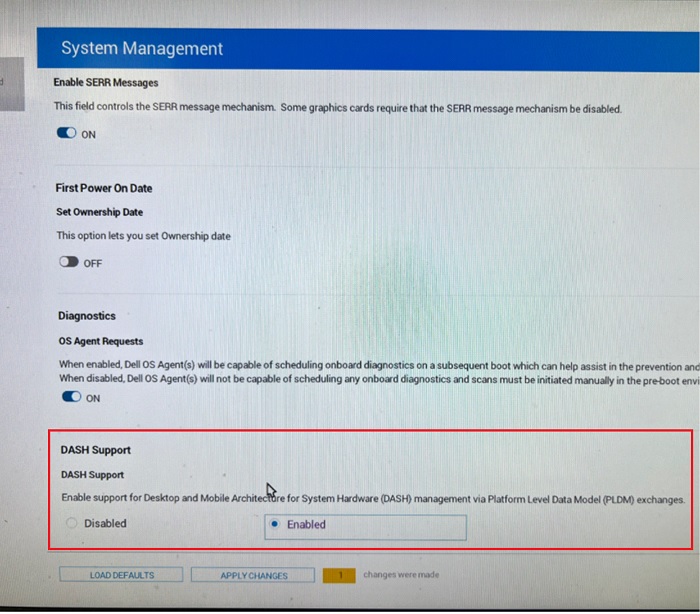
Du kan løse dette problem ved at ændre Realtek LAN 1 Gbs TLP-indstillingerne i Ubuntu og aktivere DASH i BIOS-opsætningen:
- I Ubuntu skal du køre:
Sudo gedit /etc/tlp.conf
- Find linjen med "
TLP_ENABLE=" og derefter ændre det med "TLP_ENABLE=0". - Gem og luk filen.
- Genstart computeren.
- Gå ind i BIOS-opsætningen.
- Under Systemadministration skal du aktivere DASH-understøttelse.
- Gem og forlad BIOS.
Affected Products
Precision 7865 TowerArticle Properties
Article Number: 000205992
Article Type: Solution
Last Modified: 29 Aug 2025
Version: 5
Find answers to your questions from other Dell users
Support Services
Check if your device is covered by Support Services.