PowerEdge: FD332 하드 드라이브 교체 방법
Summary: 이 문서에서는 PowerEdge FD332의 하드 드라이브를 교체하는 방법에 대해 설명합니다.
This article applies to
This article does not apply to
This article is not tied to any specific product.
Not all product versions are identified in this article.
Instructions
PowerEdge FD332 스토리지 슬레드가 있는 FX2 섀시의 경우 스토리지 슬레드의 하드 드라이버에 문제가 있으면 디스크를 핫 스왑합니다.
- PowerEdge FD332 슬레드 릴리스 잠금 장치가 잠금 위치에 있는지 확인합니다. 그렇지 않으면 드라이버 드로어가 분리될 때 전체 스토리지 슬레드가 분리되어 전원 손실이 발생합니다!
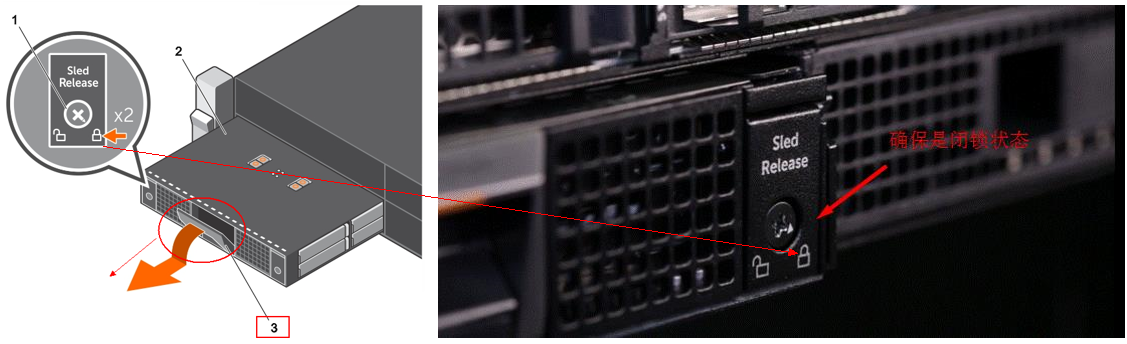
- 드라이브 서랍을 3분 이상 열어 두지 마십시오!
- 권장 사항은 문제 디스크를 분리하고 드라이버 드로어를 당긴 다음 아래 비디오를 따라 하드 드라이버와 캐리어를 교체하는 것입니다. FX2s 섀시에서 PowerEdge FD332 슬레드를 분리하지 마십시오.
자세한 내용은 Dell PowerEdge FD332 소유자 매뉴얼을 참조하십시오.
Affected Products
PowerEdge FD332, PowerEdge FM120x4 (for PE FX2/FX2s)Article Properties
Article Number: 000206415
Article Type: How To
Last Modified: 18 Jun 2025
Version: 6
Find answers to your questions from other Dell users
Support Services
Check if your device is covered by Support Services.