PowerEdge:FD332 如何更換硬碟
Summary: 本文探討如何更換 PowerEdge FD332 的硬碟。
This article applies to
This article does not apply to
This article is not tied to any specific product.
Not all product versions are identified in this article.
Instructions
若為含 PowerEdge FD332 儲存 SLED 的 FX2 機箱,如果儲存 SLED 的硬碟發生問題,請熱交換磁碟。
- 確認 PowerEdge FD332 SLED 釋放閂鎖處於鎖定位置。否則,拔下驅動程式抽取盒時,整個存儲 SLED 將拔除, 從而導致斷電!
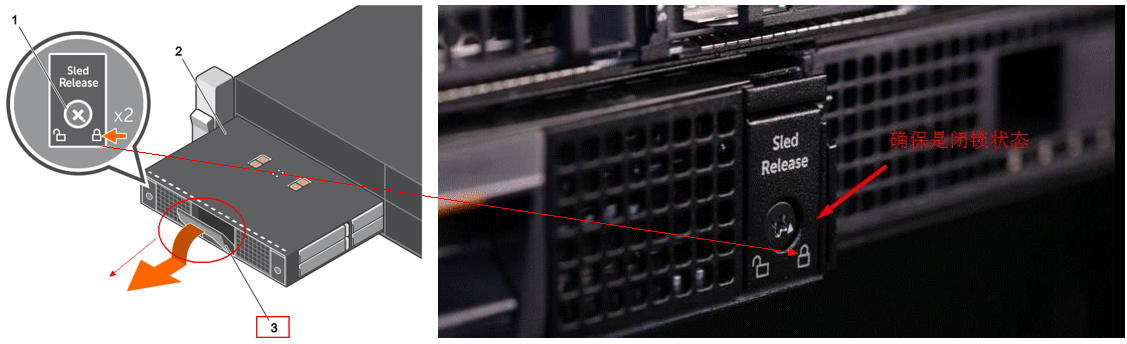
- 請勿將磁碟機抽取盒打開超過三分鐘!
- 建議卸下問題磁碟,並將驅動程式抽取盒拉入,然後按照以下影片更換硬碟和承載器。請勿 從 FX2s 機箱鬆開 PowerEdge FD332 SLED。
如需詳細資訊,請參閱 Dell PowerEdge FD332 擁有者手冊
Affected Products
PowerEdge FD332, PowerEdge FM120x4 (for PE FX2/FX2s)Article Properties
Article Number: 000206415
Article Type: How To
Last Modified: 18 Jun 2025
Version: 6
Find answers to your questions from other Dell users
Support Services
Check if your device is covered by Support Services.