PowerEdge:FD332 如何更换硬盘
Summary: 本文讨论如何更换 PowerEdge FD332 的硬盘。
This article applies to
This article does not apply to
This article is not tied to any specific product.
Not all product versions are identified in this article.
Instructions
对于带 PowerEdge FD332 存储底座的 FX2 机箱,如果存储底座的硬盘有问题,则热插拔磁盘。
- 确保 PowerEdge FD332 底座释放锁处于“已锁定”位置。否则,拔下驱动程序抽屉时,将拔下整个存储底座, 从而导致断电!
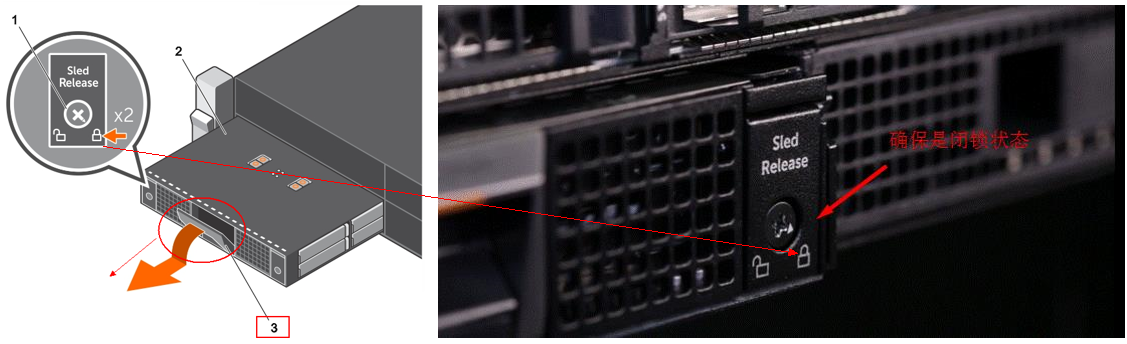
- 请勿将驱动器抽屉打开超过三分钟!
- 建议卸下问题磁盘并拉入驱动程序抽屉,然后按照以下视频更换硬盘和托架。请勿 从 FX2s 机箱释放 PowerEdge FD332 底座。
有关更多信息,请参阅《 Dell PowerEdge FD332 Owner's Manual》
Affected Products
PowerEdge FD332, PowerEdge FM120x4 (for PE FX2/FX2s)Article Properties
Article Number: 000206415
Article Type: How To
Last Modified: 18 Jun 2025
Version: 6
Find answers to your questions from other Dell users
Support Services
Check if your device is covered by Support Services.