Dell 데스크탑의 자동 켜짐 시간 BIOS 설정 문제
Summary: 이 문서에서는 Inspiron, Vostro, ChengMing, Precision, OptiPlex 데스크탑 및 AIO(All-in-One)의 자동 켜짐 시간 문제에 대한 정보를 제공합니다.
This article applies to
This article does not apply to
This article is not tied to any specific product.
Not all product versions are identified in this article.
Symptoms
해당되는 플랫폼:
- Inspiron 3891
- Inspiron 3910
- Inspiron 5410
- Inspiron 7710
- OptiPlex 3000 마이크로
- OptiPlex 3000 씬 클라이언트
- OptiPlex 3090 울트라
- OptiPlex 5000 마이크로
- OptiPlex 5090 타워
- OptiPlex 5400
- OptiPlex 5490 올인원
- OptiPlex 7000 마이크로
- OptiPlex 7000 OEM MT+
- OptiPlex 7090 타워
- OptiPlex 7090 울트라
- OptiPlex 7400
- OptiPlex 7490 올인원
- Precision 3450
- Precision 3460 소형
- Precision 3650
- Precision 3660
- Precision 타워 7865
- Vostro 3690
- Vostro 3710
- Vostro 3890
- Vostro 3910
- Vostro 5890
- 청밍 3900
Select Days를 활성화하고 BIOS Auto On Time 설정에서 원하는 요일을 설정하면 컴퓨터가 매일 자동으로 켜집니다.
요일을 요일로 설정하면 컴퓨터가 잘 작동합니다.
장애 모드:
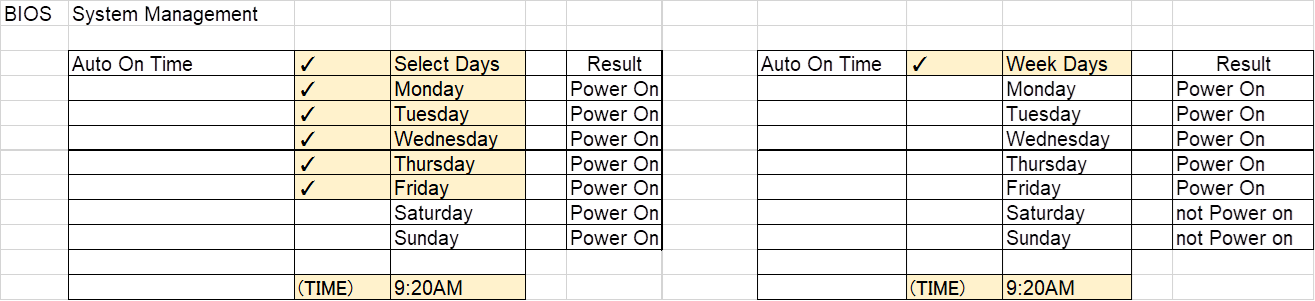
예:
컴퓨터는 월요일부터 금요일까지 자동으로 켜지지만 컴퓨터는 토요일과 일요일에도 자동으로 켜집니다.
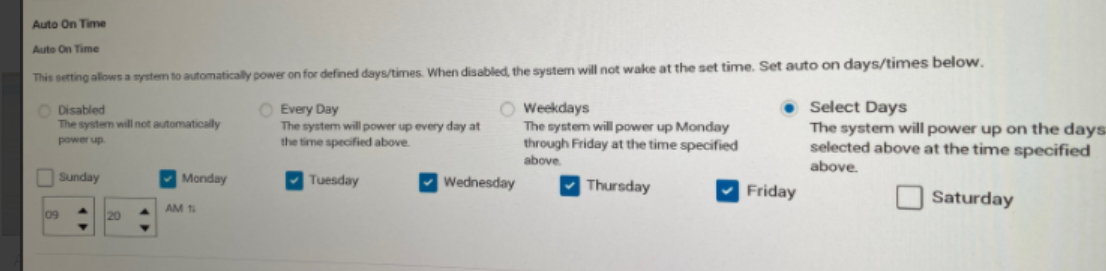
Cause
BIOS 코딩 문제
Resolution
Dell 엔지니어링 팀은 이 동작을 인지하고 있습니다. 컴퓨터에서 최신 BIOS 버전을 업데이트하면 문제를 해결하는 데 도움이 됩니다.
최신 BIOS 다운로드 및 설치:
참고: 웹 게시 날짜 및 BIOS 버전은 검증 결과에 따라 다를 수 있습니다.
| 마케팅 모델 이름 | 대상 웹 게시 날짜 | 타겟 BIOS 버전 |
|---|---|---|
| 청밍 3900 | 02-21-2023 | 1.9.0 |
| Inspiron 3891 | 02-21-2023 | 1.9.0 |
| Inspiron 3910 | 02-21-2023 | 1.9.0 |
| Inspiron 5410 | 01-17-2023 | 1.9.0 |
| Inspiron 7710 | 01-17-2023 | 1.9.0 |
| OptiPlex 3000 MFF | 02-21-2023 | 1.9.0 |
| OptiPlex 3000 TC | 01-17-2023 | 1.9.0 |
| OptiPlex 3090 UFF | 01-17-2023 | 1.9.0 |
| OptiPlex 5000 MFF | 02-21-2023 | 1.9.0 |
| OptiPlex 5090 타워 | 02-21-2023 | 1.9.0 |
| OptiPlex 5400 | 01-17-2023 | 1.9.0 |
| OptiPlex 5490 AIO | 01-17-2023 | 1.9.0 |
| OptiPlex 7000 MFF | 02-21-2023 | 1.9.0 |
| OptiPlex 7000 OEM MT+ | 02-21-2023 | 1.9.0 |
| OptiPlex 7090 타워 | 02-21-2023 | 1.9.0 |
| OptiPlex 7090 UFF | 01-17-2023 | 1.9.0 |
| OptiPlex 7400 | 01-17-2023 | 1.9.0 |
| OptiPlex 7490 AIO | 01-17-2023 | 1.9.0 |
| Precision 3450 | 02-21-2023 | 1.9.0 |
| Precision 3460 SFF | 01-17-2023 | 1.9.0 |
| Precision 3650 MT | 01-17-2023 | 1.9.0 |
| Precision 3660 | 01-17-2023 | 1.9.0 |
| Precision 타워 7865 | 01-17-2023 | 1.9.0 |
| Vostro 3690 | 01-17-2023 | 1.9.0 |
| Vostro 3710 | 02-21-2023 | 1.9.0 |
| Vostro 3890 | 01-17-2023 | 1.9.0 |
| Vostro 3910 | 02-21-2023 | 1.9.0 |
| Vostro 5890 | 02-21-2023 | 1.9.0 |
경고: BIOS를 업데이트하기 전에 외장 하드 드라이브, 프린터, 스캐너 등과 같은 디바이스를 분리하는 것이 좋습니다.
참고:
- Dell 컴퓨터에서 BIOS를 업데이트하는 방법에 대한 자세한 내용은 Dell 기술 자료 문서 Dell BIOS 업데이트를 참조하십시오.
- BIOS를 설치하려면 사용자 계정에 관리자 권한이 있어야 합니다.
Affected Products
Inspiron 24 5410 All-in-One, Inspiron 27 7710 All-in-One, Inspiron 3891, Inspiron 3910, OptiPlex 3000 Tower, OptiPlex 3000 Micro, OptiPlex 3000 Small Form Factor, OptiPlex 3000 Thin Client, OptiPlex 3090 Tower, OptiPlex 3090 Micro
, OptiPlex 3090 Small Form Factor, OptiPlex 3090 Ultra, Optiplex 5000 Tower, OptiPlex 5000 Micro, OptiPlex 5000 Small Form Factor, OptiPlex 5090 Tower, OptiPlex 5090 Micro, OptiPlex 5090 Small Form Factor, OptiPlex 5400 All-In-One, OptiPlex 5490 All-In-One, OptiPlex 7000 Tower, OptiPlex 7000 Micro, OptiPlex 7000 Small Form Factor, OptiPlex 7090 Tower, OptiPlex 7090 Micro, OptiPlex 7090 Small Form Factor, OptiPlex 7090 Ultra, OptiPlex 7400 All-In-One, OptiPlex 7490 All-In-One, OptiPlex 7000 XE Micro, Precision 3450 Small Form Factor, Precision 3460 Small Form Factor, Precision 3650 Tower, Precision 3660 Tower, Precision 7865 Tower, Vostro 3690, Vostro 3710, Vostro 3890, Vostro 3900, Vostro 3910, Vostro 5890
...
Article Properties
Article Number: 000206660
Article Type: Solution
Last Modified: 18 Apr 2025
Version: 6
Find answers to your questions from other Dell users
Support Services
Check if your device is covered by Support Services.