Dell製デスクトップでのAuto On Time BIOS設定の問題
Summary: この記事では、Inspiron、Vostro、ChengMing、Precision、OptiPlexデスクトップ、およびオールインワン(AIO)での自動オン時刻の問題について説明します。
This article applies to
This article does not apply to
This article is not tied to any specific product.
Not all product versions are identified in this article.
Symptoms
影響を受けるプラットフォーム:
- Inspiron 3891
- Inspiron 3910
- Inspiron 5410
- Inspiron 7710
- OptiPlex 3000マイクロ
- OptiPlex 3000シン クライアント
- OptiPlex 3090 Ultra
- OptiPlex 5000マイクロ
- OptiPlex 5090 Tower
- OptiPlex 5400
- OptiPlex 5490 All-in-One
- OptiPlex 7000マイクロ
- OptiPlex 7000 OEM MT+
- OptiPlex 7090 Tower
- OptiPlex 7090 Ultra
- OptiPlex 7400
- OptiPlex 7490 All-in-One
- Precision 3450
- Precision 3460 Small
- Precision 3650
- Dell Precision 3660
- Dell Precision Tower 7865
- Vostro 3690
- Vostro 3710
- Vostro 3890
- Vostro 3910
- Vostro 5890
- チェンミン3900
[ Select Days]を有効にして、BIOSの[Auto On Time ]設定で任意の曜日を設定すると、PCの電源が毎日自動でオンになることがあります。
コンピュータは、曜日を平日で設定するとうまく機能します。
障害モード:
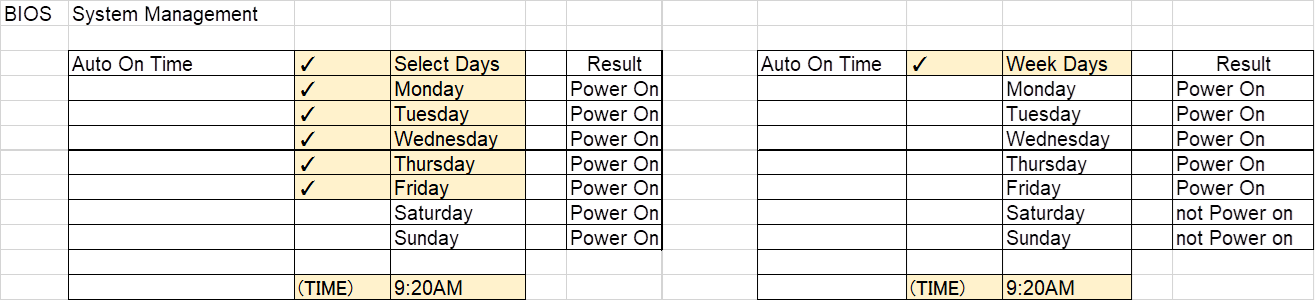
Example:
コンピューターは月曜日から金曜日まで自動オンに設定されていますが、土曜日と日曜日にもコンピューターは自動的にオンになります。

Cause
BIOSコーディングの問題
Resolution
Dellのエンジニアリング チームは、この動作を認識しています。コンピューターのBIOSを最新バージョンにアップデートすると、問題を解決することができます。
最新のBIOSをダウンロードしてインストールするには、次の手順に従います。
メモ: Web投稿日とBIOSバージョンは、検証結果によって異なる場合があります。
| マーケティングモデル名 | Web投稿目標日 | ターゲットBIOSバージョン |
|---|---|---|
| チェンミン3900 | 02-21-2023 | 1.9.0 |
| Inspiron 3891 | 02-21-2023 | 1.9.0 |
| Inspiron 3910 | 02-21-2023 | 1.9.0 |
| Inspiron 5410 | 01-17-2023 | 1.9.0 |
| Inspiron 7710 | 01-17-2023 | 1.9.0 |
| OptiPlex 3000 MFF | 02-21-2023 | 1.9.0 |
| OptiPlex 3000 TC | 01-17-2023 | 1.9.0 |
| OptiPlex 3090 UFF | 01-17-2023 | 1.9.0 |
| OptiPlex 5000 MFF | 02-21-2023 | 1.9.0 |
| OptiPlex 5090 Tower | 02-21-2023 | 1.9.0 |
| OptiPlex 5400 | 01-17-2023 | 1.9.0 |
| OptiPlex 5490 AIO | 01-17-2023 | 1.9.0 |
| OptiPlex 7000 MFF | 02-21-2023 | 1.9.0 |
| OptiPlex 7000 OEM MT+ | 02-21-2023 | 1.9.0 |
| OptiPlex 7090 Tower | 02-21-2023 | 1.9.0 |
| OptiPlex 7090 UFF | 01-17-2023 | 1.9.0 |
| OptiPlex 7400 | 01-17-2023 | 1.9.0 |
| OptiPlex 7490 AIO | 01-17-2023 | 1.9.0 |
| Precision 3450 | 02-21-2023 | 1.9.0 |
| Dell Precision 3460 SFF | 01-17-2023 | 1.9.0 |
| Dell Precision 3650 MT | 01-17-2023 | 1.9.0 |
| Dell Precision 3660 | 01-17-2023 | 1.9.0 |
| Dell Precision Tower 7865 | 01-17-2023 | 1.9.0 |
| Vostro 3690 | 01-17-2023 | 1.9.0 |
| Vostro 3710 | 02-21-2023 | 1.9.0 |
| Vostro 3890 | 01-17-2023 | 1.9.0 |
| Vostro 3910 | 02-21-2023 | 1.9.0 |
| Vostro 5890 | 02-21-2023 | 1.9.0 |
Warning: デル・テクノロジーズは、BIOSをアップデートする前に、外付けハード ドライブ、プリンター、スキャナーなどのデバイスを取り外しておくことを推奨します。
注:
- Dell製PCでBIOSをアップデートする方法の詳細については、Dellナレッジベース記事「Dell BIOSアップデート」を参照してください。
- BIOSをインストールするには、ユーザー アカウントに管理者権限が必要です。
Affected Products
Inspiron 24 5410 All-in-One, Inspiron 27 7710 All-in-One, Inspiron 3891, Inspiron 3910, OptiPlex 3000 Tower, OptiPlex 3000 Micro, OptiPlex 3000 Small Form Factor, OptiPlex 3000 Thin Client, OptiPlex 3090 Tower, OptiPlex 3090 Micro
, OptiPlex 3090 Small Form Factor, OptiPlex 3090 Ultra, Optiplex 5000 Tower, OptiPlex 5000 Micro, OptiPlex 5000 Small Form Factor, OptiPlex 5090 Tower, OptiPlex 5090 Micro, OptiPlex 5090 Small Form Factor, OptiPlex 5400 All-In-One, OptiPlex 5490 All-In-One, OptiPlex 7000 Tower, OptiPlex 7000 Micro, OptiPlex 7000 Small Form Factor, OptiPlex 7090 Tower, OptiPlex 7090 Micro, OptiPlex 7090 Small Form Factor, OptiPlex 7090 Ultra, OptiPlex 7400 All-In-One, OptiPlex 7490 All-In-One, OptiPlex 7000 XE Micro, Precision 3450 Small Form Factor, Precision 3460 Small Form Factor, Precision 3650 Tower, Precision 3660 Tower, Precision 7865 Tower, Vostro 3690, Vostro 3710, Vostro 3890, Vostro 3900, Vostro 3910, Vostro 5890
...
Article Properties
Article Number: 000206660
Article Type: Solution
Last Modified: 18 Apr 2025
Version: 6
Find answers to your questions from other Dell users
Support Services
Check if your device is covered by Support Services.